This site uses cookies to enhance your user experience. By clicking any link on this site you are giving your consent to our cookie policy. Read more
Reject
Accept All

Advertiser and Editorial Disclosures

KineMaster-Video Editor&Maker

KineMaster-Video Editor&Maker

verified

KineMaster, Video Editor Experts Group

4.3
Rating
/ Downloads
7.5.9.34034.GP Version
Advertisement
  • category

    Category: Video Playback

  • price

    Price: 0

  • age rating

    Age Rating: Everyone

  • rating

    Rating: 4.3

  • available on

    Available on: /

  • updated on

    Updated on: Jul 7, 2026

Screenshot 1
Screenshot 2
Screenshot 3
Screenshot 4
Screenshot 5
Screenshot 6
Screenshot 7
Screenshot 8
Advertisement

Features & Highlights

Chroma Key Support

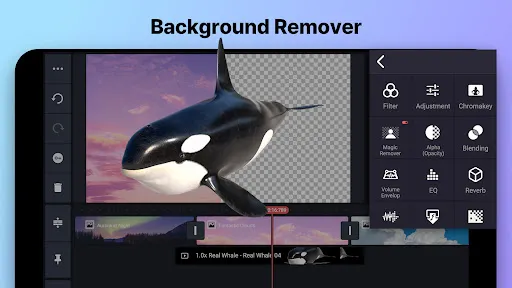
KineMaster's Chroma Key feature lets you easily remove backgrounds from your videos, enabling professional-looking effects and seamless transitions. Whether you're creating tutorials or fun skits, this tool opens up a world of creative possibilities for your projects.

High-Quality Export Options

The app supports high-quality exports up to 4K resolution, ensuring that your final product looks stunning across all platforms. You can share your videos directly to social media or save them to your device, making it easy to showcase your work in the best possible light.

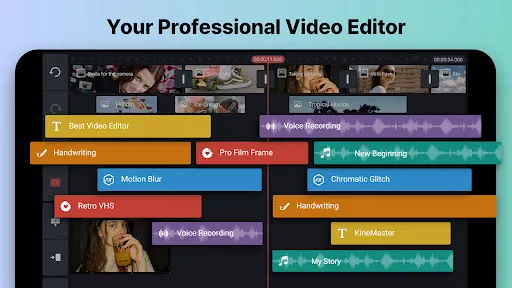
Multi-Layer Editing

KineMaster allows you to work with multiple layers of video, images, and text, giving you the creative freedom to craft complex and engaging projects. This feature is perfect for adding depth and dimension to your videos, making it a favorite among content creators of all levels.

Real-Time Recording

With KineMaster, you can record your videos in real-time directly within the app, making it easy to capture the perfect shot. This feature is especially useful for vloggers and educators who want to create dynamic content on the go without needing to edit later.

Advertisement

Pros & Cons

Pros
  • User-friendly interface makes editing intuitive for all skill levels.
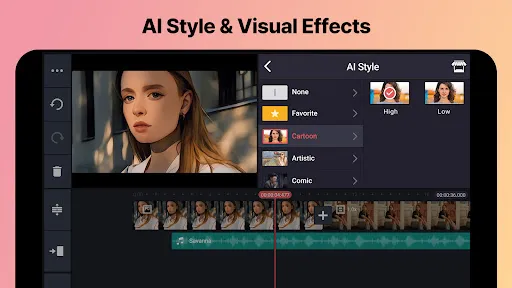
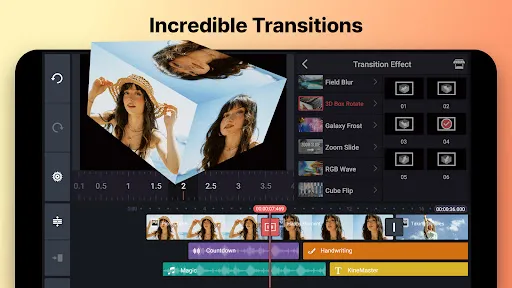
  • Extensive library of effects and transitions enhances creativity.
  • Supports multiple layers for advanced editing flexibility.
  • High-quality exports ensure professional-looking videos.
  • Regular updates introduce new features and improvements consistently.
Cons
  • Limited export options can restrict video quality and format choices.
  • Frequent ads can disrupt the editing experience and annoy users.
  • Subscription costs may be prohibitive for casual users or beginners.

Real Experience Using KineMaster-Video Editor&Maker

Application Scenarios

KineMaster is a versatile video editing application that caters to a wide range of users, from budding filmmakers to seasoned content creators. Whether you are looking to edit short social media clips, create engaging YouTube videos, or produce professional-quality films, KineMaster provides the tools necessary for all these scenarios. Users can seamlessly trim and splice video clips, add transitions, and overlay text and graphics, making it ideal for everything from vlogs to promotional content. Moreover, its robust audio editing features allow users to incorporate sound effects, voiceovers, and background music, enhancing the overall quality of the videos. The app is especially popular among educators and marketers who want to create visually appealing instructional videos or advertisements on the go.

User Experience

The user experience of KineMaster is largely positive, thanks to its intuitive interface and user-friendly design. Upon launching the app, users are greeted with a clean layout that makes navigation easy, even for those new to video editing. The timeline feature is particularly noteworthy, allowing users to see all the elements of their video in one place, making it easier to manage clips and edits. KineMaster also offers a plethora of customizable effects, including transitions, filters, and animations, which can be applied with just a few taps. Users appreciate the real-time preview feature, which allows them to see changes instantly as they edit. However, some users may find the learning curve steep initially, especially when exploring advanced features. Overall, KineMaster strikes a balance between powerful editing tools and accessibility, making it a favorite among many.

Pricing

KineMaster operates on a freemium model, offering a free version with limited features and a watermark on exported videos. For those looking to unlock the full potential of the app, a subscription is required. The pricing is quite reasonable, with options for monthly, quarterly, and yearly plans. Users can also take advantage of a free trial period to explore premium features before committing. This flexibility makes KineMaster accessible to a broad audience, catering to both casual users and serious editors. The investment in a subscription is often justified by the professional-grade tools and regular updates that enhance the app's capabilities.

Updates & Support

KineMaster is committed to continuous improvement and regularly releases updates that introduce new features, effects, and performance enhancements. Users can expect timely updates that keep the app competitive with emerging trends in video editing. Additionally, the support system is robust, with a comprehensive help center, tutorials, and a community forum where users can share tips and seek assistance. The app's developers are responsive to user feedback, often incorporating suggestions into future updates. This commitment to user satisfaction helps foster a loyal user base and encourages ongoing engagement with the app.

verified Security & Privacy Review

Security & Privacy Review KineMaster-Video Editor & Maker places a strong emphasis on user data security and privacy. The app adheres to industry-standard security practices to ensure that user information is protected during editing and sharing processes. KineMaster requires permissions for camera, microphone, and storage access to facilitate its editing features, but users are informed about these permissions and can manage them through their device settings. The app collects limited personal data, primarily for functionality improvements and user experience enhancement. KineMaster's privacy policy outlines how user data is handled, emphasizing that personal information is not sold to third parties. Additionally, the app includes options for users to control their data sharing preferences. Regular updates help address any security vulnerabilities, ensuring that users can edit and create videos with confidence. Overall, KineMaster demonstrates a commitment to safeguarding user privacy while providing powerful editing tools, making it a reliable option for video creation.
Advertisement

User Reviews

  • M M
    2026/06/05

    EDIT: I am logged into the correct account, as I always am. I've also politely emailed kinemaster about all of this and they're telling me to go through the app (I did) so they can get my device info. I explained everything in detail--and with screenshots--in my email. Meanwhile, I have no access to the app. I've been double charged (different prices) for many months. It's not a tech issue. It's a billing issue.

  • Isaac Jarmin
    2026/05/10

    I would rate this app a 5, but i took one star off because of the amount of ads was getting. i know there is a way to get rid of it, but i'm just broke and i wish there were less ads. other than the ads, still a great app. Not to mention i'm also getting ads where it says my password and email is leaked, which worried me at first, but i knew it was fake because it said it was an "antivirus". it's more like an "anti-antivirus" that infects your phone with malware. i think.

  • Frances Schirmers
    2026/06/20

    Wonderful app! I've been using it for years! I am a content creator under the Name We!rdKidd0-Artz and I post gacha stuff along with dragon puppets and randomness, you should really get this app the watermark doesn't bother me at all! there are many helpful features, I'm still learning them, out of all if it went higher than five stars I would give it seven stars because sometimes it can be confusing but it's really good anyways! it's not as laggy as the other editing apps I've used

  • Flashing Colors
    2026/05/06

    I been using this app for 6 years and I enjoy it, however, most of the music is starting to get copyrighted off of platforms, which I thought they were free to use. So I been keeping songs that are copyrighted and not copyrighted so I can use them, but its not much to use background music for your videos. I also try to edit and the editing software audio is delayed alittle bit, which isn't bad but its hard to edit sometimes.

  • Jesse Carson-Ladd
    2026/05/29

    Great app, very useful & has been my main editing software & is the only one I need 99.9% of the time. That being said this review is more to inform the developers that there is an error. So I was using & exporting in the app without any problems just how it normally is, but then I go to export one of the videos after editing it & it then says: "Something went wrong while saving. Please try again. File Access Error" So I hope it is fixed asap. Thank you.

Review Source: Google Play store public user reviews.

FAQ

1

Can I submit suggestions or feedback to KineMaster-Video Editor&Maker?

Yes, users can submit suggestions or feedback through the app's support section or directly via their official website to help improve the app's features and functionality.

2

Does KineMaster-Video Editor&Maker collect my personal data?

KineMaster may collect certain personal data to enhance user experience, but it is important to review their privacy policy for specific details on data collection and usage.

3

Does KineMaster-Video Editor&Maker support offline use?

Yes, KineMaster-Video Editor&Maker supports offline use, allowing users to edit their videos without needing an internet connection. However, some features may require online access.

4

How do I cancel my KineMaster-Video Editor&Maker subscription?

Users can cancel their KineMaster subscription through their app store account settings, either on Google Play Store for Android devices or the App Store for iOS devices.

5

How much does a subscription to KineMaster-Video Editor&Maker cost?

The subscription cost for KineMaster varies by region and plan, but it typically offers monthly and yearly options at competitive prices. Users can check the app for the most accurate pricing information.

How to use KineMaster-Video Editor&Maker

1

Can I change my customer number if I need to?

Unfortunately, customer numbers are unique and cannot be changed. If you have concerns, please reach out to customer service for assistance.

2

Can I log in on multiple devices with the same account?

Yes, you can log in on multiple devices using the same account, but ensure you log out from devices if you encounter issues.

3

How can I reach customer service for KineMaster?

You can contact customer service through the app's support section or visit our website for more options.

4

How do I activate my KineMaster account?

To activate your account, simply follow the link sent to your email during registration and complete the process as instructed.

5

How do I log in if I've lost my password?

Use the "Forgot Password" link on the login page to reset your password and regain access to your account.

What's New

Text UI Overhaul: Input, revise, style, and format directly on the Preview screenNew Text Animation: Word-by-word

Editor's Choice