This site uses cookies to enhance your user experience. By clicking any link on this site you are giving your consent to our cookie policy. Read more
Reject
Accept All

Advertiser and Editorial Disclosures

AirMirror: AirPlay Receiver

AirMirror: AirPlay Receiver

verified

NeoYantra Technologies

3.4
Rating
/ Downloads
2.4 Version
Advertisement
  • category

    Category: Video Playback

  • price

    Price: 4.99

  • age rating

    Age Rating: Everyone

  • rating

    Rating: 3.4

  • available on

    Available on: /

  • updated on

    Updated on: May 25, 2026

Screenshot 1
Screenshot 2
Screenshot 3
Screenshot 4
Screenshot 5
Screenshot 6
Screenshot 7
Screenshot 8
Advertisement

Features & Highlights

High-Quality Audio Support

AirMirror not only excels in video mirroring but also ensures crystal-clear audio transmission for an immersive experience. Whether you’re watching movies, playing games, or listening to music, the app maintains high fidelity, making every sound crisp and engaging.

Multi-Device Compatibility

This app supports a wide range of devices, including PCs and smart TVs, ensuring that you can connect and stream from virtually any iOS device. Whether you’re using an iPhone or an iPad, AirMirror accommodates your streaming needs with ease, making it incredibly versatile.

Seamless Screen Mirroring

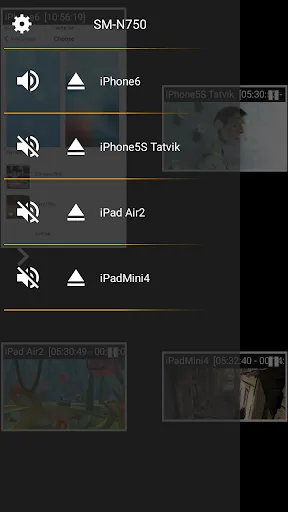
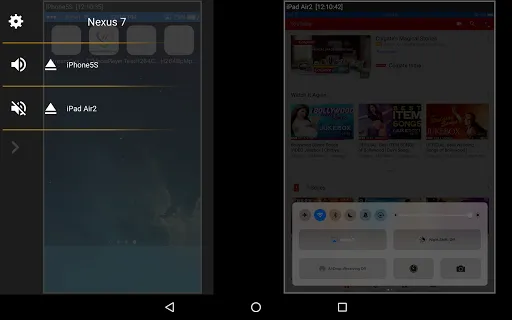
AirMirror allows you to effortlessly mirror your iOS devices to a larger screen, making it ideal for presentations, streaming videos, or sharing photos. With high-quality display support, you can enjoy your content without lag or distortion, enhancing your viewing experience significantly.

User-Friendly Interface

With its intuitive design, AirMirror makes it easy for anyone to navigate its features without a steep learning curve. The straightforward setup process allows users to start mirroring in just a few taps, so you can focus on enjoying your content rather than troubleshooting.

Advertisement

Pros & Cons

Pros
  • Seamlessly stream content from your device to larger screens.
  • Enjoy high-quality audio and video playback.
  • Easily share presentations and documents wirelessly.
  • Connect multiple devices for collaborative viewing experiences.
  • Simple setup with user-friendly interface for all ages.
Cons
  • Limited compatibility with non-Apple devices restricts user options.
  • Network connectivity issues can disrupt streaming quality and performance.
  • It lacks advanced features found in other mirroring technologies, limiting functionality.

Real Experience Using AirMirror: AirPlay Receiver

Application Scenarios

AirMirror: AirPlay Receiver is a versatile application designed for users who wish to mirror and stream content from their iOS devices to a larger screen. This app is particularly beneficial in various scenarios, such as business presentations, educational settings, and home entertainment. For instance, educators can utilize AirMirror to display presentations or educational videos directly from their iPads to a projector, enhancing the learning experience for students. In a corporate environment, professionals can seamlessly showcase reports, slideshows, and videos during meetings, making presentations more engaging and effective.

User Experience

The user experience with AirMirror is generally positive, thanks to its intuitive interface and straightforward setup process. Users can easily connect their iOS devices to the app with just a few taps, allowing for quick access to AirPlay features. The mirroring quality is commendable, with minimal lag and high-resolution output, ensuring that videos and images maintain their clarity during streaming. The app also supports multiple devices, making it convenient for households with various gadgets.

Pricing

AirMirror offers a freemium model, allowing users to access basic features without any financial commitment. This approach enables potential users to test the app and decide if it fits their needs before investing in a premium subscription. The premium version unlocks advanced functionalities, such as higher streaming quality and additional customization options. Pricing is competitive within the market, making it an attractive choice for those seeking an AirPlay receiver solution that won't break the bank. Regular promotional offers also present opportunities for users to subscribe at a reduced rate, enhancing its affordability.

Updates & Support

AirMirror is consistently updated to enhance functionality and address user feedback. The developers actively monitor performance and user reviews, implementing improvements and bug fixes to ensure a seamless experience. The app also benefits from a responsive customer support team, available to assist users with any inquiries or technical issues. Users can access a comprehensive FAQ section and tutorial resources, which provide valuable information on maximizing the app's potential. Overall, the dedication to updates and support reflects a commitment to user satisfaction, ensuring that AirMirror remains a reliable choice for AirPlay streaming.

verified Security & Privacy Review

Security & Privacy Review AirMirror: AirPlay Receiver prioritizes user data security and privacy, implementing industry-standard encryption protocols to safeguard data during transmission. The app requires minimal permissions, primarily focusing on accessing local network settings to facilitate seamless streaming. This approach helps limit potential vulnerabilities associated with excessive permissions. Users are advised to review and manage app permissions regularly to ensure a secure experience. AirMirror does not store personal user data on external servers, reinforcing its commitment to user privacy. Instead, all data processing occurs locally, minimizing exposure to potential data breaches. The app also provides clear privacy policies, outlining how data is handled and assuring users of their rights. Regular updates help address security vulnerabilities promptly, ensuring that users benefit from the latest safety features. Overall, AirMirror takes significant steps to protect user information while delivering a robust streaming experience.
Advertisement

User Reviews

  • Nigel Langley
    2026/06/13

    it used to work reasonably reliably, now consistently drops connections, it is now unusable. I have cancelled my subscription.

  • Diogo Almeida
    2026/02/10

    Perfect solution to use an Android device as a wireless extended display! This is the only free option I was able to find, all other were either full of ads, low resolution limited, subscription based, wouldn't work if the network was the mobile hotspot created by the same Android device I was trying to use as a second display... The only feedback I have so far is that the latency is a bit higher than other Airplay receiver based solutions i've tested, but I can live with it as is. Great work

  • Robert Struzinski
    2026/06/08

    none of these work without home wifi and there's no need to even use these apps unless your TV requires one them but if it does it will probably be free to use. my TV has cast or mirror but it never shows anything available to do it. these apps won't help since a common wifi router is required just like every other cast or mirror service does. dont think that you'll see anything from your phone on your TV without a home Wi-Fi router with Internet service, then why would I need one of these apps?

  • Kashif Fazal Rabi
    2026/05/28

    Good app for screen cast But I. Have problem my payment is on hold love the issue

  • Ya Big Cuzzy D
    2026/01/28

    Paid for subscription which worked for like 10 to 20 mins max at a time, then would just go all over the place, could not get the cursor to match the TV for another 2 to 5 mins before working well again for another 10 to 20 mins... and repeat...

Review Source: Google Play store public user reviews.

FAQ

1

Can I submit suggestions or feedback to AirMirror: AirPlay Receiver?

Yes, users are encouraged to submit suggestions or feedback through the app's support section, ensuring that their input is considered for future updates.

2

Does AirMirror: AirPlay Receiver collect my personal data?

Yes, AirMirror: AirPlay Receiver may collect certain personal data to enhance user experience, but it is committed to protecting user privacy and complying with data regulations.

3

Does AirMirror: AirPlay Receiver support offline use?

No, AirMirror: AirPlay Receiver requires an active internet connection to function, as it relies on streaming protocols for mirroring and media playback.

4

How do I cancel my AirMirror: AirPlay Receiver subscription?

You can cancel your subscription through the app store where you purchased it, either via the settings on your device or through your account management options.

5

How much does a subscription to AirMirror: AirPlay Receiver cost?

The subscription cost for AirMirror: AirPlay Receiver varies based on the plan selected, typically offering monthly and yearly options at competitive prices.

How to use AirMirror: AirPlay Receiver

1

Can I activate my account without a customer number?

Yes, you can activate your account using the email link provided during registration, no customer number is needed.

2

Can customer service help me with my account activation?

Absolutely! If you're having trouble activating your account, reach out to customer service for step-by-step assistance.

3

How can I reach customer service for AirMirror?

You can contact customer service via the support section on our website or by emailing support

4

How do I contact customer service for account issues?

You can contact customer service by using the chat option in the app or emailing support

5

How do I log in to my AirMirror account?

To log in, open the app, enter your credentials, and tap the login button. Ensure your email and password are correct.

What's New

*Scan the QR code to enjoy a smoother screen mirroring & cast experienceStream audio/video/photo from AirPlay clientsAirplay & screen mirroring to Android TV within taps!

Editor's Choice