This site uses cookies to enhance your user experience. By clicking any link on this site you are giving your consent to our cookie policy. Read more
Reject
Accept All

Advertiser and Editorial Disclosures

ecobee

ecobee

verified

ecobee inc.

4.3
Rating
1,000,000+ Downloads
/ Version
Advertisement
  • category

    Category: House & Home

  • price

    Price: free

  • age rating

    Age Rating: Everyone

  • rating

    Rating: 4.3

  • available on

    Available on: /

  • updated on

    Updated on: Jun 22, 2026

Screenshot 1
Screenshot 2
Screenshot 3
Screenshot 4
Screenshot 5
Screenshot 6
Advertisement

Features & Highlights

Energy Saving Alerts

The ecobee offers energy-saving alerts that notify you when your heating or cooling system is working harder than necessary. This feature helps you stay informed about your energy usage, allowing you to make adjustments that can lead to significant savings on your utility bills.

Room Sensors

With ecobee's room sensors, you can monitor and manage the temperature in multiple rooms throughout your home. These sensors detect occupancy and adjust the heating and cooling accordingly, ensuring that every space in your home remains comfortable while optimizing energy efficiency.

Smart Home Integration

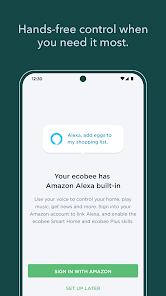
Ecobee seamlessly integrates with various smart home systems, allowing users to control their heating and cooling through popular platforms like Amazon Alexa, Google Assistant, and Apple HomeKit. This ensures that you can manage your home's climate effortlessly, whether you're at home or away.

User-Friendly App

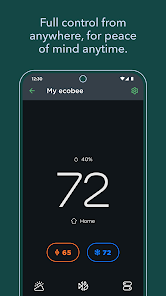
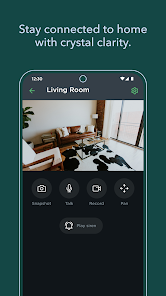
The ecobee mobile app provides a user-friendly interface for easy control of your thermostat from anywhere. You can set schedules, monitor energy usage, and even receive alerts, all from the convenience of your smartphone, making it simpler than ever to maintain your ideal home climate.

Advertisement

Pros & Cons

Pros
  • Smart scheduling adapts to your lifestyle
  • Energy savings reduce utility bills significantly
  • Remote access via app enhances convenience
  • Voice control integration offers hands-free operation
  • Room sensors optimize comfort in every space
Cons
  • Limited compatibility with certain HVAC systems
  • User interface can be confusing for some
  • Higher initial cost compared to competitors
  • Requires Wi-Fi for full functionality

Real Experience Using ecobee

Application Scenarios

The ecobee app is primarily designed to work in tandem with ecobee smart thermostats, which are ideal for homeowners seeking to optimize their heating and cooling efficiency. Users can remotely monitor and control their home temperature, making it perfect for various scenarios. For instance, if you are on vacation, you can adjust the temperature settings to save energy while ensuring your home remains comfortable upon your return. Additionally, the app is beneficial for users who want to create custom schedules based on their daily routines or for those who wish to manage multiple units in larger homes. The integration with smart home systems like Amazon Alexa or Google Assistant also allows for voice control, enhancing user convenience.

User Experience

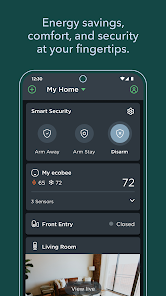
The user experience of the ecobee app is generally intuitive and user-friendly. Upon logging in, users are greeted with a clean interface that displays the current temperature and system status. Navigating through the app is straightforward, enabling users to access various features such as scheduling, energy reports, and room sensors seamlessly. The app provides detailed insights into energy usage, helping users make informed decisions about their heating and cooling habits. Notifications and alerts about system performance or if the temperature deviates from set limits are timely and useful. However, some users have reported occasional connectivity issues, especially with older devices, which can disrupt the experience. Overall, the design and functionality cater well to both tech-savvy users and those less familiar with smart home technology.

Pricing

Ecobee offers a competitive pricing structure for its smart thermostats, typically ranging from $169 to $249, depending on the model and features. The app itself is free to download and use, with no subscription fees required for basic functionalities. However, users may choose to invest in additional features, such as the ecobee SmartSensor, which can enhance the system's performance and energy savings. While the initial investment may seem significant, many users find that the long-term energy savings and increased comfort justify the cost. Compared to traditional thermostats, the ecobee system presents a solid investment for those looking to improve their home's energy efficiency.

Updates & Support

Ecobee is committed to enhancing user experience through regular updates that add features, improve security, and fix bugs. Users can expect periodic improvements that enhance app functionality and compatibility with other smart home devices. The support system is robust, offering FAQs, troubleshooting guides, and a community forum where users can share their experiences and solutions. Additionally, customer service is readily accessible via email or phone, providing prompt assistance for any issues that may arise. Some users have praised the quick response times and the helpfulness of the support team, making the overall experience more satisfactory.

verified Security & Privacy Review

The ecobee app prioritizes user security and privacy by implementing robust data protection measures. It employs encryption protocols to safeguard user information during transmission, ensuring that sensitive data remains secure. The app collects data primarily to enhance user experience, such as optimizing energy usage and providing personalized recommendations. Users have control over their data, with options to manage privacy settings directly within the app. Permissions required for the app's functionality include access to location services and notifications, which are clearly outlined during the installation process. This transparency allows users to make informed decisions about what information they share. ecobee maintains a strict data retention policy, only keeping user data as long as necessary to provide services. The company is committed to not selling user data to third parties, further enhancing trust. Regular updates and security patches are provided to address vulnerabilities, demonstrating ecobee's dedication to maintaining a secure platform for its users. Overall, the app is designed with user privacy and data security in mind, making it a reliable choice for smart home management.
Advertisement

User Reviews

  • Scott Sparks
    2025/08/26

    Unable to connect. When we first had our Ecobee thermostat installed, everything worked properly with the app. It was great to be able to change the thermostat when we were away from home. I'm not sure what has changed over the last few months, but the app cannot connect. I've uninstalled and reinstalled on several occasions. Still no luck. Hoping they can get the issue solved, soon. I miss the functions I had when the app worked properly.

  • Brandon P
    2024/08/20

    Thermostat Issues: 1. Min fan run time can't be set at Comfort Setting level instead of the 24/7. 2. Thermostat only averages all sensors, instead of letting us choose a max temp for all sensors (i.e. should run AC if ANY sensor goes above max temp, regardless how it affects temp in other rooms) 3. 'Temp correction' can be set for thermostat but not for remote sensors, which causes issues when it's trying to average temperatures. PLEASE fix as some of these have been reported for many years.

  • Justin Kallman
    2026/06/20

    This system was touted as better than nest and unfortunately it has fallen very short. The interface is not intuitive, getting to the schedule takes way longer poking around than you would expect. The Nest scheduling is very precise with the time and temp however ecobee limits your time to either :00 or :30....for 6 years I had :45 and now I can't use it anymore. No movable parts may seem "better" but it's a slight bit more pain now to adjust the temp because the interface is slow.

  • Spam InACan
    2026/06/18

    A PAINFULLY SLOW app to load & that's just the beginning. I'm coming over after my Wyze tstat finally gave up. This seemed to be the best option, or at least I thought so. The app literally takes 15 seconds to load when you tap the icon. It's not my S25 Ultra that's the problem, everything else runs fast. What's worse is half the settings can be accessed on the app, the others on the device. Also, if your network goes down you have to remove and basically power cycle to reconnect. Useless

  • Curtis Gabrielson
    2026/05/07

    Still a good app for the most part. First review was 2018, not much has really changed from a utilitarian perspective. Everything is not immediately synced up when you open the app. Temp settings and Equipment running, etc. lags so you have to wait or get confused at what's happening if in a rush. I made it so the app can constantly run in the background, but it didn't fix it.

Review Source: Google Play store public user reviews.

FAQ

1

Does ecobee collect my personal data?

Yes, ecobee collects data related to your thermostat use and preferences to provide personalized services, but it is committed to protecting your privacy and data security.

2

Does ecobee offer a free trial or free version?

Ecobee does not offer a free trial, but users can access basic features without a subscription after purchasing an ecobee device.

3

Does ecobee require an internet connection?

Yes, ecobee devices require an internet connection to access features such as remote control, scheduling, and integration with smart home ecosystems.

4

How can I contact support or send feedback for ecobee?

You can contact ecobee support through their website, by email, or through the app, and feedback can also be submitted via their support channels.

5

How do I manage or cancel my ecobee subscription?

You can manage or cancel your ecobee subscription through the ecobee app or website by accessing your account settings and following the prompts for subscription management.

How to use ecobee

1

How can I check my ecobee account status?

Log in to the app, and your account status will be displayed on the home screen or under account settings.

2

How can I contact ecobee customer service?

You can reach ecobee customer service at 1-877-932-6233 for assistance.

3

How can I reset my ecobee login password?

On the app's login screen, tap "Forgot Password?" and follow the instructions to reset your password via email.

4

How do I activate my ecobee device?

To activate, connect your ecobee to Wi-Fi, follow the prompts on the app, and register your device using the provided code.

5

How do I log in to my ecobee account?

Open the ecobee app, tap "Log In," enter your email and password, then tap "Sign In."

What's New

We update the app regularly to ensure the best experience for you. This version brings many bug fixes and improvements to your ecobee experience. Questions or comments? Let us know what you think of this update at [email protected].

Editor's Choice