This site uses cookies to enhance your user experience. By clicking any link on this site you are giving your consent to our cookie policy. Read more
Reject
Accept All

Advertiser and Editorial Disclosures

AlfredCamera Home Security app

AlfredCamera Home Security app

verified

Alfred Systems Inc.

4.7
Rating
50,000,000+ Downloads
2026.2.1 Version
Advertisement
  • category

    Category: House & Home

  • price

    Price: free

  • age rating

    Age Rating: Everyone

  • rating

    Rating: 4.7

  • available on

    Available on: /

  • updated on

    Updated on: Jul 6, 2026

Screenshot 1
Screenshot 2
Screenshot 3
Screenshot 4
Screenshot 5
Screenshot 6
Screenshot 7
Screenshot 8
Screenshot 9
Screenshot 10
Screenshot 11
Screenshot 12
Screenshot 13
Screenshot 14
Screenshot 15
Screenshot 16
Screenshot 17
Screenshot 18
Screenshot 19
Screenshot 20
Screenshot 21
Advertisement

Features & Highlights

Cloud Storage Options

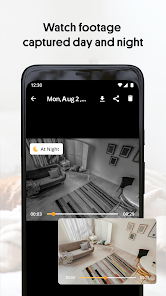
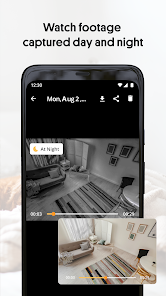
Safeguard your recorded footage with secure cloud storage options. AlfredCamera offers flexible plans that let you store important video clips, ensuring you never lose valuable evidence. Accessing and managing your recordings is straightforward, providing added convenience and security for your peace of mind.

Live Video Streaming

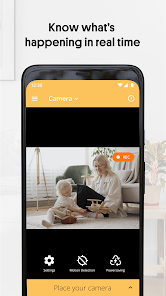
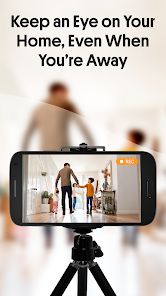
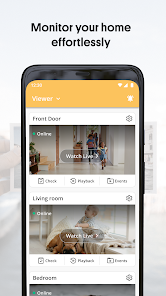
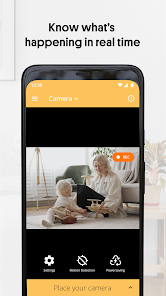
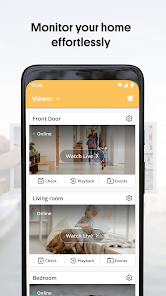
Stay connected to your home with real-time live video streaming. AlfredCamera allows you to monitor your space from anywhere, ensuring peace of mind whether you're at work or on vacation. Enjoy high-quality video feeds that help you keep an eye on your loved ones and property.

Motion Detection Alerts

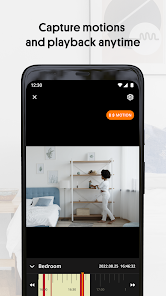
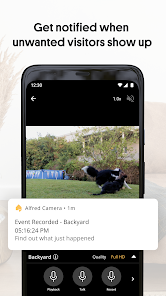
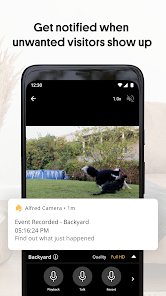
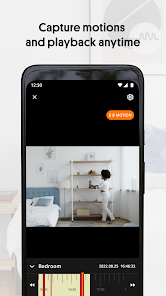
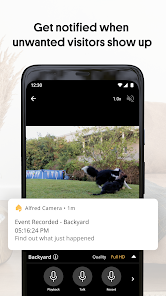
Receive instant notifications whenever motion is detected in your monitored areas. The app intelligently filters out false alarms, ensuring that you are only alerted to significant activity. This feature enhances your home security by keeping you informed and allowing for timely responses to potential threats.

Two-Way Audio

Engage in conversations from afar with the two-way audio feature. This allows you to communicate with family members or pets directly through the app, creating a sense of presence even when you're not physically there. It's a simple yet powerful way to maintain connections while away from home.

Advertisement

Pros & Cons

Pros
  • Real-time monitoring from anywhere at any time
  • Easy setup with user-friendly interface
  • Motion detection alerts for immediate response
  • Two-way audio for direct communication
  • Cloud storage options for secure video access
Cons
  • Limited free features available for users
  • Lacks advanced AI detection capabilities
  • Notifications can be delayed or inconsistent
  • Requires constant internet connectivity for functionality

Real Experience Using AlfredCamera Home Security app

Application Scenarios

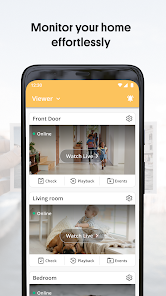
The AlfredCamera Home Security app is designed to transform any smartphone or tablet into a powerful security camera, making it an ideal solution for various scenarios. Homeowners can use the app to monitor their properties while away, ensuring peace of mind whether they are on vacation or at work. Parents can also utilize the app to keep an eye on their children, pets, or even elderly family members, providing an additional layer of security. For those who run small businesses, AlfredCamera can help monitor shop floors or stockrooms, allowing for real-time surveillance of valuable assets. Additionally, the app can be used in community settings, such as neighborhood watch programs, to foster a sense of safety among residents. Overall, the app's versatility is one of its standout features, catering to diverse security needs.

User Experience

Users have reported a generally positive experience with the AlfredCamera app. The setup process is straightforward, allowing users to quickly turn their old devices into security cameras. The intuitive interface is user-friendly, making navigation simple even for those who may not be tech-savvy. Features such as live streaming, motion detection alerts, and two-way audio enhance the overall user experience, offering comprehensive surveillance capabilities. The app's ability to operate seamlessly in the background ensures that users do not have to worry about interruptions. However, some users have mentioned occasional connectivity issues, particularly when using Wi-Fi networks with weak signals. Despite this, the overall feedback on performance and reliability remains strong, with many users appreciating the ability to access their cameras from multiple devices.

Pricing

AlfredCamera offers a freemium model, allowing users to access basic features without any cost. The free version includes live streaming, motion detection, and limited cloud storage. For those seeking more advanced features, such as HD video quality, extended cloud storage, and no ads, the premium subscription is available. The pricing is competitive compared to similar apps in the market, making it an attractive option for budget-conscious users. Subscriptions are billed monthly or annually, providing flexibility for users who may want to test the premium features before committing long-term.

Updates & Support

The developers of AlfredCamera are committed to providing regular updates to enhance functionality and address any issues that arise. Users can expect periodic feature releases and bug fixes, ensuring that the app remains up-to-date with the latest security technology trends. The support team is responsive and available through various channels, including email and in-app messaging. Users have reported satisfactory experiences when seeking assistance, with many issues resolved promptly. Additionally, the app includes a comprehensive FAQ section, allowing users to troubleshoot common problems independently.

verified Security & Privacy Review

The AlfredCamera Home Security app prioritizes user security and privacy through robust data protection measures. The app employs end-to-end encryption for video streams, ensuring that only authorized users can access their camera feeds. This feature helps protect sensitive footage from potential interception or unauthorized viewing. In terms of permissions, AlfredCamera requires access to the device's camera, microphone, and storage to function effectively. Users should be aware that granting these permissions is essential for real-time monitoring and recording capabilities. However, the app clearly outlines its permission requirements, promoting transparency. AlfredCamera also adheres to strict privacy practices by not selling or sharing user data with third parties without consent. Users can manage their privacy settings easily within the app, allowing for a customizable experience that aligns with individual comfort levels. Additionally, the app includes options to delete recorded footage and account information, reinforcing its commitment to user control over personal data. Overall, AlfredCamera demonstrates a strong commitment to security and privacy, making it a compelling choice for users seeking reliable home surveillance solutions.
Advertisement

Compare APP

User Reviews

  • stephanie m
    2026/05/04

    I liked this at first but after about a month or so the camera stopped detecting movement all the time. I could clearly see my dog in the frame frozen for hours but the camera didn't go off at all. Sometimes the walkie talkie aspect of it doesn't work either. Also don't love that if I try to use the phone for something else the camera will just open and take over even if it's closed and cleared from my phone. Very glad I didn't pay for this.

  • xVgMgUPgjM4egr5PhLPxh
    2026/06/23

    POPUP, AD, POPUPS - You can't use the app with-in 10 seconds of starting the app you get ADS that last 2 minutes, then its a POPUP AD every 15 seconds!! *I can't try it out to see if I like it before an ad starts, maybe put a time limit on the app before the ads start harassing you.. the ads aren't there to advertise "buying the full" product, the ads are there so you can make money. YOU would be able to make more money selling your app if people could try it out first (for X number of minutes)

  • Dave DeAngelo
    2026/05/22

    works but many issues. if you turn on notifications, you'll get one every 3-5 seconds because if the motion pauses for 1 second it's a whole new event. this also chops events into tiny video clips. says my phone is too dumb to recognize pets or cars. you can't remotely zoom without paying but you can't manually zoom either so you have to put the camera very close. Too stupid to pay money for. I'll keep looking

  • D.R. Wiest
    2026/05/03

    Used to be a lot better. but now after the recent update the camera phones seem to crash the entire operating system about 75% of the time. On top of it, after already paying for the app, now I'm being solicited to pay for a second tier that will apparently give me Superior features - yet if the ones that are supposed to be included actually worked I might actually consider it. Finally, Constant advertising in an app that you pay a decent amount for as apps go, is getting a little old.

  • A Google user
    2026/04/11

    I started out loving this app and I've used it on two of my older phones for about a year and a half now, but I've recently had both phone batteries swell up and one started to smoke. So don't leave the phones plugged in very long. And now you have to buy a monthly subscription to playback anything that you've recorded. So bottom line is you can record all you want you just can't view the recordings. So why have the So called free app. It's a rip off and a waste of time.

Review Source: Google Play store public user reviews.

FAQ

1

Does AlfredCamera Home Security app collect my personal data?

AlfredCamera Home Security app may collect certain personal data, such as your email address and device information, to provide its services and improve user experience. However, it adheres to privacy policies to protect your information.

2

Does AlfredCamera Home Security app offer a free trial or free version?

Yes, AlfredCamera Home Security app offers a free version with basic features, and users can also access a free trial of premium features for a limited time.

3

Does AlfredCamera Home Security app require an internet connection?

Yes, AlfredCamera Home Security app requires an internet connection to function properly, as it relies on Wi-Fi or mobile data to stream video and send notifications.

4

How can I contact support or send feedback for AlfredCamera Home Security app?

You can contact support or send feedback through the app by accessing the help or support section, or by visiting the official AlfredCamera website for additional contact options.

5

How do I manage or cancel my AlfredCamera Home Security app subscription?

You can manage or cancel your subscription through the app's settings or your app store account settings, depending on how you initially subscribed. Detailed instructions are often available in the help section of the app.

How to use AlfredCamera Home Security app

1

How can I contact customer service for AlfredCamera?

You can reach AlfredCamera's customer service through the app's support section or visit their official website for contact details.

2

How can I reset my password for AlfredCamera?

Tap on 'Forgot Password?' on the login screen and follow the instructions to reset your password via email.

3

How do I activate my AlfredCamera app?

Download the app, create an account or log in, and follow the on-screen prompts to set up your cameras for activation.

4

How do I find my customer number for AlfredCamera?

Your customer number can typically be found in the app settings or your account profile.

5

How do I log in to my AlfredCamera account?

Open the app, tap on 'Log In,' enter your email and password, then tap 'Sign In' to access your account.

What's New

- Picture in Picture is now live! Upgrade to Premium and keep your live running in a floating window whenever you switch apps — stay connected to your home no matter what you're doing.For more information, please visit:https://alfred.camera

Editor's Choice