This site uses cookies to enhance your user experience. By clicking any link on this site you are giving your consent to our cookie policy. Read more
Reject
Accept All

Advertiser and Editorial Disclosures

CVS Caremark

CVS Caremark

verified

CVS Caremark

2.3
Rating
1,000,000+ Downloads
6.0.6 Version
Advertisement
  • category

    Category: Medical

  • price

    Price: free

  • age rating

    Age Rating: Everyone

  • rating

    Rating: 2.3

  • available on

    Available on: /

  • updated on

    Updated on: Jun 30, 2026

Screenshot 1
Screenshot 2
Screenshot 3
Screenshot 4
Screenshot 5
Screenshot 6
Advertisement

Features & Highlights

24/7 Customer Support

CVS Caremark provides round-the-clock customer support to assist you with any questions or concerns regarding your prescriptions. Whether you need help with ordering, managing your medications, or understanding your benefits, their knowledgeable team is always available to provide assistance, giving you peace of mind.

Cost Comparison Tool

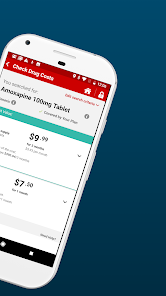
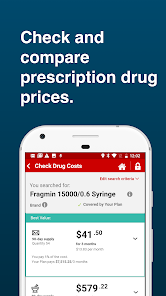
CVS Caremark offers a powerful cost comparison tool that allows you to compare prices for medications across various pharmacies. This feature empowers you to make informed decisions and potentially save money on prescriptions, ensuring you get the best value for your healthcare dollar.

Mail Order Services

With CVS Caremark's convenient mail order services, you can receive your medications delivered right to your doorstep. This is especially beneficial for ongoing prescriptions, saving you time and making it easier to manage your health needs without frequent trips to the pharmacy.

Prescription Management

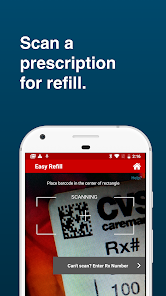
Easily manage your prescriptions with CVS Caremark's user-friendly interface. You can refill, track, and set reminders for your medications, ensuring you never miss a dose. This feature helps you stay organized and in control of your health regimen, making medication adherence simpler and more efficient.

Advertisement

Pros & Cons

Pros
  • Wide network of pharmacies for easy access
  • Affordable prescription options for savings
  • User-friendly mobile app for convenient management
  • Comprehensive medication support and resources available
  • Personalized care through dedicated pharmacist assistance
Cons
  • High out-of-pocket costs for many medications
  • Limited availability for some specialty drugs
  • Complicated prior authorization processes delay access
  • Customer service can be unresponsive and frustrating

Real Experience Using CVS Caremark

Application Scenarios

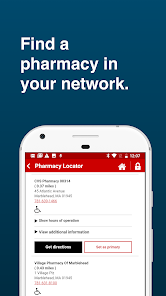
The CVS Caremark app serves as a comprehensive tool for individuals managing their prescription medications. It is particularly beneficial for those who rely on regular medication due to chronic health conditions, allowing users to easily refill prescriptions and track their medication schedules. The app is also highly useful for families managing prescriptions for multiple members, offering a centralized platform to oversee all medications in one place. Additionally, users can access medication information, including dosage instructions and potential side effects, thereby empowering them to make informed decisions about their health. For travelers or those on the go, the app provides the convenience of locating nearby CVS pharmacies, ensuring that users can pick up their medications without hassle.

User Experience

The user experience of the CVS Caremark app is generally positive, with a user-friendly interface that allows for easy navigation. Users appreciate the clean design and intuitive layout, which makes finding information quick and straightforward. The app's functionality includes features such as prescription refills, order tracking, and reminders for medication schedules, enhancing the overall user experience. Notifications for refill reminders and alerts about prescription status updates are particularly praised, as they help users stay on top of their medication regimen. However, some users have reported occasional glitches and slow loading times, particularly during peak hours when many users access the app simultaneously. Despite these minor setbacks, the overall experience remains satisfactory for most users.

Pricing

The CVS Caremark app itself is free to download and use; however, users should be aware that the cost of prescription medications may vary based on their insurance plans and the specific drugs prescribed. The app allows users to check their insurance coverage and medication prices, which can help in budgeting for healthcare expenses effectively. Furthermore, CVS often provides discounts and savings programs that can be accessed through the app, potentially reducing out-of-pocket costs for users. Overall, while the app is free, the associated costs of medications depend on individual health insurance policies and the specific medications being filled.

Updates & Support

CVS Caremark regularly updates its app to enhance performance, address user feedback, and introduce new features. Users can expect periodic updates that improve stability and security, ensuring that their personal and health information remains protected. The support team is accessible through the app, offering assistance for troubleshooting and user inquiries, further enhancing the user experience. The FAQs section within the app addresses common issues, and users can submit questions directly for more personalized help. Overall, the commitment to updates and support contributes significantly to user satisfaction, as it reflects CVS Caremark's dedication to providing a reliable and efficient service for managing healthcare needs.

verified Security & Privacy Review

The CVS Caremark app prioritizes user security and confidentiality by implementing robust encryption protocols to protect personal and health information. The app requires users to create an account, ensuring that sensitive data is securely stored and accessible only by authorized individuals. User authentication processes, including multi-factor authentication, add an additional layer of security. In terms of privacy practices, CVS Caremark is committed to adhering to HIPAA regulations, which govern the protection of health information. The app clearly outlines its privacy policy, detailing how user data is collected, used, and shared. Users are informed about the types of data collected, which may include personal identification, prescription history, and health information. The app requests necessary permissions to access device features, such as camera and location services, but users can manage these permissions according to their preferences. Overall, CVS Caremark demonstrates a strong commitment to safeguarding user data while providing transparency about its data handling practices, making it a reliable choice for managing prescriptions and healthcare needs.
Advertisement

Compare APP

User Reviews

  • Yezdi
    2026/05/30

    Terrible app. Flaky, unable to even get into or login , keeps asking me to enter my username over and over and over again . when i tried calling up the support , i was on hold for more than 45 minutes . how come something as critical as the prescription service is down for hours. The automated voice system should at least announce any nation wide system down at the start, when the customers call in.

  • Bruce Morgan
    2026/03/20

    It is harder to find things that work in this app than it is to find things that don't work. During the evening, it will randomly tell you you don't have any prescriptions or orders. The available refills always shows zero. The price a drug option doesn't work. It will only check my Medicare part D, but will not look at my secondary coverage. The review order option gives no information regarding the quantity you are about to receive. I'm transferring everything to Amazon!

  • Shannon Addington
    2024/03/21

    This app is awful. Does not display accurate information regarding refill status. The app shows prescriptions "on hold," but when you call the store, they say, "There's nothing on hold, we can fill it for you now." The convenience of an app then becomes inconvenient if it doesn't work. Use the Caremark website instead. It at least keeps track accurately and allows you to do everything that the app should. I have my preferences set to be notified of order status, etc., but I get no notifications

  • Jme Brimhall
    2020/12/01

    Not easy to use. Can never log in without resetting my entire account log in, password and I don't have 20 minutes to update a password, then use the text code, reset the password again. Geeze. The most difficult app to log into. No easy or quick way to use it. If you navigate from one page to another you have to re-enter your log in credentials. End up having to call most of the time. Just a complete time waster.

  • Chris Cabuzzi
    2025/05/24

    Good when it works, but is seriously slow to load between screens and has many issues. First, and foremost, you can't copy anything. Want to track your package? Nope, not clickable. Want to copy the tracking # so you can track that way? Nope. Want to take a screenshot so you can use your gallery app to copy the text? Not allowed. Auth also often won't prompt for fingerprint. If you swipe back, it'll gripe about too many auth requests. Close the app and fingerprint comes back. What a giant mess.

Review Source: Google Play store public user reviews.

FAQ

1

Does CVS Caremark collect my personal data?

Yes, CVS Caremark collects personal data to provide personalized services, manage prescriptions, and comply with healthcare regulations. Users can review their privacy policy for more details.

2

Does CVS Caremark offer a free trial or free version?

CVS Caremark does not offer a free trial, but the app is free to download and use for managing prescriptions and related services.

3

Does CVS Caremark require an internet connection?

Yes, CVS Caremark requires an internet connection to access its features and services, as it operates primarily online.

4

How can I contact support or send feedback for CVS Caremark?

You can contact CVS Caremark support through the app or website, where you will find customer service options, including phone numbers and online chat features for assistance.

5

How do I manage or cancel my CVS Caremark subscription?

Users can manage or cancel their CVS Caremark services by contacting their health plan provider or accessing their account settings within the app, depending on their specific plan.

How to use CVS Caremark

1

Do I need to activate my CVS Caremark account?

Yes, if you’re a new user, you will need to activate your account using your member ID and personal information.

2

How can I activate my CVS Caremark account?

To activate, visit the CVS Caremark website, click on "Activate account," and follow the prompts using your information.

3

How can I contact CVS Caremark customer service?

You can contact CVS Caremark customer service at 1-800-552-8159 for assistance.

4

How do I find my customer number for CVS Caremark?

Your customer number can be found on your member ID card or in your welcome letter from CVS Caremark.

5

How do I log in to the CVS Caremark app?

Open the app and enter your username and password, then tap "Log In" to access your account.

What's New

Minor bug fixes

Editor's Choice