This site uses cookies to enhance your user experience. By clicking any link on this site you are giving your consent to our cookie policy. Read more
Reject
Accept All

Advertiser and Editorial Disclosures

Libre by Abbott

Libre by Abbott

verified

Abbott Diabetes Care Inc.

4.3
Rating
100,000+ Downloads
1.2.0 Version
Advertisement
  • category

    Category: Medical

  • price

    Price: free

  • age rating

    Age Rating: Everyone

  • rating

    Rating: 4.3

  • available on

    Available on: /

  • updated on

    Updated on: Apr 1, 2026

Screenshot 1
Screenshot 2
Screenshot 3
Screenshot 4
Screenshot 5
Screenshot 6
Advertisement

Features & Highlights

Continuous Glucose Monitoring

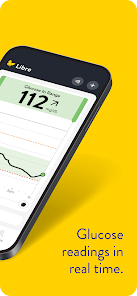
Libre by Abbott offers continuous glucose monitoring, providing real-time glucose readings without the need for fingerstick tests. This innovative technology allows users to track their glucose levels throughout the day, helping them make informed decisions about their diet and insulin dosage.

Long-lasting Sensor

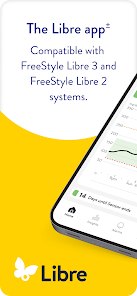
Each sensor lasts up to 14 days, providing an extended period of reliable glucose monitoring without the hassle of frequent replacements. This durability not only enhances convenience but also ensures users have consistent access to their glucose information over time.

Personalized Insights

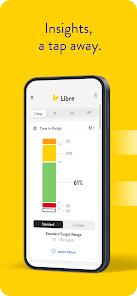
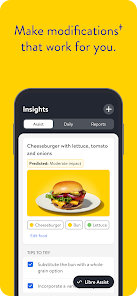
Libre by Abbott provides personalized insights based on individual glucose data, helping users identify patterns and triggers. By analyzing these insights, users can tailor their lifestyle and treatment plans, ultimately leading to improved health outcomes and greater control over their diabetes.

User-Friendly App

The Libre app is designed for ease of use, allowing users to effortlessly view and analyze their glucose data. With intuitive navigation and insightful graphs, it empowers users to understand their trends and patterns, fostering better management of their diabetes.

Advertisement

Pros & Cons

Pros
  • Experience seamless glucose tracking
  • Enjoy real-time data insights
  • Access personalized health tips
  • Connect with healthcare professionals
  • Stay motivated with progress charts
Cons
  • Limited compatibility issues
  • Requires consistent calibration
  • Data sharing can be cumbersome
  • User interface may confuse

Real Experience Using Libre by Abbott

Application Scenarios

The Libre by Abbott app is designed for individuals managing diabetes, particularly those who use continuous glucose monitoring (CGM) systems. Users can seamlessly integrate their glucose data from the Libre sensor into the app, allowing them to track their glucose levels in real-time. This functionality is particularly beneficial for people who require frequent monitoring, including those with Type 1 and Type 2 diabetes. The app is also useful during physical activities, as it helps users evaluate how exercise affects their blood sugar levels. Furthermore, it provides insights for managing dietary choices, making it a versatile tool for those seeking to maintain stable glucose levels. Users can log their meals, activities, and insulin doses, offering a comprehensive view of their health management journey.

User Experience

The user experience of the Libre by Abbott app is generally praised for its intuitive design and ease of navigation. Upon opening the app, users are greeted with a dashboard that presents their glucose readings in a clear, digestible format. The app features a straightforward layout that minimizes complexity, making it accessible for users of all ages. Notifications alert users to significant changes in glucose levels, ensuring timely interventions when necessary. The data visualization tools, including graphs and trends, provide users with a better understanding of their glucose patterns over days, weeks, or months. Moreover, the app encourages users to set personalized goals and offers reminders for calibration and sensor changes, enhancing overall engagement. Some users have noted occasional syncing issues with their sensors, but these instances are infrequent and typically resolved quickly.

Pricing

The Libre by Abbott app is free to download and use, which is a significant advantage for users managing diabetes. However, it is important to note that while the app itself is complimentary, the Libre sensors and related equipment come at a cost. Prices for the sensors can vary depending on location and insurance coverage, making it essential for users to check with their healthcare provider or local pharmacy for the latest pricing information. Many users find the investment worthwhile, given the enhanced monitoring capabilities and the potential for improved health outcomes. The cost of the sensors can be a consideration for some, but the app provides a cost-effective solution for continuous glucose monitoring.

Updates & Support

Abbott regularly updates the Libre by Abbott app to enhance its performance and user experience. Users can expect periodic updates that introduce new features, fix bugs, and improve compatibility with various devices. The company also offers customer support through its website and in-app resources, including FAQs and troubleshooting guides. For users encountering issues, contacting customer support is straightforward, with responsive representatives available to assist with technical difficulties or inquiries related to the app and sensors. The commitment to ongoing support ensures that users can maximize the app's capabilities in their diabetes management journey.

verified Security & Privacy Review

Security & Privacy Review Libre by Abbott employs robust security measures to protect user data, including encryption for data transmission and storage. The app requires users to create an account, which adds an extra layer of security through authentication. Sensitive information, such as glucose levels and personal health data, is handled with strict confidentiality. The app requests permissions primarily related to health data and notifications, ensuring users are informed about what information is being accessed. Users can manage their settings to control data sharing and notifications, enhancing their privacy experience. Libre by Abbott is compliant with relevant healthcare regulations, such as HIPAA, which governs the handling of health information. However, it is essential for users to review the privacy policy to understand how their data is used and shared. Overall, the app demonstrates a commitment to safeguarding user data while providing transparency in its privacy practices.
Advertisement

User Reviews

  • Jeffrey Jacobs
    2026/03/06

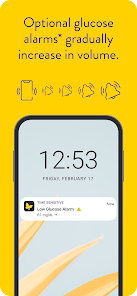
    If it wasn't for the app hijacking my sounds, I would give it a real score. I don't even mind if it notifies for the urgent low, but the fact that I get a system notification too often just because of the 'alarms unavailable,' is ridiculous. Problem with that is there is no way on android to turn that off. I would prefer no alarms at all but I understand why the Urgent Low has to be there, but if the rest are our choice then allow us to truly control it.

  • Austyn Nelson
    2025/11/07

    switched to this app from the libre 3 app at the app's suggestion. I find this new app a bit more difficult to use because of the note function. On the previous app, it would let you record everything (quick insulin, long lasting insulin, exercise, food) in one note. however, this new app requires you to make a separate note for each entry. This is particularly annoying in the morning and in the evening when I eat a meal and take insulin(s) and have to make two or three entries instead of one.

  • Keirstin Stansbury (Ke Sta)
    2025/11/24

    11/24/25 update: It seems like I cannot trust my CGM at all. it is constantly 25+ points lower than my regular meter. How am I supposed to make informed decisions without doing 10 or more fingersticks in a day? I hate that I cannot add my fingerstick readings into a reading of its own in this app. and as many others say, it is a pain to log everything individually. Please give us, the actual users, some credit to tell you what this app needs to be functionable!

  • Patrick Dover
    2026/06/21

    Insurance made me switch, and I am not impressed with the Libre app. The app and my glucometer don't match, and you can't calibrate the app. It gave me a false low alert that woke me up in the middle of the night. You have to fully open the app to see your blood sugar level. You can't change the time range of the blood sugar chart. My battery usage has increased. The reporting tools seem to be very limited. I hope that once I use up my supplies, I can switch back my previous cgm and app.

  • Dennis Moore
    2026/06/30

    When my kids move out, I hope they miss me as much as this app does when it gets too far away from me. Frequent Signal Loss alarms are very annoying. "Too far" could be anywhere from 5 to 25 feet, although sometimes 30 feet is OK. Then there's all the false LOW alarms. They seem to happen most commonly at 2am. Sometimes it's the infamous "compression error", sometimes it's the sensor deciding to start reading ~40 points below a finger stick test. Fix these problems, it's 5🌟, until then 😑

Review Source: Google Play store public user reviews.

FAQ

1

Can I share my data using the Libre by Abbott app?

Yes, the Libre by Abbott app allows users to share their glucose data with healthcare providers or family members. You can enable data sharing features within the app settings, which can help in managing diabetes more collaboratively.

2

Can I use the app without a FreeStyle Libre sensor?

The app is designed to work in conjunction with the FreeStyle Libre sensor. While you can download and explore some features of the app, full functionality, including glucose monitoring, requires a compatible sensor.

3

How do I download the Libre by Abbott app?

You can download the Libre by Abbott app from the Apple App Store or Google Play Store depending on your device. Simply search for "Libre by Abbott" and follow the prompts to install the app on your smartphone.

4

How do I set up the Libre by Abbott app?

To set up the Libre by Abbott app, download it from the app store, create an account or log in if you already have one, and then follow the on-screen instructions to connect it to your FreeStyle Libre device. You may need to scan your sensor to start tracking your glucose data.

5

How often do I need to scan my sensor?

It is recommended to scan your FreeStyle Libre sensor at least once every 8 hours to get accurate and up-to-date glucose readings. Frequent scanning will provide a better overview of your glucose trends throughout the day.

How to use Libre by Abbott

1

How can I contact customer service for the Libre by Abbott app?

You can reach customer service by calling the number provided in the app or visiting the Abbott Diabetes Care website.

2

How do I activate the Libre by Abbott app?

To activate the app, download it from your device's app store, then follow the on-screen instructions to create an account and link your device.

3

How do I log in to the Libre by Abbott app?

To log in, enter your email and password associated with your account. If you’re a new user, you may need to register first.

4

Is there a way to reset my password in the Libre by Abbott app?

Yes, click on "Forgot Password?" on the login page and follow the instructions to reset it via your email.

5

What is the customer service number for the Libre by Abbott app?

The customer service number can be found in the app under the 'Help' section or on the Abbott Diabetes Care website.

What's New

Bug fixes and performance improvements.

Editor's Choice