This site uses cookies to enhance your user experience. By clicking any link on this site you are giving your consent to our cookie policy. Read more
Reject
Accept All

Advertiser and Editorial Disclosures

Blue Iris

Blue Iris

verified

Perspective Software

2.5
Rating
100,000+ Downloads
3.0.46 Version
Advertisement
Screenshot 1
Screenshot 2
Screenshot 3
Screenshot 4
Screenshot 5
Screenshot 6
Screenshot 7
Screenshot 8
Advertisement

Features & Highlights

Custom Alerts

Stay informed with Blue Iris's customizable alerts that notify you of important events. You can set up motion detection, sound detection, or specific camera triggers, receiving real-time alerts via email or push notifications to keep you updated on any suspicious activity.

Multi-Camera Support

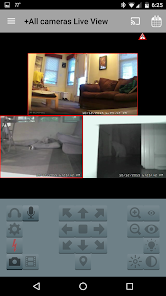
Blue Iris excels in managing multiple cameras simultaneously, allowing users to monitor their entire property with ease. Whether you have a mix of IP and analog cameras, this software seamlessly integrates them into a single interface for efficient surveillance management.

Remote Access

With Blue Iris, you can access your camera feeds from anywhere in the world. The mobile app and web interface provide convenient remote viewing and control, ensuring you stay connected to your home or business at all times, no matter where you are.

Video Recording Options

Blue Iris offers flexible video recording options tailored to your needs. Choose between continuous recording, scheduled recording, or event-based recording, ensuring that you capture everything important while optimizing storage space for your footage.

Advertisement

Pros & Cons

Pros
  • Flexible camera support for various brands and models
  • User-friendly interface simplifies setup and management
  • Advanced motion detection reduces false alarms
  • Remote access enables monitoring from anywhere
  • Comprehensive recording options enhance security coverage
Cons
  • Limited integration options with non-IP cameras can restrict system flexibility.
  • High resource usage may require powerful hardware for optimal performance.
  • The user interface can be complex, posing a learning curve for new users.

Real Experience Using Blue Iris

Application Scenarios

Blue Iris is a versatile security camera software that caters to a wide range of application scenarios. Homeowners looking to enhance their security systems can benefit from its robust features that allow for real-time monitoring of their properties via IP cameras. The software supports various camera brands, making it adaptable for users who may already have existing equipment. In commercial settings, Blue Iris can be utilized for monitoring workplaces, ensuring safety and productivity. Whether it’s tracking customer interactions in retail environments or overseeing operations in warehouses, the application provides an effective solution. Additionally, Blue Iris can be an invaluable tool for parents wanting to keep an eye on their children or caregivers monitoring elderly family members, thus providing peace of mind.

User Experience

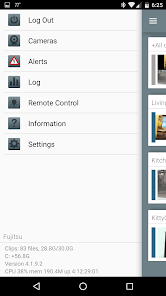
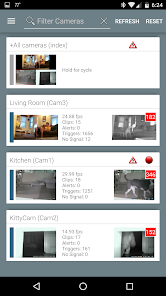
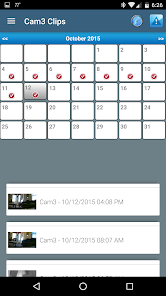
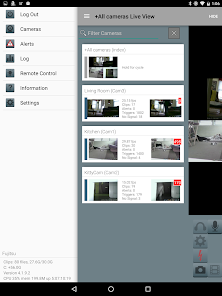
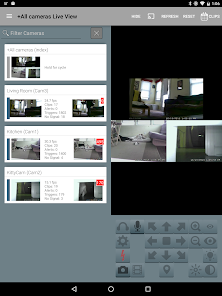
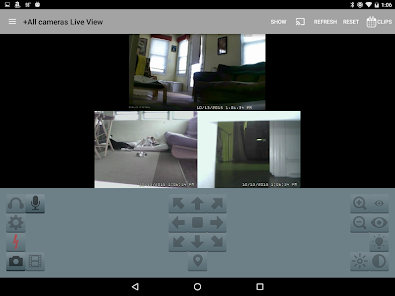
The user experience with Blue Iris is generally positive, thanks to its intuitive interface that balances complexity with functionality. Users can easily navigate through the dashboard to access live feeds, recorded footage, and camera settings. The customization options allow users to tweak alerts, motion detection settings, and camera presets to fit their specific needs. Many users appreciate the ability to view multiple camera feeds simultaneously, which enhances situational awareness. However, some users have reported a learning curve when configuring advanced features, particularly for those not well-versed in technology. The mobile app is also a highlight, offering convenient remote access to live streams and alerts, ensuring users can stay connected to their security systems from anywhere.

Pricing

Blue Iris operates on a tiered pricing model, making it accessible for various budgets. The initial purchase comes with a one-time fee, allowing users to own the software without the burden of ongoing subscription costs. While the price may seem higher compared to basic security solutions, many users find it justified considering the comprehensive features offered, such as advanced motion detection, remote access, and cloud storage options. Additionally, there are occasional discounts or promotional offers that can make the software even more appealing. For those on tight budgets, the ability to use existing cameras instead of investing in proprietary hardware adds to its cost-effectiveness.

Updates & Support

Blue Iris is consistently updated, with developers actively addressing bugs and introducing new features based on user feedback. This commitment to improvement enhances the overall reliability and functionality of the software. Users have noted that the support team is responsive and helpful, providing assistance through various channels such as forums, email, and online documentation. The community surrounding Blue Iris is also a valuable resource, with users sharing tips, troubleshooting advice, and best practices. Regular updates further ensure that users can benefit from the latest advancements in security technology, making Blue Iris a continuously evolving solution for both home and business security needs.

verified Security & Privacy Review

Security and privacy are paramount considerations for any app handling sensitive information, and Blue Iris takes these concerns seriously. The app provides users with a robust set of security features, including end-to-end encryption for video feeds, ensuring that your surveillance data remains private and secure from unauthorized access. When it comes to permissions, Blue Iris requires access to your device's camera and storage. Users are encouraged to review and manage these permissions closely to minimize risk. The app also implements secure authentication methods, such as password protection, to prevent unauthorized users from accessing the system. Blue Iris adheres to strict privacy practices, ensuring that user data is not shared with third parties without consent. The application has clear policies outlining how data is collected, used, and stored, allowing users to make informed decisions about their privacy. Regular updates further enhance the app's security, addressing vulnerabilities and improving overall performance. Overall, Blue Iris demonstrates a commitment to protecting user data and maintaining privacy, making it a reliable choice for those concerned about surveillance security.
Advertisement

User Reviews

  • D N
    2024/09/19

    4 Desktop versions and an Android update and sounds are pretty much fixed finally. BUT push alerts are still hit and miss. Some are fast, others take minutes or longer. Or never show up. Changing priority from normal to high doesn't change that either. Annoying to pay for this app in addition to the desktop version for something crucial like timely alerts thst do not work properly. I paid for the maintenance contract. Anyone who didn't is now SOL, and won't get updates to a fixed version.

  • Langdon Foss
    2020/10/20

    UI is functional but feels very dated. I'm frustrated by the inability to change the layout of cameras on-screen- If I pull up a group of two cameras I don't want to see them side by side on a vertical phone screen. The connection to the server is usually pretty snappy, at least. Overall, the excellent BI server-side software deserves a much better mobile app, especially for the price.

  • BruceK
    2023/07/30

    All good. Stunnel issues all handled and i am very happy with this program! Down from 5 stars to zero (well ... one star as that's as low as it can go). The program refuses to connect via stunnel. Which means I can't connect via https over the internet. Please FIX. It really doesn't matter what bells and whistles you add to the program until it can connect to the server. I like the new version, but what the heck good is a program that can't connect??

  • Mark Frankford
    2021/02/16

    Old version of the app worked great, until update to 3.0.15. This automatic update has essentially broken my Blue Iris system. Now, I cannot access my v4 server on any interface. Stunnel is giving errors pertaining to sslv3 alert certificate unknown, but only with this version of the app (on a phone which just yesterday worked perfectly). Other phones which, by luck, haven't been upgraded yet also still work just fine. Ugh.

  • Dan Rogowsky
    2023/05/08

    The app is generally cumbersome and unintuitive compared to other modern services. Video's stutter, and are quite glitchy, finding what you're looking for is a chore. Support is also practically non-existant, response time is about a week, and you go in circles. Remote access outside my network is broken, so I'm forced to use the remote URL bookmarked in a web browser on my phone instead. I paid $80 for this support too, on top of the $10 app.

Review Source: Google Play store public user reviews.

FAQ

1

Does Blue Iris collect my personal data?

Blue Iris does not inherently collect personal data but may log information related to the use of its services. Users should review the privacy policy for specific details on data handling practices.

2

Does Blue Iris offer a free trial or free version?

Yes, Blue Iris offers a 14-day free trial, allowing users to test the full functionality of the software before committing to a purchase. There is no free version available beyond the trial period.

3

Does Blue Iris require an internet connection?

While Blue Iris can function without an internet connection for local monitoring, an internet connection is necessary for remote access and certain features like cloud storage or notifications.

4

How can I contact support or send feedback for Blue Iris?

You can contact Blue Iris support through their official website, where you can submit a support ticket or find additional resources. Feedback can also be sent via their contact page.

5

How do I manage or cancel my Blue Iris subscription?

You can manage or cancel your Blue Iris subscription through your account settings on the Blue Iris website or by contacting their support team for assistance.

How to use Blue Iris

1

Can I change my customer number if I need to?

Customer numbers are unique and cannot be changed. If you have issues, please contact customer service for further assistance.

2

Can I have multiple accounts with different customer numbers?

No, each user should have only one account with a unique customer number. For help, contact customer service.

3

How can I contact customer service for help with my Blue Iris account?

You can reach customer service via the support section on our website or by calling the support number listed there.

4

How do I activate my Blue Iris account after purchasing?

After purchase, check your email for an activation link. Click it to activate your account. If you don't see it, contact customer service.

5

How do I find customer service contact details for Blue Iris support?

Visit the Blue Iris website and navigate to the support section for contact information.

What's New

Background audio fix

Editor's Choice