This site uses cookies to enhance your user experience. By clicking any link on this site you are giving your consent to our cookie policy. Read more
Reject
Accept All

Advertiser and Editorial Disclosures

YouCut - Video Editor & Maker

YouCut - Video Editor & Maker

verified

InShot Video Editor

4.8
Rating
100,000,000+ Downloads
1.702.1215 Version
Advertisement
Screenshot 1
Screenshot 2
Screenshot 3
Screenshot 4
Screenshot 5
Screenshot 6
Screenshot 7
Screenshot 8
Screenshot 9
Screenshot 10
Screenshot 11
Screenshot 12
Screenshot 13
Screenshot 14
Screenshot 15
Screenshot 16
Advertisement

Features & Highlights

Music & Sound Effects

Add a personal touch to your videos with a vast library of music and sound effects. YouCut lets you choose from various tracks or import your own, allowing you to set the right mood and tone for your content. Enhance your storytelling by integrating audio that complements your visuals beautifully.

Text & Filters

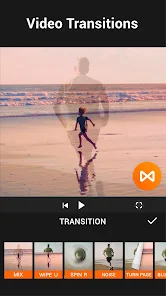
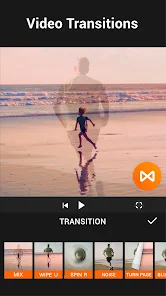
Transform your videos with stylish text overlays and a variety of filters that elevate your content. YouCut offers customizable text options, allowing you to convey messages effectively while the filters add a professional touch. This feature makes it easy to create eye-catching videos that stand out on any platform.

Video Compression

Optimize your videos for sharing without sacrificing quality with YouCut’s efficient compression tools. This feature enables you to reduce file sizes, making it easier to upload and share your creations across different platforms. Enjoy quick uploads and smooth playback while maintaining the integrity of your videos.

Video Trimming & Splitting

Easily trim and split your videos to create the perfect length for your projects. YouCut allows you to remove unwanted segments seamlessly, ensuring that only the best parts of your footage remain. This feature helps streamline your editing process and enhances the final output effortlessly.

Advertisement

Pros & Cons

Pros
  • User-friendly interface makes video editing simple for everyone.
  • Extensive editing tools enhance creativity and customization.
  • Supports multiple formats for versatile video output options.
  • Fast processing speeds save time on editing projects.
  • Regular updates ensure access to the latest features and improvements.
Cons
  • Limited features in the free version restrict advanced editing options.
  • Frequent ads can disrupt the editing experience and distract users.
  • Export quality may be lower than expected, affecting professional use.

Real Experience Using YouCut - Video Editor & Maker

Application Scenarios

YouCut - Video Editor & Maker is an incredibly versatile application that caters to a wide range of video editing needs. It is ideal for social media enthusiasts looking to create engaging content for platforms like Instagram, TikTok, and YouTube. Whether you want to compile vacation footage into a stunning montage or create promotional videos for your small business, YouCut provides the tools necessary to bring your vision to life. The app’s user-friendly interface makes it accessible for beginners, while advanced features appeal to seasoned editors who desire more control over their projects. From adding music and voiceovers to incorporating text overlays and transitions, YouCut adapts to various scenarios, whether for casual sharing with friends or professional-grade projects.

User Experience

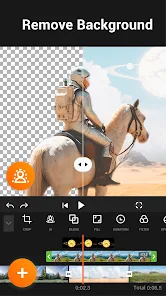
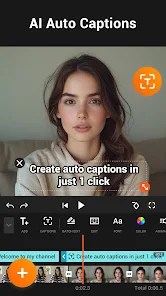
The user experience with YouCut is generally positive, thanks to its intuitive design and robust functionality. Upon launching the app, users are greeted with a clean interface that simplifies navigation. The editing tools are easily accessible, allowing users to trim, cut, and merge clips with just a few taps. The real-time preview feature is particularly beneficial, enabling users to see edits as they make them. Additionally, YouCut offers a range of filters and effects that enhance the overall visual appeal of videos. Users appreciate the option to reverse or speed up clips, which adds a creative flair to their edits. However, some users have reported occasional bugs during updates, which can disrupt the editing process. Overall, the app strikes a balance between ease of use and powerful editing capabilities, making it a favorite among many.

Pricing

YouCut operates on a freemium model, offering users a robust set of features at no cost. The free version allows for basic video editing, including cutting, trimming, and adding music. However, those seeking an ad-free experience and access to premium features, such as additional effects, transitions, and advanced editing tools, can opt for a subscription plan. The pricing is competitive, making it accessible for casual users and professionals alike. The subscription is billed monthly or annually, providing flexibility depending on user needs. Given the extensive features available even in the free version, many users find that the investment in the premium version is worth it for the enhanced editing capabilities.

Updates & Support

YouCut frequently rolls out updates to improve functionality and introduce new features, ensuring users have access to the latest tools in video editing. The development team actively listens to user feedback, which has led to the addition of requested features and enhancements. The app also has a dedicated support section that provides users with tutorials and FAQs to troubleshoot common issues. While response times can vary, the support team is generally helpful and responsive to inquiries. Regular updates not only enhance the app experience but also demonstrate the developers' commitment to maintaining a high-quality product that meets user needs.

verified Security & Privacy Review

In today's digital landscape, security and privacy are paramount, and YouCut - Video Editor & Maker appears to prioritize these concerns. The app is designed with a user-centric approach, ensuring that personal data remains protected throughout the editing experience. YouCut collects minimal user data, primarily to enhance functionality and improve user experience, which is a common practice among video editing apps. The app requests permissions that are essential for its operation, such as access to media files and storage. Users are informed about these permissions during the installation process, enabling them to make informed decisions. Importantly, YouCut does not require unnecessary permissions that could compromise user privacy. YouCut's privacy policy outlines its commitment to data security, detailing how user information is handled and stored. The app employs industry-standard encryption techniques to safeguard data against unauthorized access. Moreover, users have control over their content, with options to delete or manage their data as desired. Overall, YouCut demonstrates a responsible approach to user privacy and data security, fostering trust among its user base.
Advertisement

User Reviews

  • Dan L
    2024/12/24

    Best video editor for the buck. Has all the features, if not more, than that of expensive video apps or ones that have subscriptions. Bravo to the devs. Would be nice if it would let you select multiple photos / videos from cloud storage and allow you to select whole folders and add all the photos / videos to a movie. Overall, it's an awesome app that's updated frequently. Support it and it's developers and purchase the pro version.

  • Joe Allen
    2024/12/19

    Love using this app! May not do all the fancy stuff like cutting out and green screening, all though it might and I haven't tried it 😂, but you can do all the basic editing needs for free. I ended up buying it because it's a small 1 time purchase, not a monthly subscription. Great editing app that I use for Instagram reels and YouTube shorts!

  • Henry E
    2025/05/25

    I've been using this app for years to CONVENIENTLY edit videos. You could edit any video that you have on your phone; whether it's important stuff or inappropriate stuff. This app works as advertised. It has most of what you'd need for editing ANY video all from your phone. You could even take various videos and stitch them together! And in all, it's a great program to KEEP on your phone. Because, you might actually NEED it! And it'll thus, be on your phone ready to go!

  • Danielle Frye
    2025/12/24

    Such an awesome app. My daughter used this to edit a scary video for her cousin. The music selection is a bit limited for my standards. I also wish that there is less pro items. I wish we could use some actual music or make it easier to extract music. Overall, You cut is a easy way to edit my videos for collections. Thank You, YouCut!

  • Sophia Xue
    2024/11/23

    I absolutely love this video editing app! I've been using it for about 4 years now, and I'm always so happy to see the new updates that it gets! One thing I've always really wanted to see in the app is music. They have many music options that they've made themselves, but I really want to add my own music from YouTube or other apps. Besides that, this app is really easy to use and I enjoy it a lot! ❤️❤️

Review Source: Google Play store public user reviews.

FAQ

1

Can I submit suggestions or feedback to YouCut - Video Editor & Maker?

Yes, users can submit suggestions or feedback through the app's support section or by contacting the developers directly via their official website or social media channels.

2

Does YouCut - Video Editor & Maker collect my personal data?

YouCut - Video Editor & Maker may collect certain data to improve user experience, but it typically does not require extensive personal information for basic usage.

3

Does YouCut - Video Editor & Maker support offline use?

Yes, YouCut - Video Editor & Maker can be used offline, allowing users to edit videos without an internet connection.

4

How do I cancel my YouCut - Video Editor & Maker subscription?

To cancel your subscription, you can go to the subscription settings in your app store and follow the prompts to unsubscribe.

5

How much does a subscription to YouCut - Video Editor & Maker cost?

The subscription cost for YouCut - Video Editor & Maker may vary, but it typically offers different pricing tiers for premium features, which can be checked within the app.

How to use YouCut - Video Editor & Maker

1

Can I log in to YouCut on multiple devices?

Yes, you can log in to YouCut on multiple devices using the same account credentials. Just ensure you're logged out on other devices if needed.

2

Can I log in to YouCut using my social media account?

Yes, you can log in to YouCut using your Google or Facebook account for a quicker sign-in process.

3

How can I contact customer service for YouCut?

You can reach customer service through the app's help section or by emailing support

4

How do I activate my YouCut account after signing up?

To activate your YouCut account, check your email for an activation link and follow the instructions provided.

5

How do I change my login email for YouCut?

To change your login email, go to your account settings in the app and follow the prompts to update your email address.

What's New

* Score big with style transitions* Bug fixes and other improvementsAny concerns or suggestions? Let us know at [email protected]. Don't forget to subscribe us on YouTube: https://www.youtube.com/@YouCutApp

Editor's Choice