This site uses cookies to enhance your user experience. By clicking any link on this site you are giving your consent to our cookie policy. Read more
Reject
Accept All

Advertiser and Editorial Disclosures

vivago.ai-AI Video&Effects

vivago.ai-AI Video&Effects

verified

Sparking Innovations Limited

4.4
Rating
5,000,000+ Downloads
2.9.6 Version
Advertisement
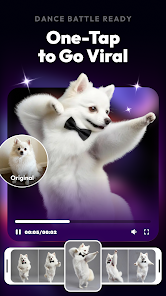
Screenshot 1
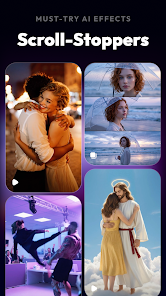
Screenshot 2
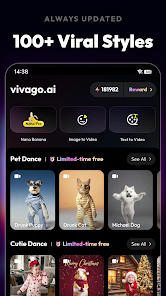
Screenshot 3
Screenshot 4
Screenshot 5
Screenshot 6
Advertisement

Features & Highlights

AI-Powered Editing

Vivago.ai harnesses the power of artificial intelligence to streamline the video editing process, allowing users to create stunning visuals effortlessly. With smart suggestions and automated enhancements, you can save time while achieving professional-quality results that captivate your audience.

Customizable Templates

Speed up your workflow with vivago.ai's library of customizable templates designed for various video styles and genres. These templates provide a solid foundation for your projects, allowing you to easily personalize them to reflect your unique vision and brand identity.

Real-Time Effects

Transform your videos on the fly with vivago.ai's real-time effects feature. Whether you're looking to add dynamic filters or unique transitions, this capability lets you experiment and express your creativity instantly, making your content stand out in a crowded digital landscape.

Seamless Sharing Options

Vivago.ai makes it easy to share your creations across multiple platforms with just a few clicks. This feature ensures that your videos reach your audience wherever they are, maximizing engagement and enhancing your online presence without any hassle.

Advertisement

Pros & Cons

Pros
  • Transform videos effortlessly
  • Apply stunning effects instantly
  • User-friendly interface designed
  • Share creations on social media
  • Regular updates with new features
Cons
  • Limited video editing tools
  • Occasional performance glitches
  • Higher learning curve for users
  • Subscription costs can add up

Real Experience Using vivago.ai-AI Video&Effects

Real Experience Application Scenarios

Vivago.ai is designed to meet a variety of video editing and effects needs, making it suitable for both casual users and professional creators. Whether you are looking to enhance your social media content, create engaging marketing videos, or produce high-quality personal projects, this app offers versatile features. Users can apply stunning visual effects, filters, and transitions to their videos, making it ideal for influencers and content creators who want to stand out. Additionally, Vivago.ai can be used for educational purposes, allowing teachers and students to create informative videos with engaging visuals. The app's AI capabilities enable it to analyze video content, suggesting adjustments and effects that can elevate the final product, thus catering to both novice users and seasoned professionals.

User Experience

The user experience with Vivago.ai is generally positive, characterized by an intuitive interface that simplifies video editing. Upon launching the app, users are greeted with a clean layout that makes navigation seamless. The drag-and-drop functionality allows for easy importation of video clips, ensuring that even those with minimal editing experience can quickly get started. The AI-driven features provide intelligent suggestions for effects and enhancements, making the editing process more efficient. Moreover, the rendering speed is commendable, allowing users to preview changes in real-time. However, some users have reported occasional lag when applying multiple effects simultaneously, which can be a minor drawback. Overall, the app strikes a balance between advanced features and user-friendliness, making it accessible to a wide range of users.

Pricing

Vivago.ai offers a competitive pricing structure, with a free version that provides access to basic features, allowing users to test the app without any financial commitment. For those seeking advanced functionalities, a subscription-based model is available. This model includes various tiers, each unlocking additional effects, filters, and export options. The premium subscription is reasonably priced compared to similar apps in the market, making it a viable option for both individuals and small businesses. Users often appreciate the flexibility of monthly or annual billing, allowing them to choose a plan that best fits their needs. The value provided by the premium features further enhances the app's appeal, especially for frequent users who require more sophisticated tools.

Updates & Support

Vivago.ai is committed to continuous improvement, with regular updates that introduce new features and enhancements based on user feedback. The development team actively engages with the community, ensuring that users' suggestions are taken into account. The app also boasts a responsive customer support system, providing assistance through FAQs, tutorials, and direct contact options for troubleshooting. Users have reported positive experiences with the support team, highlighting their prompt responses and helpful guidance. Overall, the combination of frequent updates and reliable support contributes to a satisfying user experience, making Vivago.ai a reliable choice for video editing enthusiasts.

verified Security & Privacy Review

Security & Privacy Review Vivago.ai prioritizes user security and privacy through robust data protection measures. The app employs encryption protocols to safeguard user-generated content and personal information, ensuring that data remains secure during transmission and storage. When it comes to permissions, Vivago.ai requires access to the device's camera and microphone to enable its video and effects features. Users are prompted to grant these permissions at the time of installation, and the app provides clear explanations for each request, promoting transparency. The app has a comprehensive privacy policy outlining how user data is collected, utilized, and shared. It emphasizes that personal information will not be sold to third parties. Users have the option to manage their data preferences and can delete their accounts or request data deletion at any time. Overall, Vivago.ai demonstrates a commitment to maintaining user privacy and security, making it a reliable choice for those looking to create and share video content without compromising their personal information.
Advertisement

User Reviews

  • Kurt C
    2026/06/25

    This is a trash app. So many ads, grouped in threes and unskippable. Everything you click on leads to a series of ads. No credits to begin with, but, you guessed it, you can watch ads to make your first creation. 15 to be exact, plus the ads (three) for every click. By the time I amassed enough credits to do something I had forgotten why I was there. Finally made something and it turned out awful. Don't waste your time, there are better apps for this. Deleted.

  • suk una
    2026/06/16

    Transform the uploaded image into cinematic 3-frame sequential film stills (horizontal frames stacked vertically), full bleed edge-to-edge. Each frame should show a different moment from the same scene, with clear progression. Vary the composition, camera angle, and distances to create a sense of movement and storytelling. Use a cinematic, cooler-toned, high-contrast, deep-space blacks film with a natural color grade. Add subtle film grain, slight motion blur, and natural imperfections to emulat

  • Jue Viole Grace
    2026/06/11

    after installation, I open the app then a long ad pop ups, after it ends I clicked on video generation. it asked me 30 credits . I watched 3 long ad for this too then I click on video generation again a AD pop up. after my video get generated then this software put a watermark huh? seriously? too remove the watermark I have to watch 3 more ads hell naaahhhh. thank god there are too many websites to remove watermarks

  • Msaad
    2026/06/07

    I like the rewards section very much. Gives you a chance to earn credits without paying. update.deducted my credits without showing me the result update 2 initially gave it four stars. Had to change my mind due to issues. you get free credits then when you try to use them you're putting queue which is normal for a free app. they have a feature where you can watch an ad to skip the queue. I watched several ads and they did not skip the queue then it failed AND it took my credits again. deleting

  • Umer Writes
    2026/06/01

    have used this app for a full week, and one of the biggest issues is that the credits provided after purchasing the subscription are very low. There should be at least 1000 credits. Also, the credits deducted for generating pictures are too high — instead of 60 credits, it should only cost 2 or 3 credits per image. Similarly, for video generation, the credit cost should be reduced to around 10 credits. These changes would make the app much better and more user-friendly.”

Review Source: Google Play store public user reviews.

FAQ

1

Can I share my videos directly from vivago.ai?

Yes, vivago.ai includes built-in sharing options that allow users to export their videos directly to social media platforms, email, or cloud storage. This feature streamlines the process of sharing content with friends, followers, or clients.

2

Can I use vivago.ai for professional video projects?

Absolutely! vivago.ai provides advanced tools and high-quality output options that cater to professional video projects. Users can create videos suitable for marketing, social media, and other professional uses, while still benefiting from the app's innovative AI capabilities.

3

Does vivago.ai require an internet connection?

While some features of vivago.ai may require an internet connection, many editing tools can be used offline. Users can download the app and work on their projects without being connected to the internet, though certain updates and effects might need online access.

4

How does the AI in vivago.ai enhance video quality?

The AI in vivago.ai analyzes video content to optimize aspects like lighting, color correction, and stabilization. It can also automatically suggest edits, effects, and music based on the video’s theme, helping users achieve a polished final product with minimal effort.

5

Is there a subscription fee for vivago.ai?

vivago.ai offers a free version with basic features, but there are subscription plans available that unlock additional tools, effects, and premium content. Users can choose a plan that fits their needs, whether they require occasional use or more advanced capabilities.

How to use vivago.ai-AI Video&Effects

1

Can I reset my vivago.ai password?

Yes, use the "Forgot Password?" link on the login page to receive a password reset email.

2

How can I contact customer service for vivago.ai?

You can reach vivago.ai customer service through their official website's contact page or support email.

3

How do I find the customer number for vivago.ai?

The customer number can typically be found in your account settings or in the confirmation email you received after signing up.

4

How do I log into my vivago.ai account?

To log in, visit the vivago.ai website or app, enter your registered email and password, and click "Log In."

5

How do I update my account information on vivago.ai?

Log in to your account, go to "Account Settings," and make the necessary updates.

What's New

Bug Fixes

Editor's Choice