This site uses cookies to enhance your user experience. By clicking any link on this site you are giving your consent to our cookie policy. Read more
Reject
Accept All

Advertiser and Editorial Disclosures

USAA DriveSafe

USAA DriveSafe

verified

USAA

4.0
Rating
1,000,000+ Downloads
3.16.0.134836 Version
Advertisement
  • category

    Category: Auto & Vehicles

  • price

    Price: free

  • age rating

    Age Rating: Everyone

  • rating

    Rating: 4.0

  • available on

    Available on: /

  • updated on

    Updated on: May 20, 2026

Screenshot 1
Screenshot 2
Screenshot 3
Screenshot 4
Screenshot 5
Screenshot 6
Advertisement

Features & Highlights

Personalized Safety Insights

The app analyzes your driving patterns and delivers personalized safety insights tailored to your habits. By highlighting areas for improvement, it empowers you to become a better driver while fostering a sense of awareness and responsibility on the road.

Real-Time Driving Feedback

USAA DriveSafe provides real-time feedback on your driving habits, helping you understand how your behaviors impact your safety. This feature offers insights into acceleration, braking, and speed, allowing you to make adjustments that can lead to safer driving and potentially lower insurance rates over time.

Rewards for Safe Driving

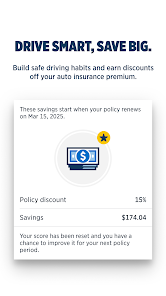
By consistently demonstrating safe driving behaviors, you can earn rewards through USAA DriveSafe. This incentivization not only makes driving more enjoyable but also encourages a commitment to safety, benefiting both you and the community.

Trip Tracking and History

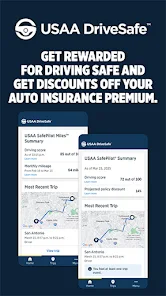
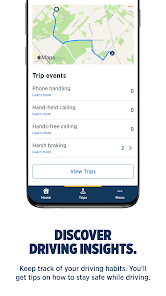
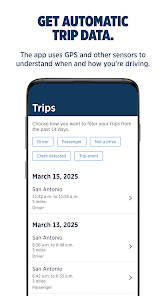
USAA DriveSafe keeps a detailed log of your trips, allowing you to review your driving performance over time. This feature helps you identify trends and patterns in your driving behavior, making it easier to track progress and stay motivated to improve your skills.

Advertisement

Pros & Cons

Pros
  • Receive personalized driving feedback to improve your skills.
  • Enjoy potential discounts for safe driving habits.
  • Access real-time driving data through an easy-to-use app.
  • Stay connected with family and friends for added safety.
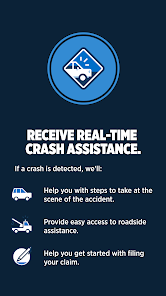
  • Benefit from 24/7 roadside assistance for peace of mind.
Cons
  • Limited availability only for USAA members may exclude potential users.
  • Higher premiums for high-risk drivers can lead to increased costs.
  • Driving data privacy concerns may deter some users from participation.

Real Experience Using USAA DriveSafe

Application Scenarios

The USAA DriveSafe app is designed for individuals who want to improve their driving habits and save on insurance premiums. It is particularly beneficial for new drivers, families, and those looking to cultivate safer driving behaviors. The app provides users with real-time feedback on their driving performance, which can be especially useful for parents monitoring their teenagers' driving skills. Additionally, for those who frequently travel or commute, the app can help identify patterns that may lead to safer routes or practices. By rewarding safe driving with potential discounts, USAA DriveSafe appeals to cost-conscious drivers who wish to lower their insurance costs while promoting a culture of safety on the road.

User Experience

The user experience of the USAA DriveSafe app is commendable, boasting an intuitive interface that makes navigation seamless. Upon first use, users can easily set up their profiles and link their vehicles. The app tracks driving behavior, including speed, braking, and acceleration, and offers personalized feedback through a visually appealing dashboard. Many users appreciate the gamified elements, such as scoring systems and progress tracking, which encourage them to improve their driving habits. The notifications are timely and informative, providing insights without being overwhelming. Users have reported feeling more aware of their driving habits, leading to safer practices over time. Additionally, the ability to access insurance-related information directly through the app streamlines the overall experience.

Pricing

USAA DriveSafe is available at no additional cost for USAA members, which is a significant advantage for those already enrolled in the insurance program. The app is designed to reward users with potential premium discounts based on their driving performance, thus providing long-term savings. However, it is essential to note that the app is specifically tailored for USAA members, which means that non-members will not be able to access its features or benefits. Overall, the pricing structure is favorable, as users can potentially lower their insurance costs while benefiting from an innovative tool aimed at enhancing their driving habits.

Updates & Support

The developers of USAA DriveSafe are committed to providing regular updates to enhance functionality and user experience. Users can expect frequent improvements based on feedback and technological advancements. The app offers solid support options, including a comprehensive FAQ section and a responsive customer service team. Users can reach out via the app for assistance or visit the USAA website for additional resources. This commitment to ongoing support and updates ensures that users have a reliable tool that adapts to their needs, making it a valuable asset for anyone looking to enhance their driving experience and safety.

verified Security & Privacy Review

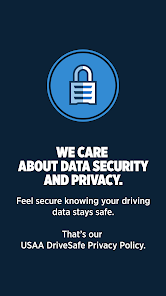
The USAA DriveSafe app prioritizes user security and privacy, implementing robust measures to protect sensitive information. The app employs encryption protocols to safeguard data transmitted between the user’s device and USAA servers, ensuring that personal and financial information remains confidential. In terms of permissions, the app requires access to location services to accurately track driving habits. Users are informed about these permissions during the installation process, allowing them to make informed decisions. Furthermore, users have control over their data, with options to manage privacy settings and opt-out of data sharing practices. USAA adheres to strict privacy policies, with a commitment to transparency regarding data collection and usage. The app collects only the necessary information to enhance user experience and improve safety features. Regular updates and security audits are conducted to address potential vulnerabilities, reinforcing the app's reliability in maintaining user trust. Overall, the USAA DriveSafe app demonstrates a solid commitment to protecting user data, making it a secure choice for those looking to improve their driving habits while ensuring their privacy is respected.
Advertisement

Compare APP

User Reviews

  • Daniel Hanson-Rios
    2026/04/19

    Kinda cool app, and I appreciate the discount received from driving better, but it absolutely wrecks the battery life on my phone. Turning off the battery optimization for this app (no others have the permission to run in the background) and I go from a full charge to the 15% low battery alert in about 4-6 hours. Definitely needs to get fixed if they want more people to start using it.

  • Nalani Palchizaca Dotseth
    2024/10/01

    Don't like the latest update. Navigation sucks. The Old way before this update, in terms of layout/navigation, was way better. Would like it more if they went back to a User Friendly layout. My battery levels have significantly dropped. And another thing, It only shows, about 14 days worth of trips & doesn't even include the map for the trips, which makes it difficult to track who did what trip. Plus, I wasn't able to update my trips for the previous 2 or so weeks,& I can't update them now.

  • Wallace Walker
    2025/08/04

    This finicky app records all data, stays on in the background 24/7, draining my battery. I "FORCE STOP" the app when not driving. I also turn off all its "PERMISSION SETTINGS" when not in use. It does a great job informing you, yet most of the time, it changes scores so quickly. I went from 100 to 77, back to 99, for no reason. It might be another lead generator app. PROGRESSIVE SNAPSHOT was simple, as it hooked into your ODB and didn't ruin the life expectancy of your mobile device.

  • Joe Heuer
    2024/09/01

    The new user interface (UI) is a lot less user-friendly compared to the previous one, which was very user-friendly. The one upside is that it seems to trigger false events a lot less. It used to trigger harsh braking (which is a huge negative impact on driving score) randomly, and not trigger if actually braking hard for a legitimate reason, ie being cut off, or having someone blow through a red light or stop sign causing you to brake extremely hard to avoid a crash.

  • Bobby Miller
    2026/06/24

    This app is frustrating. I only have it for the discount. And by that I mean lowering my premium, not getting an unobtainable discount through driving. The app drains the phone battery and collects personal data. I had one harsh braking in practice and thought this might be a good thing. Not even close. I didn't change anything and I get harsh braking every other drive. I've never had an accident in 38 years of driving but this app paints me as a bad driver. Not even close.

Review Source: Google Play store public user reviews.

FAQ

1

Can I submit suggestions or feedback to USAA DriveSafe?

Yes, users can submit suggestions or feedback through the app's feedback feature or by reaching out to USAA's customer support.

2

Does USAA DriveSafe collect my personal data?

Yes, USAA DriveSafe collects data related to your driving habits, which may include location and trip information, to provide personalized feedback and improve your driving experience.

3

Does USAA DriveSafe support offline use?

USAA DriveSafe requires an internet connection to access certain features, but it can still track driving data offline and sync it when a connection is restored.

4

How do I cancel my USAA DriveSafe subscription?

You can cancel your USAA DriveSafe subscription through the app's settings or by contacting USAA customer service for assistance.

5

How much does a subscription to USAA DriveSafe cost?

The subscription cost for USAA DriveSafe varies based on the plan chosen, so it’s best to check the app for the latest pricing details.

How to use USAA DriveSafe

1

Can I access my DriveSafe account using a different device?

Yes, you can log in to your USAA DriveSafe account from any device with internet access using your customer number and password.

2

Can I change my customer number if I need to?

Customer numbers are unique and cannot be changed. If you need assistance, please contact customer service for support.

3

How can I contact customer service for USAA DriveSafe?

You can reach USAA DriveSafe customer service by calling the number on the back of your card or through the USAA mobile app.

4

How do I activate my USAA DriveSafe account?

To activate your USAA DriveSafe account, log in to your account on the USAA website or app and follow the activation prompts provided.

5

How do I reset my password for my USAA DriveSafe account?

You can reset your password by clicking the 'Forgot Password?' link on the login page and following the instructions provided.

What's New

We regularly update the USAA DriveSafe™ App to make your mobile experience even better. Each new version is designed to give you fast, secure and reliable access to your information.What’s new:- General bug fixes and minor improvements.

Editor's Choice