This site uses cookies to enhance your user experience. By clicking any link on this site you are giving your consent to our cookie policy. Read more
Reject
Accept All

Advertiser and Editorial Disclosures

Remini - AI Photo Enhancer

Remini - AI Photo Enhancer

verified

Bending Spoons

4.1
Rating
500,000,000+ Downloads
3.7.1260.202518969 Version
Advertisement
  • category

    Category: Photography

  • price

    Price: free

  • age rating

    Age Rating: Everyone

  • rating

    Rating: 4.1

  • available on

    Available on: /

  • updated on

    Updated on: Jul 1, 2026

Screenshot 1
Screenshot 2
Screenshot 3
Screenshot 4
Screenshot 5
Screenshot 6
Screenshot 7
Screenshot 8
Screenshot 9
Screenshot 10
Screenshot 11
Screenshot 12
Screenshot 13
Screenshot 14
Screenshot 15
Screenshot 16
Screenshot 17
Screenshot 18
Screenshot 19
Screenshot 20
Screenshot 21
Screenshot 22
Screenshot 23
Screenshot 24
Advertisement

Features & Highlights

AI Photo Restoration

Remini uses advanced artificial intelligence to bring old and blurry photos back to life. It enhances details and sharpness, making your cherished memories clear and vibrant again. With just a few taps, you can transform faded images into stunning visuals that you’ll love to share.

Real-Time Enhancement

Experience instant photo enhancements with Remini's real-time processing capabilities. Simply upload your images and watch as the app works its magic, improving resolution and clarity in seconds. This feature is perfect for those who want quick results without sacrificing quality.

User-Friendly Interface

Navigating Remini is a breeze thanks to its intuitive design. Whether you're a tech novice or a seasoned user, you'll appreciate how easy it is to enhance your photos and videos. The straightforward layout ensures a smooth experience, making photo enhancement accessible to everyone.

Video Enhancer

Not just for photos, Remini also offers a powerful video enhancement feature that elevates the quality of your videos. It sharpens footage, reduces noise, and enhances details, allowing you to relive your moments in stunning clarity. Bring your videos to life and share them with friends and family.

Advertisement

Pros & Cons

Pros
  • Transforms old photos into high-resolution images
  • Enhances details for clearer, sharper visuals
  • Restores colors to make images vibrant
  • User-friendly interface for effortless editing
  • Fast processing for quick results and sharing
Cons
  • Inconsistent results across different photo types
  • Limited control over enhancement settings
  • May introduce artifacts or distortions
  • Subscription model can be costly over time

Real Experience Using Remini - AI Photo Enhancer

Application Scenarios

The Remini - AI Photo Enhancer app is particularly effective in various scenarios that demand high-quality images. Users often turn to this app when they want to restore old photos that have faded over time, bringing life back to cherished memories. Whether it's a family portrait from decades ago or a travel snapshot that has lost its vibrancy, Remini excels at enhancing clarity and detail. Additionally, the app is popular among social media enthusiasts who wish to elevate their profile pictures or create stunning visuals for their posts. The AI-driven technology can transform everyday pictures into professional-looking images, making it an essential tool for content creators and influencers alike. Furthermore, photographers seeking to enhance their portfolios can utilize Remini to refine their work, adding a polished touch to their images.

User Experience

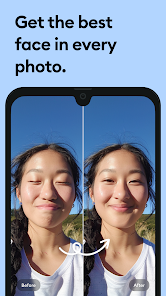
User experience with Remini is generally positive, thanks to its intuitive interface and easy navigation. Upon opening the app, users are greeted with a straightforward design that allows for seamless photo uploads. The enhancement process is surprisingly fast, with most images processed in a matter of seconds. Users appreciate the before-and-after comparison feature, which visually showcases the remarkable improvements made. However, some users have reported occasional glitches or slower performance during peak usage times, but these instances are relatively rare. The quality of enhancements, especially in restoring facial details and colors, has garnered praise, making the app a favorite among those who prioritize image quality. Overall, the user experience is enhanced by regular updates that aim to refine the app's performance and capabilities.

Pricing

Remini operates on a freemium model, offering both free and premium subscription options. The free version provides users with limited daily enhancements, which is sufficient for casual users who only need occasional photo touch-ups. For those seeking unlimited access and advanced features, the premium subscription is a worthwhile investment. The pricing is competitive compared to other photo enhancement apps in the market, and users often find the cost justified by the quality of enhancements provided. Discounts and promotional offers are also frequently available, making it accessible for users who are hesitant to commit long-term.

Updates & Support

The developers of Remini are committed to continuous improvement, regularly releasing updates that enhance functionality and introduce new features. User feedback is actively sought and incorporated, which has resulted in a more refined app experience over time. The support team is responsive and helpful, addressing user concerns and technical issues promptly through various channels, including in-app support and email. Users have noted that the community aspect, including forums and social media pages, provides additional support and tips for maximizing the app's capabilities. Overall, the commitment to updates and user support contributes significantly to a positive user experience.

verified Security & Privacy Review

The Remini - AI Photo Enhancer app prioritizes user security and privacy through its data handling practices. The app requires several permissions, including access to your device's storage to enhance photos effectively. Users should be aware that granting these permissions allows the app to access and process images uploaded for enhancement. Remini employs encryption protocols to protect user data during transmission. However, it’s essential for users to read the app's privacy policy, which outlines data collection practices. The app may collect personal information such as email addresses for account management and service improvement purposes. Additionally, user data may be retained for a specified period, which raises considerations for those concerned about long-term data storage. Users can manage their privacy settings within the app, allowing them to limit data sharing and enhance their privacy experience. Overall, while Remini takes steps to protect user information, users should remain vigilant about the permissions they grant and the data they share.
Advertisement

User Reviews

  • Jessie M.
    2026/05/30

    Warning! Do not get this app! The services are overpriced. They charge weekly. I decided to buy just to test the app. If you prompt the AI to change a photo, it will be very blurry. You're basically paying for a service you are not getting. I bought one week subscription so that you dont have to. If you dont buy subscription, you will need to watch an ad after every single action you do.

  • LDCM59
    2026/05/25

    App would not open. It kept saying "Oops, something went wrong. Try again later." Uninstalled the app and tried reinstalling. Still won't open. Let me know when you fix this. All I want to do is take the face from one picture where a person's head was cut off at the top and swap with one that wasn't, but he wasn't smiling. Gemini suggested your app. Might want to fix it.

  • Jack Andrews
    2026/02/05

    Y'all have taken these ads too far. You recognized that you provide a valuable service and took advantage of that and now the app is basically unusable. I had to sit through three 30-second ads because I clicked on an image, clicked "enhance," and it just didn't do anything three times. Then you need to watch an ad to download the image you just watched an ad to enhance! Beyond ridiculous.

  • Mk
    2023/08/13

    it's good at enhancing photos, but the ads are annoying. One ad for opening the app, one ad for enhancing, and one ad for saving the picture. Also, I'm very glad they remove the feature where you have to pay to remove their "fixed lighting". I couldn't use the app for a while because they're fixed lighting usually just whitewashed the models put into the program. Like, not even joking. Nothing else would change but their skin color. Good program all being said.

  • eduardo hernandez
    2025/01/12

    The free version used to give you a few ads before and after working on each pic. Now it's so full of ads that are increasingly harder to get passed, that it's not worth my time to keep using it. As for the product itself, it still needs to improve the way it deals with hair, hands and sometimes the eyes. As a Photoshop user, I would merely use Remini to aid myself with some issues but I've never used an image enhanced by Remini in full. I just don't love what it does.

Review Source: Google Play store public user reviews.

FAQ

1

Does Remini - AI Photo Enhancer collect my personal data?

Remini may collect certain personal data to provide its services and improve user experience, but it typically outlines its data collection practices in its privacy policy.

2

Does Remini - AI Photo Enhancer offer a free trial or free version?

Yes, Remini offers a free version with limited features, and users can also access a trial period for premium features before deciding on a subscription.

3

Does Remini - AI Photo Enhancer require an internet connection?

Yes, Remini requires an internet connection to process images as it relies on cloud-based AI technology for enhancing photos.

4

How can I contact support or send feedback for Remini - AI Photo Enhancer?

Users can contact Remini support through the app's help section or by visiting their official website, where they can find contact forms and support email addresses for feedback and inquiries.

5

How do I manage or cancel my Remini - AI Photo Enhancer subscription?

Users can manage or cancel their subscriptions directly through the app's settings or the app store where they purchased the subscription, following the provided instructions.

How to use Remini - AI Photo Enhancer

1

Can I use the Remini app on multiple devices?

Yes, you can log into your account on multiple devices, but features may vary based on the device.

2

How can I contact customer service for Remini?

You can reach Remini customer service through the app's support section or email them directly at their official support email.

3

How can I recover my Remini account?

Use the 'Forgot Password' option on the login screen to reset your password via email.

4

How do I log in to the Remini app?

Open the app and tap on 'Log In' to enter your credentials or use social media accounts for quick access.

5

How do I report a problem with the app?

Use the feedback option in the app or email support detailing the issue you're facing.

What's New

Make your photos stand out with AI-enhanced editing on Remini! We’ve fixed some pesky bugs and made performance improvements to ensure a seamless experience.Love from the Remini team

Editor's Choice