This site uses cookies to enhance your user experience. By clicking any link on this site you are giving your consent to our cookie policy. Read more
Reject
Accept All

Advertiser and Editorial Disclosures

Lightroom Photo & Video Editor

Lightroom Photo & Video Editor

verified

Adobe

4.6
Rating
100,000,000+ Downloads
11.1.2 Version
Advertisement
  • category

    Category: Photography

  • price

    Price: free

  • age rating

    Age Rating: Everyone

  • rating

    Rating: 4.6

  • available on

    Available on: /

  • updated on

    Updated on: Jul 6, 2026

Screenshot 1
Screenshot 2
Screenshot 3
Screenshot 4
Screenshot 5
Screenshot 6
Screenshot 7
Screenshot 8
Screenshot 9
Screenshot 10
Screenshot 11
Screenshot 12
Screenshot 13
Screenshot 14
Screenshot 15
Screenshot 16
Screenshot 17
Screenshot 18
Screenshot 19
Screenshot 20
Screenshot 21
Screenshot 22
Screenshot 23
Screenshot 24
Advertisement

Features & Highlights

AI-Powered Enhancements

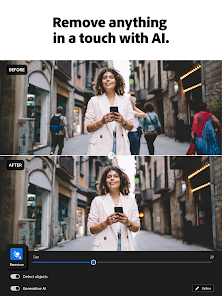
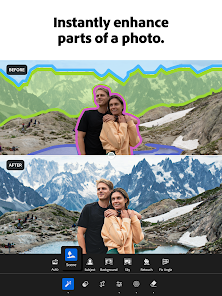
Harness the power of AI with Lightroom's intelligent enhancement features. The app automatically analyzes your images and suggests improvements, making it easier to achieve stunning results without extensive editing knowledge, allowing you to focus on your creativity.

Editing Tools

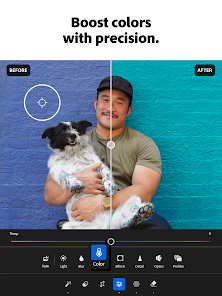
Lightroom offers a comprehensive suite of editing tools that cater to both beginners and professionals. With features such as exposure adjustments, color grading, and noise reduction, you can enhance your photos to perfection, bringing out details that truly matter in every shot.

Mobile Syncing

Lightroom seamlessly syncs your edits and collections across devices, allowing you to start a project on your desktop and finish it on your mobile. This flexibility ensures you can edit on the go, maintaining your creative flow no matter where you are.

Organizational Features

Stay organized with Lightroom's powerful cataloging capabilities. You can easily tag, rate, and categorize your photos and videos, ensuring you can find your favorite memories in seconds, even if your library grows over time.

Advertisement

Pros & Cons

Pros
  • User-friendly interface simplifies photo and video editing for all skill levels.
  • Powerful editing tools enhance creativity and improve visual storytelling.
  • Seamless organization helps manage and find photos effortlessly.
  • Cloud storage allows access to edits from any device, anywhere.
  • Regular updates ensure access to the latest features and improvements.
Cons
  • Limited offline functionality can hinder editing flexibility.
  • High subscription cost may not suit all budgets.
  • Steeper learning curve for beginners compared to simpler apps.

Real Experience Using Lightroom Photo & Video Editor

Real Experience Application Scenarios

Lightroom Photo & Video Editor is a versatile tool that caters to a wide range of users, from professional photographers to casual hobbyists. Whether you’re editing photos from a recent vacation, enhancing family portraits, or crafting stunning visuals for social media, this app provides all the necessary features. Users can import images and videos directly from their devices or cloud storage, making it convenient for on-the-go editing. The app is also beneficial for those looking to create high-quality content for their blogs or portfolios, as its robust editing capabilities allow for fine-tuning adjustments and creative effects. Additionally, Lightroom's preset options enable quick edits, making it an ideal choice for users who need to process large batches of photos efficiently.

User Experience

The user experience of Lightroom Photo & Video Editor is designed with both simplicity and sophistication in mind. The interface is clean and intuitive, allowing users to navigate through its various features with ease. The editing tools are highly responsive, ensuring that adjustments can be made seamlessly. One of the standout features is the non-destructive editing option, which allows users to experiment with different looks without permanently altering their original files. The app also supports RAW image formats, providing photographers with the flexibility to edit their images in greater detail. Furthermore, the tutorial section guides new users through the app's functionalities, making it accessible for those who may be unfamiliar with photo editing. Overall, the combination of powerful tools and ease of use results in a satisfying experience for users at all skill levels.

Pricing

Lightroom Photo & Video Editor operates on a subscription-based pricing model. Users can opt for a free version, which offers basic editing features but limits access to premium tools and cloud storage. The premium subscription unlocks advanced functionalities, including more editing presets, additional storage space, and exclusive features like advanced healing brushes and selective adjustments. Pricing varies depending on the subscription plan chosen, with options for monthly or annual payments. While some users may find the cost a consideration, the value provided through robust editing capabilities and constant updates justifies the investment for serious photographers and videographers.

Updates & Support

Adobe is committed to providing ongoing updates and support for Lightroom Photo & Video Editor, ensuring that users always have access to the latest features and improvements. Regular updates introduce new editing tools, presets, and bug fixes, enhancing the overall user experience. Moreover, users can find extensive support resources, including tutorials, community forums, and direct customer service options. The active user community is a valuable asset, as it allows individuals to share tips, tricks, and advice. With a responsive support team and a wealth of online resources, users can feel confident in resolving any issues or inquiries they may encounter.

verified Security & Privacy Review

Security & Privacy Review Lightroom Photo & Video Editor prioritizes user security and privacy, implementing robust measures to protect personal data. The app employs encryption protocols for data transmission, ensuring that photos and videos are securely uploaded and stored. Adobe, the parent company, adheres to strict privacy policies that govern user data handling, focusing on transparency and user control. Upon installation, the app requests permissions that are essential for its functionality, such as access to photos, media, and files. Users are encouraged to review these permissions and adjust them as needed. Lightroom also provides options for users to manage their Adobe account settings, allowing for tailored privacy preferences. Furthermore, Adobe commits to not selling user data to third parties, reinforcing its dedication to user privacy. Regular updates to the app include security enhancements, ensuring that user data remains safeguarded against potential vulnerabilities. Overall, Lightroom Photo & Video Editor demonstrates a strong commitment to maintaining user security and privacy throughout its operations.
Advertisement

User Reviews

  • Jessica Rauseo
    2025/06/15

    I have used this app for years and pay for it. Never had any issues with the mobile version which is what I use most. Gave 5 stars. At some point in the last month or two, the app is acting really strangely. When I choose a photo to edit, the image itself changes as if glitching before I've even done anything to it. Recently, after doing a bunch of edits and downloading to my phone, it downloads the original image, without edits. I don't know what changed but it is almost unusable at this point.

  • Rick Bianchi
    2026/06/21

    pretty decent editing software but not worth the subscription price. It was doing good at finding the subject in my photos at first but now it can't find the broad side of a barn. In fact it won't find any subject now. I'm sure it's a software issue but how it was missed before updating the software is what concerns me. I am still learning the ins and outs of the app and editing in general and this is a good app in general for someone starting out.

  • Ian Campbell
    2026/06/19

    Completely unusable for editing phone pictures after the June update. When selecting an image to edit, I see the correct image for a split second, but then it is replaced with a glitched image of colored rectangles (see screenshot). I can move the edit sliders but I can't see how it impacts the real image. I seem to be able to edit photos taken with my Fujifilm xt5 camera (previously imported), but not pictures taken by my phone.

  • Whitney Coy
    2026/04/14

    Recently, this app has been overheating my phone and will close out mid-edit. I pay for premium and it keeps telling me that my cloud storage is full. However, I don't really have that much on there. It is also exporting my photos blurry. Sometimes if I export them one at a time it will be clear, but it usually takes a few attempts. This has made my work time increase dramatically! Anyone else having this issue all of a sudden?

  • Eduardo Reynoso
    2026/05/06

    I re subscribed after several months because I was having issues and the issues are still there. More often than not my videos cannot be exported, it will hang for minutes and then throw an error, the recommended presets constantly fail with the error "server unavailable" and when it does export the video contains glitches. Of course Google won't refund me... There are better apps out there, don't waste your money

Review Source: Google Play store public user reviews.

FAQ

1

Does Lightroom Photo & Video Editor collect my personal data?

Lightroom Photo & Video Editor may collect personal data to enhance user experience and provide personalized services, but users can review the app's privacy policy for detailed information on data collection and usage.

2

Does Lightroom Photo & Video Editor offer a free trial or free version?

Yes, Lightroom Photo & Video Editor offers a free version with limited features, as well as a trial period for users to explore the full range of premium features before committing to a subscription.

3

Does Lightroom Photo & Video Editor require an internet connection?

While some features of Lightroom Photo & Video Editor may require an internet connection, such as cloud storage and syncing, many editing functions can be performed offline.

4

How can I contact support or send feedback for Lightroom Photo & Video Editor?

To contact support or send feedback for Lightroom Photo & Video Editor, you can visit the Adobe support website or use the help feature within the app to access resources and customer service options.

5

How do I manage or cancel my Lightroom Photo & Video Editor subscription?

You can manage or cancel your Lightroom Photo & Video Editor subscription through the app settings or your account on the Adobe website, where you can also find options for changing your plan.

How to use Lightroom Photo & Video Editor

1

Can customer service help me with my Lightroom subscription?

Yes, customer service can assist you with any subscription-related inquiries, including billing and account issues.

2

How can I log in to my Lightroom account?

To log in, open the Lightroom app, click on the 'Log In' button, and enter your Adobe ID and password.

3

How can I update my customer number if it’s incorrect?

You can update your customer number by contacting customer service directly for assistance.

4

How do I activate my Lightroom account?

You can activate your account by entering the activation code provided in your purchase confirmation email on the Adobe website.

5

How do I contact customer service for Lightroom issues?

You can reach customer service through the Adobe website or the help section in the Lightroom app.

What's New

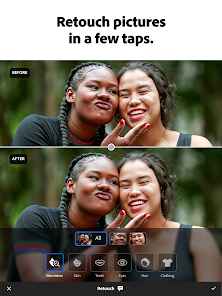
- Get clear skin with new manual skin retouching tools, now in one view within Retouch- Exports and selective edits are up to 35% faster than before- New camera & lens support (https://adobe.com/go/cameras)- Bug fixes and stability improvements

Editor's Choice