This site uses cookies to enhance your user experience. By clicking any link on this site you are giving your consent to our cookie policy. Read more
Reject
Accept All

Advertiser and Editorial Disclosures

PhotoPills

PhotoPills

verified

PhotoPills, SL

4.8
Rating
100,000+ Downloads
1.8.18 Version
Advertisement
  • category

    Category: Photography

  • price

    Price: $10.99

  • age rating

    Age Rating: Everyone

  • rating

    Rating: 4.8

  • available on

    Available on: /

  • updated on

    Updated on: Apr 15, 2026

Screenshot 1
Screenshot 2
Screenshot 3
Screenshot 4
Screenshot 5
Screenshot 6
Screenshot 7
Screenshot 8
Screenshot 9
Screenshot 10
Advertisement

Features & Highlights

Astrophotography Tools

With specialized tools for astrophotography, PhotoPills empowers users to plan stunning night sky shots. From calculating exposure times to tracking star movements, these features guide both beginners and experienced photographers to capture breathtaking images of the cosmos with precision and ease.

Augmented Reality Planner

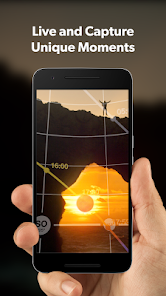
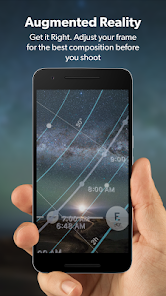
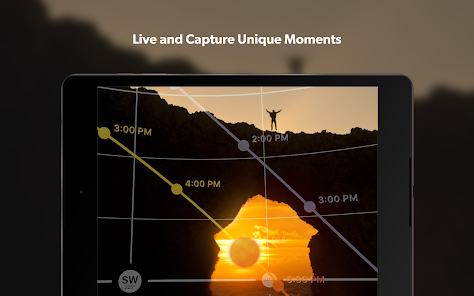
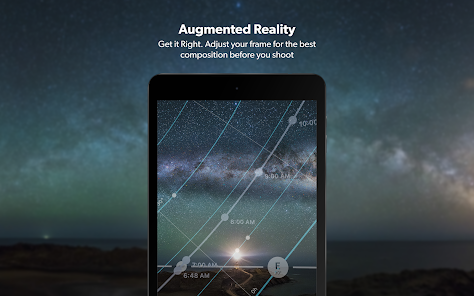
PhotoPills offers an innovative augmented reality mode that lets you visualize the sun, moon, and Milky Way in real-time. This feature helps photographers plan their shots more effectively by displaying celestial bodies' positions overlaid on the live camera view, ensuring you capture the perfect moment in nature.

Customizable Notifications

Stay ahead of the game with customizable notifications that remind you of important astronomical events. Whether it’s a lunar eclipse or the peak of a meteor shower, PhotoPills ensures you never miss an opportunity to capture awe-inspiring moments in the sky.

Location-Based Calculations

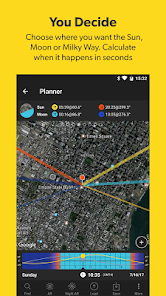
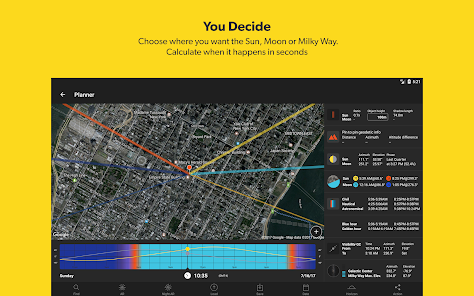
PhotoPills excels in its ability to provide location-based calculations, allowing you to determine when and where the sun and moon will rise and set. This feature is invaluable for photographers looking to catch those golden hours, making it easier to plan shoots around stunning natural light.

Advertisement

Pros & Cons

Pros
  • Plan your photography with precise solar and lunar data at your fingertips.
  • Discover optimal shooting times using the augmented reality feature for stunning compositions.
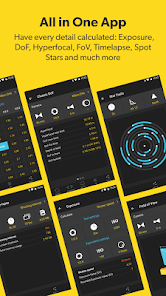
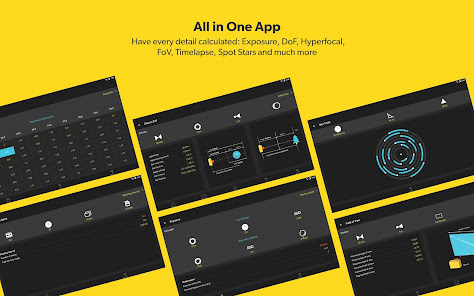
  • Calculate exposure and depth of field easily with intuitive tools and calculators.
  • Access a vast library of photography tutorials to enhance your skills and creativity.
  • Track weather conditions to ensure the best shooting opportunities every time.
Cons
  • PhotoPills can be overwhelming for beginners due to its complex features.
  • The app may drain battery life quickly during extensive use.
  • Some users find the interface less intuitive compared to alternative options.

Real Experience Using PhotoPills

Real Experience Application Scenarios

PhotoPills is an indispensable tool for photographers, especially those who love landscape and astrophotography. One of the primary scenarios where PhotoPills shines is during the golden hour, where capturing the perfect light can make or break a shot. The app allows users to plan their shoots by showing the exact time of sunrise and sunset, as well as the direction of the sun at any given location. This feature is crucial for photographers looking to capture dramatic lighting conditions. Additionally, for those interested in photographing the night sky, PhotoPills offers tools for tracking celestial events, such as meteor showers, eclipses, and the phases of the moon. Users can easily locate the Milky Way and plan their shots accordingly, ensuring they are in the right place at the right time.

User Experience

The user experience of PhotoPills is top-notch, characterized by an intuitive interface that caters to both novice and experienced photographers. The app's layout is clean and well-organized, making navigation seamless. Users can quickly access a variety of tools, including a depth of field calculator, an exposure calculator, and a 3D augmented reality feature that allows users to visualize the position of the sun and stars in real-time. Additionally, the app includes a comprehensive tutorial section, helping users maximize its potential. The community aspect is another highlight, where users can share their experiences and tips, creating a supportive environment. Overall, the ease of use combined with powerful features makes PhotoPills a favorite among photography enthusiasts.

Pricing

PhotoPills is a premium app, and its pricing reflects the extensive features and tools it offers. As of now, the app is available for a one-time purchase on both iOS and Android platforms, which many users find to be a worthwhile investment. This pricing model eliminates recurring subscription fees, allowing users to enjoy all updates and features without ongoing costs. Given the app's rich functionality and the value it brings to photographers, many find the price to be reasonable. For those who are serious about their photography, PhotoPills is an investment that pays off in the quality of their work.

Updates & Support

PhotoPills is committed to continuous improvement, regularly releasing updates that introduce new features and enhancements based on user feedback. The development team is highly responsive, ensuring that any bugs or issues are promptly addressed. Users can easily access support through the app, with a well-organized FAQ section and a dedicated support team ready to assist. Furthermore, the app frequently adds new tutorials and resources, helping users stay informed about the latest photography techniques and tools. Such dedication to updates and support indicates that PhotoPills values its user base and strives to provide the best experience possible.

verified Security & Privacy Review

Security & Privacy Review PhotoPills prioritizes user security and privacy by implementing robust data protection measures. The app does not require unnecessary permissions, only requesting access to the device's camera and storage, which are essential for its functionality. This limited access minimizes potential vulnerabilities and enhances user trust. Data collected by PhotoPills is primarily used to improve the app's performance and user experience. The app does not share personal information with third parties, ensuring that user data remains confidential. Additionally, PhotoPills employs encryption protocols to protect any sensitive information stored on the device. Users are encouraged to review the app's privacy policy, which transparently outlines data collection practices and user rights. Regular updates help maintain security standards and address potential vulnerabilities, reflecting the developers' commitment to safeguarding user information. Overall, PhotoPills demonstrates a responsible approach to security and privacy, making it a trustworthy choice for photography enthusiasts.
Advertisement

User Reviews

  • A Google user
    2019/02/07

    I love the tools in this app however am extremely disappointed that there is no way from the developer to not have to pay 9.99 twice when switching devices. I use Adobe on my mac and PC products I see no reason that I shouldn't just have a photo pills login to use what I paid for on an android and iPhone. 10 bucks may not seem like much, but when you purchase something you assume you've purchased it and won't have to again.

  • Andrew Opila
    2020/10/29

    Been looking for a photo app for a while that pretty much does it all. And this is the one. So many wonderful features, especially for landscape photographers. So much of making a good landscape image is about planning and being able to imagine what the shot will look like before you take it. This app contains all the planning tools you'll need to capture your perfect shot. Love the milky way augmented reality. It's a game changer.

  • Cliff Kimura
    2020/06/15

    Great program, it's improved my milky way photography so much! And it has so many other useful tools. They have great YouTube videos. But what I learned is they have great tech help. Had a problem with my AR, found them on Facebook and that I could message them which I did and was able to msg with them about my issue. They were patient and had me go through some tests and was able to figure what the problem was. So impressed! Best $9.99 I ever spent!

  • Len Philpot
    2022/01/17

    From what I've seen this is the best and most developed collection of photographic tools in a single app. The Planner alone is worth the price of admission. The other tools are generally simpler but still very useful. While many of the calculations can be done mentally it's very nice to have the tools for, if no other reason, confirmation in the heat of battle. About the only thing I'd really like is a desktop version of they Planner, at least. It would be much easier on a big screen.

  • A Google user
    2019/04/10

    Astonishingly useful app. The more I use it, the more amazed I am at the level of detail and functionality (and they add more regularly)! Takes a bit of work to become proficient with it but there are lots of good video tutorials online (for real, you should watch them.) Any effort you put in will be highly rewarded. A "must have" for serious photographers.

Review Source: Google Play store public user reviews.

FAQ

1

Does PhotoPills collect my personal data?

PhotoPills prioritizes user privacy and does not collect personal data unless users voluntarily provide it for support or feedback purposes.

2

Does PhotoPills offer a free trial or free version?

PhotoPills does not offer a free trial or free version; however, it is available for a one-time purchase that grants full access to its features.

3

Does PhotoPills require an internet connection?

PhotoPills can be used offline, allowing users to access its features without an internet connection once the app is downloaded and data is cached.

4

How can I contact support or send feedback for PhotoPills?

Users can contact PhotoPills support or send feedback through the app's help section or by visiting their official website for additional contact options.

5

How do I manage or cancel my PhotoPills subscription?

Since PhotoPills does not have a subscription model, there are no recurring payments to manage or cancel. Users simply purchase the app once for lifetime use.

How to use PhotoPills

1

Can I change my login details for PhotoPills?

Yes, you can change your login details by going to your account settings after logging in.

2

Can I log in to PhotoPills on multiple devices?

Yes, you can log in on multiple devices using the same account. Just enter your credentials on each device.

3

How can I contact customer service for PhotoPills?

You can reach customer service by emailing support

4

How do I activate my PhotoPills account?

To activate your account, follow the link sent to your email after purchase and complete the registration process.

5

How do I get support if I have a problem with my account?

You can get support by reaching out to customer service via email or using the in-app support feature.

What's New

Bug fixes.Please, If you find a bug (or have a suggestion), send us an email to [email protected] and we'll fix it as soon as possible :)

Editor's Choice