This site uses cookies to enhance your user experience. By clicking any link on this site you are giving your consent to our cookie policy. Read more
Reject
Accept All

Advertiser and Editorial Disclosures

MyNISSAN®

MyNISSAN®

verified

Nissan North America, Inc.

4.6
Rating
/ Downloads
6.1.12 Version
Advertisement
  • category

    Category: Auto & Vehicles

  • price

    Price: 0

  • age rating

    Age Rating: Everyone

  • rating

    Rating: 4.6

  • available on

    Available on: /

  • updated on

    Updated on: Jul 3, 2026

Screenshot 1
Screenshot 2
Screenshot 3
Screenshot 4
Screenshot 5
Screenshot 6
Screenshot 7
Screenshot 8
Advertisement

Features & Highlights

Navigation Assistance

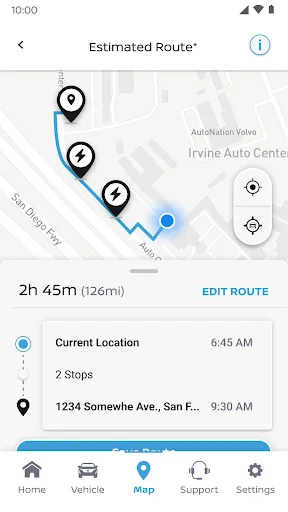
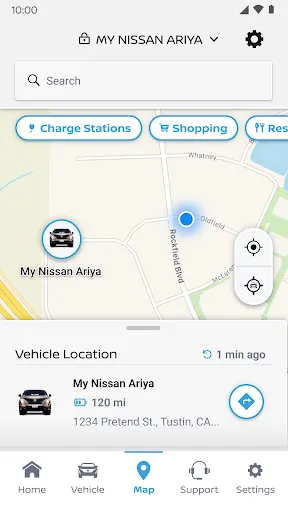
Navigating to your next destination is a breeze with the integrated navigation feature in MyNISSAN®. You can send directions directly to your vehicle, so you're always on the right path without the hassle of fiddling with maps or GPS devices.

Remote Start

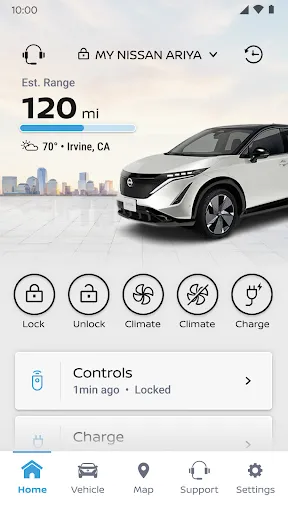
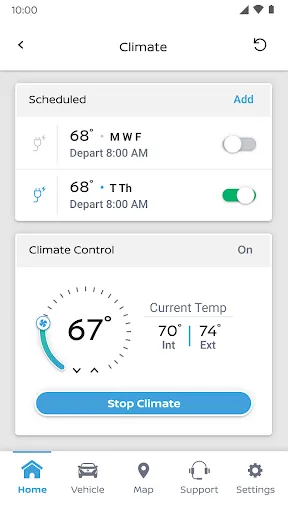
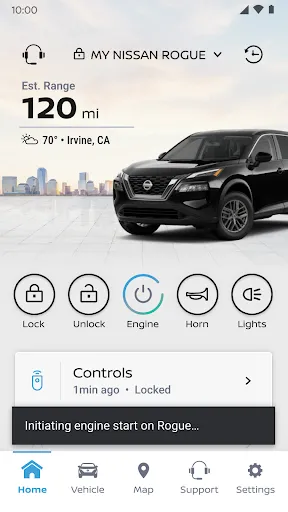
With the MyNISSAN® app, you can start your vehicle from anywhere, providing you with the ultimate convenience. This feature allows you to warm up or cool down your car before you even step inside, ensuring a comfortable ride no matter the weather outside.

Service Scheduling

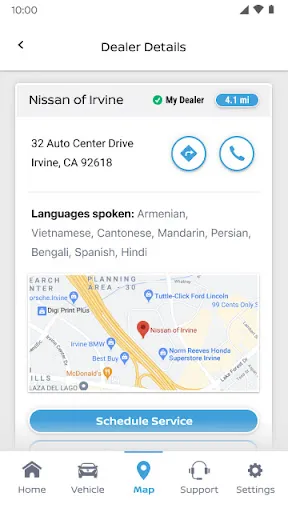
Never miss a service appointment again with the easy-to-use scheduling feature. MyNISSAN® allows you to book service appointments at your preferred dealer right from the app, making maintenance simple and ensuring your vehicle stays in peak condition.

Vehicle Health Reports

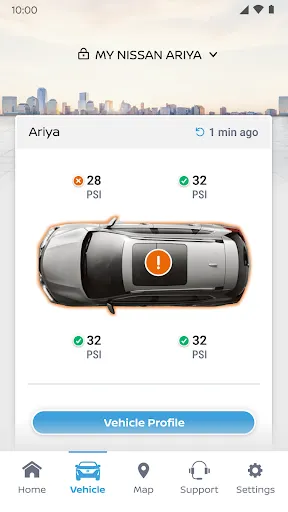
Stay informed about your vehicle's performance with regular health reports sent directly to your smartphone. MyNISSAN® keeps you updated on critical systems, helping you avoid potential issues and ensuring your car remains in top shape for all your adventures.

Advertisement

Pros & Cons

Pros
  • Access real-time vehicle information anytime, anywhere.
  • Stay updated on maintenance schedules effortlessly.
  • Enjoy personalized alerts for recalls and service needs.
  • Seamlessly connect with roadside assistance when needed.
  • Easily locate nearby dealerships and service centers.
Cons
  • Limited compatibility with older Nissan models may restrict usage for some owners.
  • User interface can be confusing, leading to a frustrating experience for new users.
  • Frequent app updates may cause temporary functionality issues, disrupting user access.

Real Experience Using MyNISSAN®

Real Experience Application Scenarios

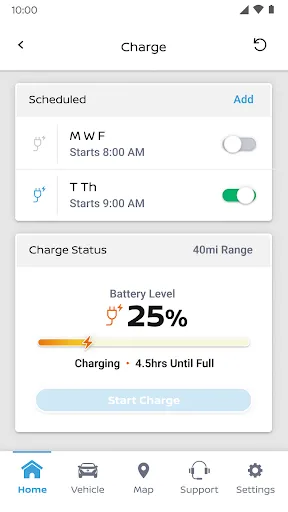
The MyNISSAN® app serves as a comprehensive tool for Nissan vehicle owners, providing a seamless connection between drivers and their cars. Whether you're on a road trip, commuting to work, or simply parked at home, the app enhances your driving experience by offering features tailored to everyday scenarios. For instance, you can remotely start your vehicle, adjust climate controls, or lock and unlock doors from the convenience of your smartphone. This is particularly useful during extreme weather conditions, allowing you to prepare your car before stepping inside. Additionally, the app helps users locate their parked vehicle, which is invaluable in crowded areas or large parking lots. The built-in maintenance reminders and service scheduling ensure that your car remains in top condition, giving peace of mind to owners who prioritize vehicle upkeep.

User Experience

User experience with the MyNISSAN® app is generally positive, characterized by an intuitive interface and responsive design. Upon downloading the app, users are guided through a straightforward setup process that links their vehicle with the app. The dashboard is well-organized, providing easy access to various features such as vehicle health reports, fuel efficiency tracking, and trip history. Users frequently praise the app's real-time notifications about maintenance needs and recalls, which help them stay informed about their vehicle's status. However, some users have reported occasional connectivity issues, particularly in areas with poor network coverage. Overall, the majority appreciate the convenience and functionality of the app, making it a valuable companion for Nissan drivers.

Pricing

The MyNISSAN® app is free to download and use, making it an excellent value for all Nissan vehicle owners. There are no hidden fees or subscription costs associated with accessing its core features. This pricing model ensures that all users can take advantage of the app's capabilities without incurring additional expenses. However, it should be noted that some advanced features may require specific vehicle models or subscriptions to additional services, which could vary based on individual preferences and needs.

Updates & Support

Nissan is committed to providing regular updates to the MyNISSAN® app, enhancing functionality and addressing user feedback. The app periodically receives updates that improve performance, add new features, and fix any bugs. Users can easily check for updates via their app store. Customer support is readily available through the app, offering assistance via live chat, email, or a dedicated help section. Users have reported quick response times and effective solutions to their inquiries, reflecting Nissan's dedication to customer satisfaction. Overall, the combination of regular updates and responsive support contributes to a positive user experience, ensuring that the app remains a useful tool for Nissan owners.

verified Security & Privacy Review

Security & Privacy Review The MyNISSAN® app prioritizes user security and privacy through robust data protection measures. It employs encryption protocols to safeguard sensitive information transmitted between the app and servers, ensuring that user data remains confidential during interactions. Regarding permissions, the app requires access to essential features such as location services and contacts, which are necessary for providing personalized services and enhancing user experience. Users are informed about these permissions upfront and can manage them through their device settings, promoting transparency. The app's privacy policy outlines its commitment to user data handling, detailing how personal information is collected, used, and shared. MyNISSAN® adheres to applicable privacy regulations, ensuring that user data is utilized responsibly and for legitimate purposes only. Users can expect regular updates to the app, which may include security enhancements to address potential vulnerabilities. Overall, MyNISSAN® demonstrates a strong commitment to maintaining user security and privacy, making it a trustworthy choice for Nissan owners seeking a connected experience.
Advertisement

User Reviews

  • bomy chang
    2026/06/10

    and again!! App is incredibly slow, even when connected to wifi. The app just circles forever for every single tap. The last two days, it would just time out and I have not been able to set the climate at all. When I need to charge, I have to get on my car to see my battery level. Not sure what the purpose of having this app is anymore. Very disappointed! 05/11/26: After update.. APP STILL CONNECTS WHEN IT FEELS LIKE IT. I CANT EVEN CHARGE MY CAR BECAUSE I CANT TOGGLE THE CHARGE SCHEDULE!!

  • Alexes
    2026/06/10

    The app worked well...when it worked. With an EV, i rely on the app to let me know my charge levels remotely. Now, the app has frozen. I tried logging out and back in and its giving me an "oops, something went wrong, try again" ive uninstalled and reinstalled, restarted my phone, all the things and still nothing. No updated noted either. Very annoyed! 🙄

  • Donovan
    2026/04/21

    Coming from a multi national company, I expected more. This app is trash. The app still shows incorrect fuel and mileage even after updating and continously refreshing it. The troubling part is that it will show my vehicle as locked when it's not and in the beginning I relied on it. I can't do much about stolen items. Half the time the remote locking works. Nissan, you can do better.

  • Amber Ocana
    2026/02/04

    I waited months and months after getting my brand new 25 Rogue to be able to use climate controls (or any controls, actually). There was finally a fix, and the options finally became available to me within the app... All was great for a few days, now climate control fails every single time. Every once in a while I can start the engine but nothing is consistent. Lock/unlock doesn't even work. I have uninstalled and reinstalled the app multiple times, nothing. This is super frustrating.

  • James Murphy
    2026/04/01

    Update: Almost a year later and the mileage on the app still doesn't update. After the last app update, now climate control does not work from app as well. Edit: Great when it works. Had a recall notice on the app that didn't go away even after taking my car in for service 2x. Once it finally cleared, the app started working fully again. 2 year update: App still wont sgow correct fuel milage remaining or any tire pressure. Connections to vehicle are inconsistent.

Review Source: Google Play store public user reviews.

FAQ

1

Can I submit suggestions or feedback to MyNISSAN®?

Yes, MyNISSAN® encourages users to submit suggestions and feedback through the app or official website to help improve future updates and features.

2

Does MyNISSAN® collect my personal data?

Yes, MyNISSAN® collects certain personal data to provide services and improve the app experience, but it adheres to privacy policies to protect user information.

3

Does MyNISSAN® support offline use?

Some features of MyNISSAN® may be accessible offline, but many functionalities, such as remote services, require an internet connection to operate effectively.

4

How do I cancel my MyNISSAN® subscription?

Users can cancel their MyNISSAN® subscription through the app settings or by contacting customer support for assistance with the cancellation process.

5

How much does a subscription to MyNISSAN® cost?

The subscription cost for premium features in MyNISSAN® can vary based on the services selected, so users should check the app for specific pricing details.

How to use MyNISSAN®

1

Can I activate my MyNISSAN® account online?

Yes, you can activate your account online by following the instructions sent to your email after registration.

2

Can customer service help me with account activation issues?

Yes, customer service can assist you with any account activation issues you may encounter. Just reach out for help.

3

How can I contact customer service for MyNISSAN®?

You can reach MyNISSAN® customer service by calling the number provided on our website or using the chat feature in the app.

4

How can I update my customer information?

To update your information, log in to your MyNISSAN® account and navigate to the "Account Settings" section.

5

How do I find my customer number in the app?

Your customer number can be found in your account settings under "Profile" in the MyNISSAN® app.

What's New

Bug fixes and performance improvements

Editor's Choice