This site uses cookies to enhance your user experience. By clicking any link on this site you are giving your consent to our cookie policy. Read more
Reject
Accept All

Advertiser and Editorial Disclosures

Microsoft Family Safety

Microsoft Family Safety

verified

Microsoft Corporation

3.9
Rating
5,000,000+ Downloads
2.0.5.1103 Version
Advertisement
  • category

    Category: Parenting

  • price

    Price: free

  • age rating

    Age Rating: Everyone

  • rating

    Rating: 3.9

  • available on

    Available on: /

  • updated on

    Updated on: Jun 25, 2026

Screenshot 1
Screenshot 2
Screenshot 3
Screenshot 4
Screenshot 5
Screenshot 6
Advertisement

Features & Highlights

Activity Reporting

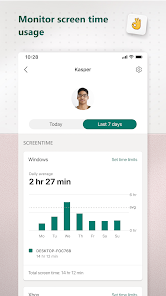
Gain insights into your family's online activities with detailed activity reports. Microsoft Family Safety provides summaries of website visits, app usage, and screen time, helping you understand how your family interacts with technology. This feature empowers you to have informed conversations about digital habits and safety.

Driving Safety Features

Encourage safe driving habits with built-in driving safety features. The app offers trip details, driving scores, and alerts for risky behavior, fostering a culture of road safety among family members. It’s an excellent way to promote responsible driving, especially for new drivers in the family.

Location Sharing

Stay connected with your family through real-time location sharing. Microsoft Family Safety allows you to see where your loved ones are, ensuring peace of mind when they’re out and about. Whether it’s for safety or coordination, knowing their whereabouts can make all the difference in your daily life.

Screen Time Management

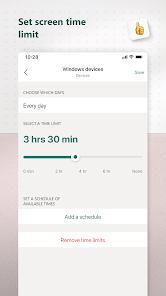
Take control of your family's digital consumption with effective screen time management tools. Microsoft Family Safety enables you to set limits on app usage and screen time, helping balance online and offline activities. This feature supports healthier habits by encouraging breaks and quality family time.

Advertisement

Pros & Cons

Pros
  • Easily monitor family location in real-time for added peace of mind.
  • Set screen time limits to promote a healthy digital balance.
  • Receive activity reports to stay informed about your family's online habits.
  • Enable driving safety features to protect young drivers and encourage safe behavior.
  • Share reminders and to-do lists to enhance family organization and communication.
Cons
  • Limited features compared to other parental control apps may hinder effectiveness.
  • Requires a Microsoft account for full functionality, limiting accessibility.
  • Can be intrusive, potentially causing privacy concerns for family members.

Real Experience Using Microsoft Family Safety

Real Experience Application Scenarios

Microsoft Family Safety is designed to cater to various family dynamics, offering a comprehensive toolkit for parents and guardians. One of the primary scenarios includes monitoring screen time, allowing parents to set daily limits on device usage for each family member. This is particularly beneficial in today’s digital age where children are often glued to their screens. Additionally, the app enables location tracking, which gives peace of mind to parents by allowing them to see the real-time location of their children. This feature is especially useful for families with teenagers who may venture out without parental supervision. Moreover, the app includes driving safety features, where parents can receive reports on their teens’ driving habits, helping to promote safer driving practices.

User Experience

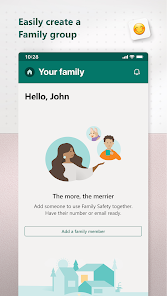
Users generally find the Microsoft Family Safety app intuitive and user-friendly. The interface is clean and well-organized, making it easy to navigate through various features. Setting up family accounts is straightforward, and the app provides clear instructions on how to invite family members. The dashboard offers a quick overview of family activities, which simplifies monitoring tasks. Many users appreciate the customizable notifications that keep them informed about their children’s activities, such as when they exceed screen time limits or when they reach a specific location. However, some users have reported occasional glitches, particularly with location tracking accuracy, which can be frustrating. Overall, the app's features enhance family communication and foster a collaborative approach to safety and responsibility.

Pricing

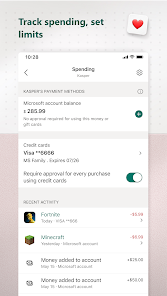
Microsoft Family Safety is available as part of the Microsoft 365 subscription, which offers a range of plans for families and individuals. The basic features of the app can be accessed for free, making it an attractive option for families looking to improve their digital safety without incurring costs. However, to unlock premium features such as advanced location tracking and additional storage, users may need to opt for the subscription service. Pricing varies depending on the plan selected, but it generally offers good value for families who are already utilizing other Microsoft services.

Updates & Support

Microsoft frequently updates the Family Safety app to enhance functionality and address user feedback. These updates often include bug fixes, performance improvements, and new features that enrich the user experience. The app also has a dedicated support section where users can find FAQs, troubleshooting tips, and contact information for further assistance. Users have noted that the support team is responsive and helpful, providing timely solutions to any issues encountered. Overall, the combination of regular updates and accessible support contributes to a reliable and evolving application that meets the needs of modern families.

verified Security & Privacy Review

Security & Privacy Review The Microsoft Family Safety app prioritizes user data security and privacy, employing robust encryption protocols to safeguard personal information. The app requires users to sign in with a Microsoft account, which adds an additional layer of authentication and ensures that data is linked to a secure profile. Permissions requested by the app are primarily related to location tracking, activity monitoring, and notifications. Users are informed about the data being collected, and they have control over what information is shared, allowing for customization of privacy settings. The app adheres to industry-standard practices for data handling, ensuring that sensitive information is only accessible to authorized users. Microsoft's commitment to transparency is evident through its privacy statements, which outline how user data is utilized and shared. The company routinely updates its privacy policies to align with evolving regulations, reinforcing its dedication to user trust and data protection. Overall, Microsoft Family Safety offers a secure environment for families to manage safety while maintaining control over their personal data.
Advertisement

User Reviews

  • Eric Shaffer
    2025/05/20

    This App is far inferior to Xbox family, which makes it that much more frustrating. The UI is counterintuitive, it pulls in XBox but not in a useful manner, and it's lacking control features. I cannot add bonus time without a request, and once my child is out of time the request won't process as the Internet connection is blocked. Just copy XBox Family for Windows devices and we'll all be better off.

  • Bradford White
    2026/06/12

    App doesn't load correctly. Stops on various pages and requires closing the window and re-opening. Took 5 minutes to add $ to my son's account, and after the app finally worked I received an error message. Seriously Microsoft, I'm trying to give you money. When I click "more info" on why it failed, I'm taken to a generic help window. Not helpful. But first, I'm asked if I want to buy Microsoft 365... So dumb, Microsoft. update two years later. this app is still doesn't work.

  • Mark Webb
    2026/06/03

    I nearly never leave a review on apps installed from the app store. This app is AWFUL. My core issue is the authentication of this app. I have to sign in, then verify the last four digits of my phone number, then solve a puzzle, then they send a text with a code, THEN they require me to enter another email address. unfortunately, it never sends a verification code to that second email address that I need for this app. So now I can't use it. The web version lets you skip this 5 step process.

  • Julio S
    2026/06/15

    I had some issues for a while, but they were easy to deal with. but one is a vital tough though. it seems I am unable to give my kids screen time. I add it into the app, and it doesn't update. it keeps saying 0. however when I got to the website it does show the time I allowed. the big problem is that my kids do not get the screen time. I have to physically login to my account and give them time that way. please help

  • Mike Manning
    2026/04/26

    Uninstalling, doesn't work most of the time over last two years. Not reliable. Sometimes works, but many times app just won't unlock my child's PC when I change settings in the app or when the request more time. I tried to send a log through the app, but when I get to the screen to write comments and attach my logs, there is no button to send it!!!! There is an x in the upper left and a checkmark in the upper right but they do nothing.

Review Source: Google Play store public user reviews.

FAQ

1

Can I submit suggestions or feedback to Microsoft Family Safety?

Yes, users can provide feedback and suggestions through the app or Microsoft's official support channels.

2

Does Microsoft Family Safety collect my personal data?

Yes, Microsoft Family Safety may collect personal data to provide its services, but it follows strict privacy policies to protect user information.

3

Does Microsoft Family Safety support offline use?

Yes, some features, like location sharing, may work offline, but most functionalities require an internet connection for full capability.

4

How do I cancel my Microsoft Family Safety subscription?

You can cancel your subscription through your Microsoft account settings under the "Services & subscriptions" section.

5

How much does a subscription to Microsoft Family Safety cost?

A Microsoft 365 subscription, which includes Microsoft Family Safety, typically starts at around $6.99 per month or $69.99 per year, depending on the plan.

How to use Microsoft Family Safety

1

Can I change my customer number for Microsoft Family Safety?

Customer numbers are typically fixed, but you can contact customer service for specific inquiries regarding changes.

2

How can I activate my Microsoft Family Safety account?

To activate your account, follow the instructions in the activation email sent to you after purchase.

3

How can I update my contact information in my Microsoft Family Safety account?

Log in to your account, go to your profile settings, and update your contact information there.

4

How do I log in to my Microsoft Family Safety account?

To log in, visit the Microsoft Family Safety website and enter your Microsoft account credentials.

5

How do I verify my account after logging in?

Verification details are usually found in your account settings under security options.

What's New

- General bug fixes.

Editor's Choice