This site uses cookies to enhance your user experience. By clicking any link on this site you are giving your consent to our cookie policy. Read more
Reject
Accept All

Advertiser and Editorial Disclosures

AirDroid Parental Control

AirDroid Parental Control

verified

SAND STUDIO

4.5
Rating
10,000,000+ Downloads
2.7.0.3 Version
Advertisement
  • category

    Category: Parenting

  • price

    Price: free

  • age rating

    Age Rating: Everyone

  • rating

    Rating: 4.5

  • available on

    Available on: /

  • updated on

    Updated on: Jul 1, 2026

Screenshot 1
Screenshot 2
Screenshot 3
Screenshot 4
Screenshot 5
Screenshot 6
Screenshot 7
Screenshot 8
Screenshot 9
Screenshot 10
Screenshot 11
Screenshot 12
Screenshot 13
Screenshot 14
Screenshot 15
Screenshot 16
Screenshot 17
Screenshot 18
Screenshot 19
Screenshot 20
Screenshot 21
Screenshot 22
Screenshot 23
Screenshot 24
Advertisement

Features & Highlights

App Usage Monitoring

Gain insights into how your child interacts with their favorite apps through comprehensive app usage monitoring. AirDroid Parental Control provides detailed analytics, helping you understand their screen time habits and encouraging healthy digital behavior. This feature empowers you to foster a balanced relationship with technology.

Content Filtering

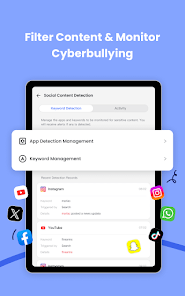
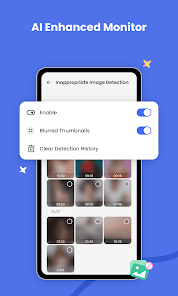
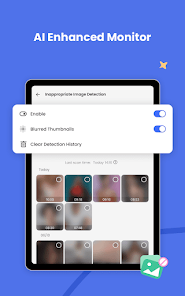
Protect your child from inappropriate content with AirDroid Parental Control's content filtering feature. This tool lets you block harmful websites and restrict access to unsuitable apps, ensuring a safer online experience. It's about creating a secure digital environment where your child can explore freely and responsibly.

Real-Time Location Tracking

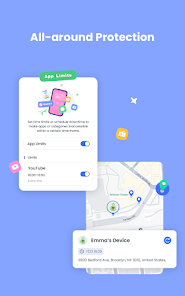
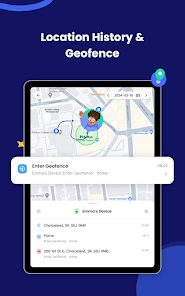
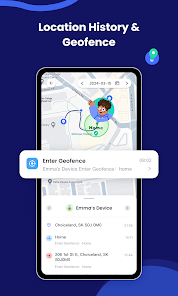
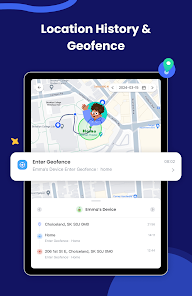
Stay connected with your child’s whereabouts using AirDroid Parental Control's real-time location tracking feature. This allows you to monitor their location throughout the day, ensuring their safety and giving you peace of mind while they explore the world. It’s all about keeping you informed, no matter where they are.

Screen Time Management

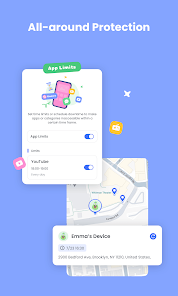
Easily set limits on how long your child can use their devices with the screen time management feature. This capability allows you to create customized schedules for device usage, promoting a healthier lifestyle and encouraging more offline activities. You can guide them toward a better balance between online and offline life.

Advertisement

Pros & Cons

Pros
  • Easily monitor your child's device activity in real-time.
  • Set screen time limits to promote healthy device usage.
  • Track your child's location for added safety and peace of mind.
  • Block inappropriate apps and websites to ensure a safe online experience.
  • Receive instant alerts for suspicious activities or unauthorized app installations.
Cons
  • Limited features in the free version may restrict effective monitoring capabilities.
  • User interface can be confusing for less tech-savvy parents.
  • Occasional connectivity issues may hinder real-time tracking and updates.

Real Experience Using AirDroid Parental Control

Real Experience Application Scenarios

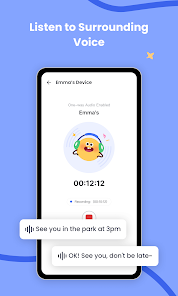
AirDroid Parental Control is designed to help parents monitor and manage their children's smartphone usage effectively. One common scenario is when parents want to ensure that their children are not spending excessive time on social media or gaming apps. With AirDroid, they can set usage limits for specific applications, making it easier to encourage healthier digital habits. Additionally, the app proves beneficial for tracking a child's location, allowing parents to know where their kids are at all times, which is especially useful for younger children or teenagers who are out with friends. Parents can also remotely lock the device during homework hours or bedtime, promoting a balanced lifestyle.

User Experience

The user interface of AirDroid Parental Control is intuitive and easy to navigate, making it accessible for parents who may not be tech-savvy. Upon installation, users are greeted with a clean dashboard that provides an overview of their child's device activity. The setup process is straightforward, requiring minimal technical knowledge. Users appreciate the real-time notifications that alert them to their child's app usage and location changes, which fosters a sense of security. However, occasional glitches have been reported, such as delays in notifications or issues with app blocking, which can be frustrating. Overall, the app's functionality, coupled with an appealing design, enhances the user experience significantly.

Pricing

AirDroid Parental Control offers a subscription-based pricing model, which can be appealing to many parents looking for ongoing monitoring solutions. The pricing is competitive within the market, with options for monthly, quarterly, and annual subscriptions. The annual plan provides the best value, allowing families to save significantly compared to the monthly subscription. Although some users may find the cost a bit steep, the features offered—such as location tracking, app usage limits, and screen time management—justify the investment for many families. Moreover, a free trial period is available, enabling users to test out the app before committing to a subscription.

Updates & Support

AirDroid Parental Control frequently receives updates that enhance its functionality and address any bugs or issues reported by users. These updates not only fix existing problems but also introduce new features based on user feedback, which demonstrates the developers' commitment to improving the app. Support options are readily available through a comprehensive help center, which includes FAQs and troubleshooting guides. For more personalized assistance, users can reach out via email or through the app's customer support feature. Overall, the combination of regular updates and responsive support contributes to a positive user experience, ensuring that parents can rely on the app for effective monitoring of their children's device usage.

verified Security & Privacy Review

Security & Privacy Review AirDroid Parental Control prioritizes data security and user privacy through robust encryption protocols and stringent privacy practices. The app employs end-to-end encryption to safeguard communications between the parent and child's devices, ensuring that sensitive information remains confidential. Permissions are clearly outlined during the installation process, allowing users to make informed decisions about the access granted to the app. Key permissions include location tracking, call monitoring, and app usage statistics, all of which are essential for effective parental oversight. Moreover, AirDroid Parental Control adheres to data minimization principles, collecting only the necessary information to provide its services. User data is handled with care, and the app maintains transparency regarding data usage and sharing policies. Regular updates and patches are implemented to address any potential security vulnerabilities, further enhancing user trust. Overall, AirDroid Parental Control demonstrates a commitment to ensuring the security and privacy of its users, making it a reliable choice for parents seeking to monitor their children's device usage.
Advertisement

User Reviews

  • Jan
    2026/04/15

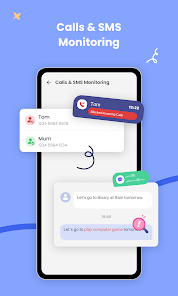
    I wanted to monitor my rented space for unusual things going on. But, the app probably freezes a lot. the message says that 'the app is not responding; please check the Internet connection'. I have Internet connection. I waited. It doesn't seem to work. The one device which I wanted to use doesn't allow the uninstall to work. On the whole, maybe it's not a good fit for me.

  • Meg B
    2024/12/12

    Just a heads up, there is only a 3 day trial, if you were hoping it was free or had free features, it doesn't after 3 days. I'm not the fence on if I want to subscribe. It looks promising but that could change after I may decide to pay. Just wish apps were more upfront about this information in the store page before downloading, it was a pain to set up.

  • Angela Swann
    2025/07/18

    Not happy with it. I paid for the year so I'll continue to use it. Most of the features stop working after a while. I have to keep going in to allow app permissions every time the app updates, and downtime stopped working after the latest update. It uses military time, and doesn't give you an option to for a 12hr clock. You can't see chats from social media apps, but you can see incoming messages from texts, but not outgoing.

  • Jamee Thieman
    2025/01/22

    Overall the app works well, especially to be able to control downtime and app limits on an iPhone with an Android phone. However, there is no way to limit overall screen time. You can limit the time in each app but not a cumulative screen time (all apps in total). Also, for some reason the time spent in an app does not agree in the app compared to my child's phone. The time spent in an app on the iPhone one may show 8 minutes while the app shows 25 minutes. I tend to believe the iPhone.

  • Brittany Cook
    2024/04/03

    I don't like that I can't see the texts my daughter is sending, I can only see incoming texts. They are also not separated by person, every text goes to the same thread. The daily usage never updates, it stays at 0. I also get annoyed with the constant notifications every time a text or weather alert, app notification, etc come in. Putting time limits on apps and even adding them to the block list doesn't prevent my daughter from using them. I can block an app and she can use it normally.

Review Source: Google Play store public user reviews.

FAQ

1

Can I submit suggestions or feedback to AirDroid Parental Control?

Yes, users can submit suggestions or feedback through the app's support section or official website to help improve the app.

2

Does AirDroid Parental Control collect my personal data?

AirDroid Parental Control has a privacy policy in place and may collect data to provide its services, but it emphasizes the protection of user privacy.

3

Does AirDroid Parental Control support offline use?

Yes, certain features of AirDroid Parental Control can be accessed offline, but full functionality typically requires an internet connection.

4

How do I cancel my AirDroid Parental Control subscription?

To cancel your subscription, you can go to your account settings within the app or through the app store where you purchased the subscription.

5

How much does a subscription to AirDroid Parental Control cost?

The subscription cost for AirDroid Parental Control varies based on the plan chosen, with options for monthly, yearly, or lifetime subscriptions.

How to use AirDroid Parental Control

1

Can I change my customer number?

Customer numbers are unique and cannot be changed. For any concerns, please contact customer service.

2

Can I retrieve my account if I lose my customer number?

Yes, you can retrieve your account by contacting customer service with your registered email for assistance.

3

How can I log in to my AirDroid account?

To log in, open the app, enter your email and password, then click "Log In."

4

How do I activate my AirDroid Parental Control account?

To activate your account, follow the activation link sent to your email after registration.

5

How do I contact customer service for AirDroid Parental Control?

You can reach customer service through the support section on our website or by emailing support

What's New

Bug fixes and finetunes that improve stability and user experience.

Editor's Choice