This site uses cookies to enhance your user experience. By clicking any link on this site you are giving your consent to our cookie policy. Read more
Reject
Accept All

Advertiser and Editorial Disclosures

JB4 Mobile

JB4 Mobile

verified

Dmac Mobile Developments, LLC

3.6
Rating
10,000+ Downloads
3.0.5 Version
Advertisement
  • category

    Category: Sports

  • price

    Price: $27.99

  • age rating

    Age Rating: Everyone

  • rating

    Rating: 3.6

  • available on

    Available on: /

  • updated on

    Updated on: Dec 31, 2025

Screenshot 1
Screenshot 2
Screenshot 3
Screenshot 4
Screenshot 5
Screenshot 6
Screenshot 7
Advertisement

Features & Highlights

Customizable Maps

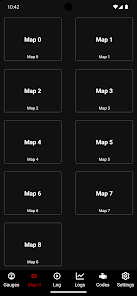
With JB4 Mobile, you can create and switch between multiple customizable maps tailored to your driving needs. This feature gives you the flexibility to adapt your vehicle's performance for different conditions, whether you're cruising in the city or hitting the track.

Data Logging

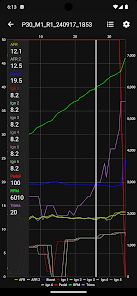
Track your vehicle's performance with JB4 Mobile's comprehensive data logging feature. This allows you to record critical metrics such as boost levels, air-fuel ratios, and more, providing you with insights to fine-tune your setup and ensure everything is running at its best.

Performance Tuning

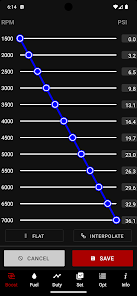
JB4 Mobile offers advanced performance tuning capabilities, allowing users to adjust their vehicle's settings in real-time. With intuitive controls, you can optimize engine performance and enhance acceleration, making every drive more exhilarating and personalized to your preferences.

User-Friendly Interface

Designed with simplicity in mind, JB4 Mobile features a user-friendly interface that makes navigation a breeze. Whether you're a seasoned enthusiast or a newcomer, you'll find it easy to access all functionalities and customize your vehicle without any hassle.

Advertisement

Pros & Cons

Pros
  • JB4 Mobile offers real-time performance monitoring for your vehicle's engine.
  • Enjoy easy installation with no permanent modifications required.
  • Access customizable tuning options to match your driving preferences.
  • Benefit from regular updates that enhance functionality and performance.
  • Experience seamless integration with various vehicle makes and models.
Cons
  • Limited compatibility with certain vehicles may restrict user options.
  • Setup process can be complex for inexperienced users.
  • Customer support may be slow, leading to frustration during troubleshooting.

Real Experience Using JB4 Mobile

Real Experience Application Scenarios

The JB4 Mobile app is designed primarily for automotive enthusiasts looking to enhance the performance of their vehicles. Whether you’re a casual driver wanting to optimize fuel efficiency or a serious car tuner aiming for maximum horsepower, this app caters to a wide range of needs. Users can monitor real-time data from their vehicle’s engine, making it suitable for both everyday driving and performance testing. The app is particularly beneficial for those who have installed JB4 tuning systems, as it provides detailed diagnostics and tuning options. Additionally, it can be used in competitive racing scenarios where precise data is crucial for making split-second adjustments. Overall, the JB4 Mobile app is versatile enough to be used by both novice drivers and experienced tuners alike.

User Experience

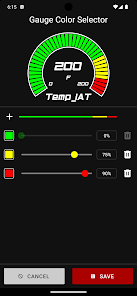
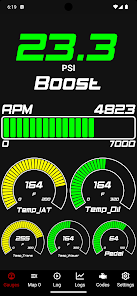
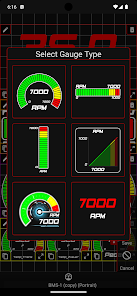
User experience with the JB4 Mobile app is generally positive, characterized by an intuitive interface that allows users to navigate through various features with ease. The app offers a clean layout, ensuring that even those unfamiliar with automotive tuning can find the information they need without feeling overwhelmed. The dashboard provides a comprehensive overview of vehicle performance metrics, including boost levels, air-fuel ratios, and engine temperatures. Users have noted that the real-time data updates are quick and reliable, which enhances the overall experience. Furthermore, the ability to customize dashboards with preferred metrics allows users to tailor the app to their specific needs. However, some users have reported occasional connectivity issues with their vehicles, which can be frustrating during critical tuning sessions.

Pricing

The JB4 Mobile app operates on a freemium model, allowing users to access basic features without any cost. However, to unlock the full range of functionalities, including advanced tuning options and detailed diagnostics, a one-time purchase is required. While the initial investment may seem steep for some, many users find that the benefits of enhanced vehicle performance and the ability to fine-tune settings justify the price. Additionally, there are no recurring subscription fees, which makes it a cost-effective choice for car enthusiasts who want to maintain their vehicle’s performance over time.

Updates & Support

The developers of JB4 Mobile are committed to providing regular updates to enhance functionality and fix any bugs. Users have reported that updates are rolled out systematically, often introducing new features or improving existing ones based on user feedback. The app also includes a robust support system, with a dedicated FAQ section and customer service available for troubleshooting. Community forums are another valuable resource, allowing users to share tips and experiences. Overall, the combination of regular updates and responsive support contributes to a reliable user experience, making the JB4 Mobile app a dependable companion for automotive enthusiasts.

verified Security & Privacy Review

Security & Privacy Review The JB4 Mobile app prioritizes user security and privacy through a combination of robust practices and transparent policies. Data transmission is secured with end-to-end encryption, ensuring that sensitive information remains confidential while in transit. The app adheres to industry standards for data protection, minimizing the risk of unauthorized access. In terms of permissions, JB4 Mobile requires only essential access to function effectively, limiting the collection of unnecessary personal data. Users are informed about the specific permissions needed, such as location services and device storage, and can manage these settings within the app. The privacy policy is clear and comprehensive, detailing how user data is collected, used, and shared. JB4 Mobile also offers users the option to delete their accounts and associated data at any time, reinforcing its commitment to user autonomy and control. Overall, the app demonstrates a strong dedication to safeguarding user privacy and maintaining data integrity, making it a reliable choice for those concerned about security.
Advertisement

User Reviews

  • Squigglylinezz
    2022/02/18

    App is nice when I can actually use it. When connected it never wants to read any of the gauges besides boost, it randomly starts "logging" but won't turn off, and it won't read codes. If everything worked they way it should the app would be phenomenal. It's kinda disappointing that I paid like $20 for an app to have the ability to read gauges, data log, scan and clear codes but the only way I can get it to work is by uninstalling the app and then reinstalling.

  • Jeff Woodard
    2023/04/24

    Unit itself is great. The app is great when it connects. But sadly that's far too rare. And the company doesn't seem to care. Doesn't matter if you have Bluetooth or hard wired set up either. Most users experience the problem where it just won't connect. And then randomly once ever couple hundred attempts it might work. If they ever care enough to fix this very real problem the JB4 will be once of the very best options for tuning tubo cars. But without being able to connect I can't recommend.

  • Lee T
    2024/10/31

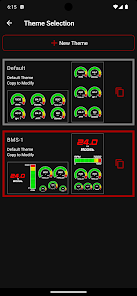
    Not sure what happened with this latest update but I just wanted to work when I turn it on and it connects to my jb4. Now I only have one choice for a color scheme on my gauges and when I have the gauges on they don't stay on. They time out with my phone and shut off. The previous Edition would stay on if you had the gauges up.

  • A Google user
    2019/09/07

    Works well, zero connection issues. I believe the placement of the Bluetooth adapter on the JB4 is the reason for some issues people are having. I placed mine where the install instructions recommend and have never had a single failure to connect. This thing makes a very noticable difference and increase the fun factor of driving my vehicle. I can't imagine driving without it now. Zero fault codes because of the JB4. Worth the money and definitely go for the Bluetooth/app combo.

  • Andrew Duncan
    2022/05/15

    Early days, only used for a few days but for me, so far, it does what is says it would. And using a Samsung galaxy S20 with a quality otg it is rock solid connection wise. What I do need to follow is the s6 connection approach though, as referred to by the developer in the introduction text. I.e. connect otg first, then plug USB. Logging is very very easy and autolog great. Others comment there has been no development over the years, which maybe true, but it covers what I needed.

Review Source: Google Play store public user reviews.

FAQ

1

Does JB4 Mobile collect my personal data?

JB4 Mobile prioritizes user privacy and does not collect personal data unless explicitly provided by the user for specific functionalities or support.

2

Does JB4 Mobile offer a free trial or free version?

JB4 Mobile does not offer a free trial or free version; however, users can explore its features through a subscription model.

3

Does JB4 Mobile require an internet connection?

JB4 Mobile does not require a constant internet connection to function, as it primarily connects to your vehicle's JB4 system via Bluetooth. However, some features may benefit from internet access.

4

How can I contact support or send feedback for JB4 Mobile?

Users can contact support or send feedback for JB4 Mobile through the app's help section or by visiting the official JB4 website for additional contact options.

5

How do I manage or cancel my JB4 Mobile subscription?

You can manage or cancel your JB4 Mobile subscription through your account settings within the app or through the app store where you initially subscribed.

How to use JB4 Mobile

1

Can I activate my account from the mobile app?

Yes, you can activate your account directly in the JB4 Mobile app by following the on-screen instructions after downloading the app.

2

How can I reach customer service for JB4 Mobile?

You can contact our customer service by calling the support number listed on our website or through the help section in the app.

3

How can I update my customer information?

To update your customer information, log in to your account and navigate to the profile settings section to make changes.

4

How do I contact customer service if I can't log in?

If you can't log in, visit our website for alternative contact methods, like email or a support hotline.

5

How do I log in to my JB4 Mobile account?

To log in, open the app and enter your registered email and password. If you forgot your password, use the "Forgot Password" option.

What's New

Support for new Android Target SDK requirements.Map and manual Log button now only appear once connected.Log/firmware import now auto-refresh file list.

Editor's Choice