This site uses cookies to enhance your user experience. By clicking any link on this site you are giving your consent to our cookie policy. Read more
Reject
Accept All

Advertiser and Editorial Disclosures

Fishbrain - Fishing App

Fishbrain - Fishing App

verified

Fishbrain

4.5
Rating
5,000,000+ Downloads
11.51.0.(23360) Version
Advertisement
  • category

    Category: Sports

  • price

    Price: free

  • age rating

    Age Rating: Teen

  • rating

    Rating: 4.5

  • available on

    Available on: /

  • updated on

    Updated on: Jun 29, 2026

Screenshot 1
Screenshot 2
Screenshot 3
Screenshot 4
Screenshot 5
Screenshot 6
Screenshot 7
Screenshot 8
Advertisement

Features & Highlights

Catch Log

Easily document your fishing adventures with the Catch Log feature, allowing you to track the species you catch, the weight, and the location. This helps you analyze your fishing habits over time and improve your skills while sharing your success with the Fishbrain community.

Community Insights

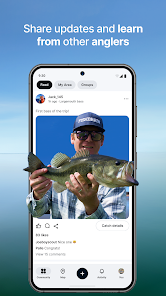
Connect with fellow anglers through Community Insights, where you can share tips, ask questions, and learn from the experiences of others. This vibrant community aspect not only enriches your fishing knowledge but also creates a sense of camaraderie among users passionate about the sport.

Custom Maps

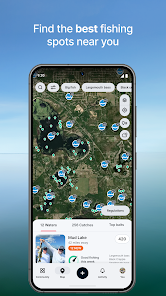
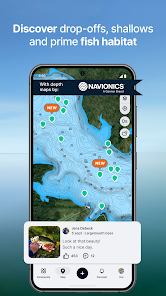
Navigate your favorite fishing spots with Custom Maps, allowing you to mark locations, track your routes, and save places for future visits. This feature ensures that you never lose track of your best fishing holes and can easily return to them whenever you want.

Fishing Forecast

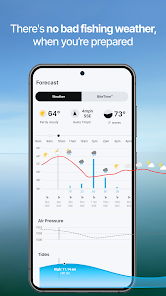
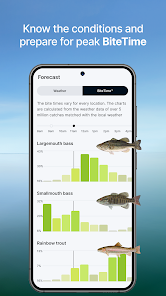
Make the most of your fishing trips with the Fishing Forecast, which provides real-time data on weather conditions, tides, and fish activity. This feature helps you plan your outings more effectively, increasing your chances of landing that big catch by fishing at the right time and place.

Advertisement

Pros & Cons

Pros
  • Connect with a vibrant fishing community
  • Access detailed maps and fishing spots
  • Track your catches and personal records
  • Receive weather updates and fishing forecasts
  • Share experiences and tips with fellow anglers
Cons
  • Limited features in the free version
  • Inaccurate location data sometimes reported
  • Heavy reliance on user-generated content
  • Subscription costs can be high for premium features

Real Experience Using Fishbrain - Fishing App

Application Scenarios

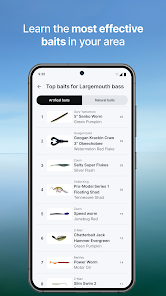
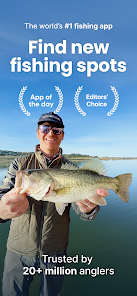
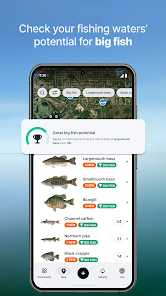
Fishbrain is designed for both novice and seasoned anglers who seek to enhance their fishing experience. Users can explore a vast database of fishing spots tailored to their location, making it easy to find the perfect place to cast a line. The app also offers a feature that allows users to log their catches, providing a personal diary of their fishing adventures. Additionally, Fishbrain's social networking capabilities enable users to connect with fellow anglers, share tips, and even organize group fishing trips. Whether you're fishing from a boat, the shore, or a remote lake, Fishbrain adapts to various scenarios, helping users maximize their time on the water.

User Experience

The user interface of Fishbrain is intuitive and visually appealing, making navigation a breeze. Upon opening the app, users are greeted with a clean layout that showcases fishing spots nearby, weather conditions, and top catches made by other users. The ability to filter spots based on species, bait type, and accessibility is particularly useful, allowing users to customize their fishing plans. The community aspect of Fishbrain stands out, as users can follow each other, share photos, and participate in discussions about fishing techniques. Notifications about local fishing events and updates on weather conditions keep users engaged and informed. Overall, Fishbrain creates a supportive environment that fosters connectivity and learning among fishing enthusiasts.

Pricing

Fishbrain operates on a freemium model, offering a free version that grants access to basic features such as logging catches and viewing nearby fishing spots. However, users can opt for a premium subscription that unlocks additional features, including advanced statistics, detailed maps, and exclusive access to special content. The pricing for the premium subscription is competitive, catering to a wide range of budgets. Given the wealth of information and community engagement offered, many users find the premium features to be worth the investment, enhancing their overall fishing experience.

Updates & Support

Fishbrain is committed to continuous improvement, regularly rolling out updates that enhance functionality and user experience. These updates often include new features, bug fixes, and performance enhancements based on user feedback. The support team is responsive and available to assist users with any queries or issues they may encounter. The app also includes a comprehensive FAQ section, helping users troubleshoot common problems independently. This dedication to user satisfaction ensures that Fishbrain remains a reliable companion for anglers everywhere.

verified Security & Privacy Review

Fishbrain prioritizes user security and privacy, implementing robust measures to protect personal information. The app collects data such as location, fishing activity, and user profiles to enhance the fishing experience, but it ensures that this data is handled responsibly. The app requires permissions for location services, which are essential for tracking fishing spots and connecting with other users. Users can customize their settings to limit data sharing, promoting a user-centric approach to privacy. Fishbrain adheres to stringent data protection regulations, ensuring that user information is encrypted and securely stored. Fishbrain has a transparent privacy policy, clearly outlining how data is collected, used, and shared. Users are informed about their rights regarding data access and deletion. The app also provides options for reporting any privacy concerns, demonstrating a commitment to user trust and safety. Overall, Fishbrain’s security and privacy practices reflect a dedicated effort to maintain a safe and secure environment for fishing enthusiasts while allowing them to enjoy the community features of the app.
Advertisement

User Reviews

  • Zafy -
    2025/07/25

    I wanted to use this as a personal log for fishing, but it's priotizing being a social media platform for some reason and there's apparently no option for your profile or logged catches to be private. I don't want a bunch of strangers seeing my photos so I guess I just wont log catches on the app anymore. Otherwise the free version is functional but a lot is behind paywalls.

  • Just Some Guy
    2026/06/27

    It's ok. The pro is definitely not worth the price. Ai predicted spots are usually dead wrong, the bite time is typically wrong, and depth charts are about as useless as can be since it needs navigatable waters for fish finders. last year, it was 50, which was almost worth it, but the new price is laughable. Basically, pro is as good as guessing. A lot of our local waters are "unidentified waters" and as far as catch positions, it's only if people let it so it's not really useful as you hope.

  • Audrik Herrmann
    2026/04/29

    Used to like the app, I used to use it to see recent catches at some spots Id went to just to see what people were catching and I like to see whats the trophy of a species on the lake. But they changed it and now you need there pro subscription for $13/month for literally everything on the app. Why do I need to pay $13/month just to see recent catches at a lake. All you have access to is just liking people's posts, posting, and looking at the map. 🤦‍♂️🤦‍♂️

  • Hayden Cox
    2026/03/29

    Well I did like it at first, but it's not been as useful after I moved. Not only that, but they will refuse to stop trying to charge you for a subscription even after you cancelled it. I was charged on an account with no money and after I cancelled it they continued to try and charge that account and refused to refund it after they were successful. Scummy.

  • Victoria Urrutia
    2026/03/11

    "3 Day trial turns into 1 year of uselessness." Almost $90 down now, my refund request was denied twice by google, was told to reach out to the app support directly, told there is nothing they can do on their end. Then was told to reach out to google support... thanks for having me waste my time trying to get a refund. Also im sure I canceled the 3 day trail to avoid this and now suddenly there's no trancation showing that... sketchy.

Review Source: Google Play store public user reviews.

FAQ

1

Does Fishbrain - Fishing App collect my personal data?

Yes, Fishbrain collects personal data to provide its services, improve user experience, and personalize content. Users should review the privacy policy for detailed information on data collection and usage.

2

Does Fishbrain - Fishing App offer a free trial or free version?

Fishbrain offers a free version with limited features, and users can explore premium features through a subscription. A free trial may also be available for new users to test premium features.

3

Does Fishbrain - Fishing App require an internet connection?

Yes, Fishbrain typically requires an internet connection to access its features, such as maps, social interactions, and updates. However, some features may be available offline once they are downloaded.

4

How can I contact support or send feedback for Fishbrain - Fishing App?

You can contact Fishbrain support through the app's help center, email support directly, or use social media channels for feedback and assistance.

5

How do I manage or cancel my Fishbrain - Fishing App subscription?

You can manage or cancel your subscription through the app store where you purchased the subscription (iOS or Android) by accessing your account settings and subscription options.

How to use Fishbrain - Fishing App

1

How can I contact Fishbrain customer service?

You can reach Fishbrain customer service through the app's support section or by emailing support

2

How do I activate my Fishbrain subscription?

To activate your subscription, log in to the app, navigate to the subscription section, and follow the prompts to complete the payment process.

3

How do I find the customer number for Fishbrain?

Your customer number can usually be found in your account settings within the app or on your subscription confirmation email.

4

What should I do if I can't log in to my Fishbrain account?

If you can't log in, check your internet connection, reset your password, or contact customer support for assistance.

What's New

Greetings from just under the surface.We’re always fine-tuning and tweaking Fishbrain to make it easier and better for you to use. This time around you’ll be happy to hear that we’ve fixed a bunch of bugs. Then fed them to the fish. And don’t forget, if you have any suggestions or need support, we’re here for you at: [email protected] lines!

Editor's Choice