This site uses cookies to enhance your user experience. By clicking any link on this site you are giving your consent to our cookie policy. Read more
Reject
Accept All

Advertiser and Editorial Disclosures

The Roku App (Official)

The Roku App (Official)

verified

Roku, Inc. & its affiliates

4.7
Rating
50,000,000+ Downloads
13.4.0.7242945 Version
Advertisement
  • category

    Category: Entertainment

  • price

    Price: free

  • age rating

    Age Rating: Teen

  • rating

    Rating: 4.7

  • available on

    Available on: /

  • updated on

    Updated on: Jun 20, 2026

Screenshot 1
Screenshot 2
Screenshot 3
Screenshot 4
Screenshot 5
Screenshot 6
Screenshot 7
Screenshot 8
Advertisement

Features & Highlights

Casting and Screen Mirroring

Easily cast photos, videos, and music from your device to your TV using the Roku App. Additionally, with screen mirroring capabilities, you can share your smartphone screen on the big screen, perfect for sharing memories or presentations with friends and family.

Channel Browsing

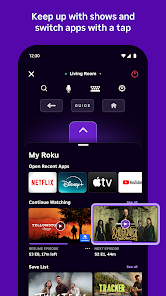
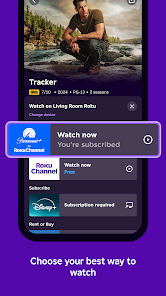
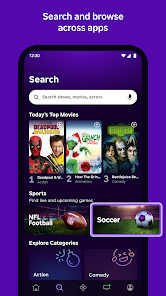
Explore a wide array of channels directly from the app. You can search for new content, browse categories, and even add channels to your Roku device with a few taps, ensuring you never miss out on the latest entertainment options.

Personalized Recommendations

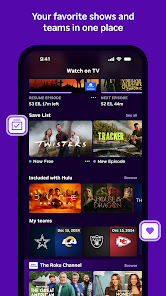
The app provides tailored recommendations based on your viewing habits and preferences. This makes discovering new shows and movies a breeze, allowing you to dive into content that truly piques your interest without endlessly scrolling.

Remote Control

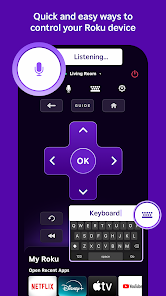
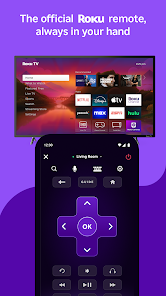
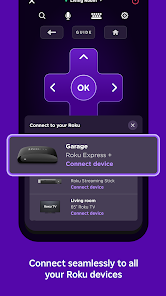
The Roku App transforms your smartphone into a convenient remote control for your Roku device. With a simple tap, you can navigate menus, adjust volume, and even use voice commands, making it easier than ever to find and enjoy your favorite shows and movies.

Advertisement

Pros & Cons

Pros
  • Control your Roku device from your smartphone easily
  • Stream content directly to your TV with a tap
  • Search for shows and movies using voice commands
  • Access a personalized channel lineup tailored for you
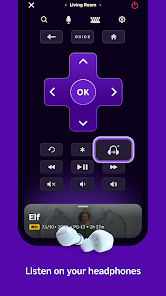
  • Use private listening for an immersive audio experience
Cons
  • Limited functionality compared to physical remotes
  • Frequent connectivity issues with devices
  • User interface can be confusing for newcomers
  • Some features require account sign-in to access

Real Experience Using The Roku App (Official)

Application Scenarios

The Roku App (Official) serves as a versatile companion for Roku device users, enhancing the overall streaming experience. One of the most common scenarios involves using the app as a remote control, particularly when the physical remote is misplaced or when users prefer the convenience of their smartphones. The app allows users to navigate through their Roku device seamlessly, offering features like voice search and keyboard input, which significantly improve the user experience. Additionally, the app facilitates content discovery by providing personalized recommendations based on viewing history, allowing users to curate their watchlist effectively. Another scenario is during travel; users can connect to their Roku devices from hotel Wi-Fi networks, ensuring they can access their favorite shows and movies regardless of location. Moreover, the app enables users to cast media from their mobile devices directly to the TV, making it ideal for sharing photos, videos, or music during gatherings.

User Experience

The user experience of The Roku App is generally smooth and intuitive. Upon opening the app, users are greeted with a clean interface that mirrors the Roku device's layout, making navigation familiar and easy. The setup process is straightforward, allowing users to link their phones to their Roku devices quickly. The remote control feature is responsive, and the addition of voice commands enhances usability, especially for those who prefer hands-free navigation. Users often appreciate the quick access to their favorite channels and the ability to search for content without scrolling through endless menus. However, some users have reported occasional connectivity issues, which can disrupt the experience. Overall, the app streamlines the streaming process, but users may encounter minor hiccups that could affect their enjoyment.

Pricing

The Roku App (Official) is free to download and use, making it an accessible tool for anyone with a Roku device. There are no hidden fees or subscription costs associated with the app itself, which is a major advantage for users looking to enhance their streaming experience without additional financial commitment. However, it's important to note that while the app is free, users may still need subscriptions to third-party services to access premium content. This means that while the app itself is budget-friendly, the overall streaming experience may incur costs depending on the channels or services the user chooses to subscribe to.

Updates & Support

The developers of The Roku App regularly release updates to improve functionality and address any bugs. These updates often introduce new features, enhance compatibility with the latest Roku devices, and refine the user interface for an even smoother experience. Users can expect frequent enhancements that keep the app in line with the evolving streaming landscape. Support is readily available through the app, with robust FAQs and troubleshooting guides designed to assist users in resolving common issues. Additionally, users can reach out via the official Roku support page for more complex inquiries. This proactive approach to updates and customer support significantly enhances user satisfaction, ensuring that help is never far away.

verified Security & Privacy Review

The Roku App prioritizes user security and privacy, implementing robust measures to protect personal information. The app requires permissions that are essential for its functionality, such as access to the device’s location and network connections. These permissions enable users to enjoy a seamless streaming experience, including personalized content recommendations and device management. Data handling practices are designed to align with industry standards, ensuring that user data is encrypted during transmission. Roku adheres to strict privacy policies that disclose how data is collected, used, and shared. Users are informed about the types of data collected, which may include viewing history and device information, and have the option to manage their privacy settings within the app. Furthermore, Roku allows users to opt-out of certain data collection practices, empowering them to maintain control over their information. Regular updates ensure that the app stays compliant with evolving security standards, providing users with peace of mind while they enjoy their streaming experience.
Advertisement

User Reviews

  • Shelby Cunningham
    2026/04/12

    This is by far the best roku remote app. BY FAR. I can't give it 5 stars though, because it often wont open. I have to uninstall and reinstall like twice a week. It always works for a couple days, then boom... nothing. I've tried ALL the other apps but they're complete garbage, if you could fix whatever problem causes this, that would be great, but it's totally not a deal breaker, as its the ONLY app of its kind that works at all.

  • Jeremy Bryan
    2026/03/10

    App works well with my TV. I usually watch the TV daily with headphones so I don't disturb my wife. I have to route my headphones through the phone app instead of the TV as there is no direct Bluetooth option. The only thing I HATE, if I'm listening to the TV with my headphones and have to pause my show to do something (bathroom, take dog out, etc.), any alert that comes in my phone unpauses it. This is very annoying and I always have to rewind. Please fix this automatic unpausing. Thank You!

  • Amy Smith
    2026/02/20

    I love the fact that I can use the Roku remote app on my phone to control all of my Roku TVs. It works well for the most part. What I don't like is the new center area where the arrows that make the cursor move up and down and left and right are gone and now there is a big purple block that I have to tap at the top, bottom, on the left side or the right side of it to move the cursor. It's not as easy to hit the correct area as it was when there was an actual arrow that showed where to tap.

  • Manda B
    2025/06/27

    Changing my review to say the app works much better now. Went from not working at all to working consistently. only took them a long while lol. Im very thankful for it (when it's working properly) because evidently my household can keep track of a single remote. I can't even find the remote I just bought. It's still in the box🤦‍♀️🤷‍♀️. So I, and other family members can use the app as a remote when needed! Thank you roku😘

  • Justyn Tru
    2024/08/31

    useless at worst, unoptimal at best. I tried connecting to my TV and it didn't show up. Then Itried to do it manually by IP address—nothing. It took 20-30 minutes of restarting my phone and my TV, unpliggimg my router, reconnecting everything, then searching for devices again. eventually it worked for a while, but had a couple seconds of latency for every input. then it disconnected and I couldn't find my device again. I spent more time trying to use the app than actually using it.

Review Source: Google Play store public user reviews.

FAQ

1

Does The Roku App (Official) collect my personal data?

The Roku App (Official) may collect certain personal data to enhance user experience, improve services, and for advertising purposes, as outlined in their privacy policy.

2

Does The Roku App (Official) offer a free trial or free version?

The Roku App (Official) is free to download and use, but it does not offer a subscription model, as it primarily functions as a remote control and content access tool.

3

Does The Roku App (Official) require an internet connection?

Yes, The Roku App (Official) requires an internet connection to communicate with your Roku device and stream content.

4

How can I contact support or send feedback for The Roku App (Official)?

To contact support or send feedback for The Roku App (Official), users can visit the Roku support website or use the in-app feedback feature to provide comments and report issues.

5

How do I manage or cancel my The Roku App (Official) subscription?

Since The Roku App (Official) does not have a subscription service, there is no need to manage or cancel a subscription. Users can simply uninstall the app if they wish to stop using it.

How to use The Roku App (Official)

1

How can I contact customer service for The Roku App?

You can contact Roku customer service through their official website or by calling their support number available in the app. Visit the "Help" section for more details.

2

How can I find my Roku account number?

Your Roku account number can be found in your account settings on the Roku website or in the app under "Account Information."

3

How can I log in to The Roku App?

Open the app and click on "Sign In". Enter your Roku account email and password to access your account.

4

How do I activate The Roku App on my device?

To activate, open the app, sign in, and follow the on-screen instructions. You may need to enter a code on the Roku website to complete the activation.

5

How do I reset my password for The Roku App?

To reset your password, go to the login page, click on "Forgot Password?", and follow the instructions sent to your registered email.

What's New

- Minor bug fixes.

Editor's Choice