This site uses cookies to enhance your user experience. By clicking any link on this site you are giving your consent to our cookie policy. Read more
Reject
Accept All

Advertiser and Editorial Disclosures

NYT Crossplay: Play and Spell

NYT Crossplay: Play and Spell

verified

The New York Times Company

4.7
Rating
100,000+ Downloads
2.2.1 Version
Advertisement
  • category

    Category: Word

  • price

    Price: free

  • age rating

    Age Rating: Everyone

  • rating

    Rating: 4.7

  • available on

    Available on: Android, Windows

  • updated on

    Updated on: Jul 2, 2026

Screenshot 1
Screenshot 2
Screenshot 3
Screenshot 4
Screenshot 5
Screenshot 6
Screenshot 7
Screenshot 8
Advertisement

Features & Highlights

Customizable Game Modes

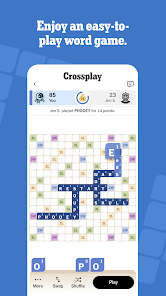
Tailor your gaming experience to suit your style with customizable game modes. Choose from various settings that adjust the difficulty and pace, allowing you to play solo or with friends in a way that feels just right. This flexibility keeps the gameplay fresh and exciting every time you log in.

Engaging Word Challenges

Dive into a variety of unique word challenges that keep your mind sharp and entertained. Each challenge is designed to test your vocabulary and spelling skills, providing fun twists and surprises along the way. Whether you're a seasoned wordsmith or just starting out, there's something here to elevate your game.

Interactive Learning Features

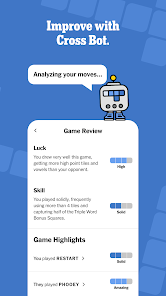
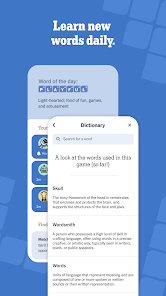
Enhance your spelling skills with interactive learning features that are integrated into the gameplay. As you play, you'll receive hints and tips that help you improve your vocabulary, making the app not just a game, but also a valuable educational tool. It's a fun way to learn while enjoying the challenge!

Real-Time Crossplay

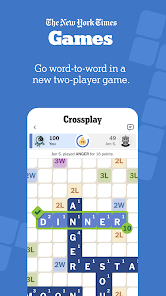
Experience the thrill of real-time gameplay with friends and players from around the world. NYT Crossplay: Play and Spell seamlessly connects you across different platforms, allowing you to compete and collaborate no matter where you are. This feature ensures that your spelling prowess is always put to the test, regardless of device.

Advertisement

Pros & Cons

Pros
  • Engage in exciting wordplay!
  • Challenge friends in real-time!
  • Boost your vocabulary skills!
  • Intuitive interface for all ages!
  • Unlock achievements and rewards!
  • Play anytime, anywhere with ease!
Cons
  • Limited word options available
  • Difficulty for beginners
  • In-app purchases required
  • Requires internet access

Real Experience Using NYT Crossplay: Play and Spell

Application Scenarios

NYT Crossplay: Play and Spell is designed for a variety of scenarios, making it a versatile addition to any app library. Whether you are looking to engage in a casual game session during your commute, challenge friends and family in a competitive setting, or simply enjoy a relaxing solo experience, this app caters to all. The game excels in social situations, allowing users to connect with others through its multiplayer mode, making it perfect for family game nights or virtual gatherings. Additionally, the educational aspect of the app appeals to students and lifelong learners who wish to expand their vocabulary and spelling skills while having fun. The app can also be utilized in classrooms, where teachers can implement it as a learning tool to enhance students' language skills in an interactive manner.

User Experience

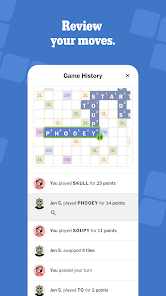
The user experience of NYT Crossplay: Play and Spell is intuitive and engaging, designed to keep players of all ages entertained. The interface is clean and user-friendly, which allows for easy navigation through various game modes and settings. Players are greeted with vibrant graphics and smooth animations, creating an immersive environment that enhances gameplay. The app also offers a robust tutorial for new users, ensuring that everyone can quickly learn the rules and strategies. One of the standout features is the real-time multiplayer option, which fosters a competitive atmosphere, while the single-player mode provides a more relaxed gaming experience. Furthermore, the app encourages social interaction by enabling users to challenge friends directly, making it a perfect choice for those who enjoy a community-driven experience.

Pricing

NYT Crossplay: Play and Spell adopts a freemium pricing model that appeals to a broad audience. The app is free to download and offers a variety of basic features without any initial cost, allowing users to explore the game before committing to any purchases. For those looking to enhance their experience, premium features are available through in-app purchases. These may include additional game modes, exclusive content, or customization options. The pricing is competitive compared to similar apps in the market, and the value provided through the premium features justifies the investment for serious players. Overall, the pricing structure is designed to be accessible while offering enough incentive for users to consider upgrading.

Updates & Support

NYT Crossplay: Play and Spell is regularly updated to ensure a fresh and engaging experience for its users. The development team is committed to improving the app based on user feedback, which leads to the introduction of new features, game modes, and bug fixes. Users can expect seasonal updates that often include themed events and challenges, keeping the gameplay exciting and relevant. Support is readily available through the app’s help section, where users can find FAQs and troubleshooting guides. Additionally, customer support can be contacted through email or social media platforms, ensuring that any issues are addressed promptly. This dedication to updates and user support contributes significantly to the overall satisfaction of players, ensuring that they remain engaged with the app over time.

verified Security & Privacy Review

Security & Privacy Review NYT Crossplay: Play and Spell prioritizes user security and privacy through robust data protection measures. The app employs encryption protocols to safeguard personal information during transmission, ensuring that user data remains confidential and secure from unauthorized access. In terms of permissions, the app requires minimal access to device features, primarily focusing on what is necessary for optimal functionality. Users have the option to manage permissions effectively, allowing them to maintain control over their personal information. The app's privacy policy clearly outlines how user data is collected, used, and shared. It emphasizes that personal data is not sold to third parties, aligning with best practices in data privacy. Additionally, users can easily access their data and request deletion if they choose to discontinue using the app. Overall, NYT Crossplay: Play and Spell demonstrates a commitment to protecting user privacy while providing a secure and enjoyable gaming experience.
Advertisement

User Reviews

  • freakingmayhem
    2026/06/20

    I love it, but it's been feeling worse lately. Slow to load games, occasionally doesn't update scores, buttons will remain greyed out when they should be active, and dragging tiles can have sluggish delays. It could use a lot of quality of life tweaks as well that others have mentioned, including tile rack tweaks and dark mode. The score should probably be a little bigger when not zoomed in.

  • Chris Dibbern
    2026/04/10

    The UI is buggy. Rearranging tiles seldom works even when you try very carefully. I think the drop targets must be too small or something. Often letters and scores won't update after they change, etc. Has the potential to be a decent, Scrabble-like game. Others like wordfeud are a bit more polished even though they have a slightly different set of rules / vocabulary.

  • Dylan J. Cole
    2026/04/05

    Very buggy and slow on my phone, which runs everything else just fine. Crashes often, seems to restart itself from scratch every time you navigate away and come back, and has a glitch where you end up with eight letters on your rack. Also feels a little half–baked; for example, when you double tap to zoom, it simply zooms to the center of the board, rather than to the location you tapped.

  • Ann Marshall
    2026/04/25

    When I play the medium level game, I always seem to win. So it gets boring. I moved up to the hard level and never win. i think you need to rebalance the algorithm. I noticed that the hard level in general the computer gets more high point tiles. knowing infinite obscure, and foreign words for many 5 6 7 tile words. As the opponent, I feel, I get mostly 1. 2 and 3 letter tiles. so, I am frustrated and really don't wanna play the game much anymore.

  • Alec Goldstein
    2026/04/21

    Love the game, just wish the performance were better. The longer it's open, the more laggy it gets, plus my phone will lose battery quickly and get very hot. Not even 4K Video will heat up my phone, but this app sets it on fire. After closing the app, I go to app settings in my phone, Force Stop and Clear Cache, which seems to help for the next time I open it, but it's not a fix by any means. This is clearly a very serious issue multiple people complain about and I wish they'd address it.

Review Source: Google Play store public user reviews.

FAQ

1

Are there daily challenges in the NYT Crossplay: Play and Spell app?

Yes, the app features daily challenges that provide players with new words and puzzles to solve each day, helping to keep the gameplay fresh and engaging. Completing these challenges can also earn you rewards.

2

Can I play NYT Crossplay: Play and Spell with friends?

Yes, the app includes features that allow you to challenge friends or invite them to play together. You can connect with friends through social media or by sharing a unique game code.

3

Can I track my progress in the NYT Crossplay: Play and Spell app?

Yes, players can track their progress through various metrics, including completed levels, scores, and achievements. This feature helps you monitor your improvement over time.

4

How do I download the NYT Crossplay: Play and Spell app?

You can download the NYT Crossplay: Play and Spell app from the App Store for iOS devices or Google Play Store for Android devices. Simply search for the app by name and follow the prompts to install it on your device.

5

How often is the content updated in the NYT Crossplay: Play and Spell app?

The app regularly updates its content to include new words, challenges, and features to keep the gameplay engaging. Players can expect fresh content that evolves with user feedback and trends in word gaming.

How to use NYT Crossplay: Play and Spell

1

How can I contact customer service for the NYT Crossplay: Play and Spell app?

You can reach customer service through the app's help section or visit the official website for support resources.

2

How do I log in to the NYT Crossplay: Play and Spell app?

To log in, open the app, select "Log In," and enter your registered email and password. If you forgot your password, use the reset option.

3

Is there a way to activate the NYT Crossplay: Play and Spell app?

Activation is usually automatic upon logging in with your NYT account. If needed, follow the instructions provided in the app for activation help.

4

What is the customer service number for the NYT Crossplay: Play and Spell app?

The customer service number is typically found in the app's settings or help section. Check there for the most accurate information.

What's New

This version contains a fix for a player chat feature issue.Have feedback? Email us. [email protected]

Editor's Choice