This site uses cookies to enhance your user experience. By clicking any link on this site you are giving your consent to our cookie policy. Read more
Reject
Accept All

Advertiser and Editorial Disclosures

Associate Words: Solitaire

Associate Words: Solitaire

verified

Astrasen Play

4.9
Rating
100,000+ Downloads
1.171 Version
Advertisement
  • category

    Category: Word

  • price

    Price: free

  • age rating

    Age Rating: Everyone

  • rating

    Rating: 4.9

  • available on

    Available on: Android, Windows*

  • updated on

    Updated on: Jun 24, 2026

Screenshot 1
Screenshot 2
Screenshot 3
Screenshot 4
Screenshot 5
Screenshot 6
Screenshot 7
Screenshot 8
Advertisement

Features & Highlights

Challenging Daily Puzzles

Every day brings new challenges with the daily puzzles feature, inviting players to test their skills and earn rewards. This keeps the gameplay fresh and exciting, motivating players to return regularly and engage with the community as they strive to conquer each day's unique puzzle.

Customizable Themes

Players can personalize their game experience with a range of customizable themes and card designs. This feature allows you to express your style and preferences, making the game feel more personal and engaging, whether you prefer a classic look or something more modern and vibrant.

Dynamic Game Modes

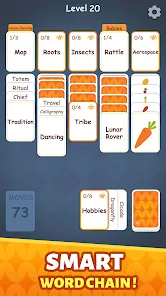
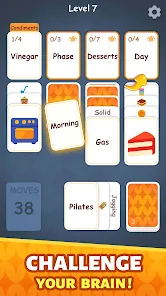
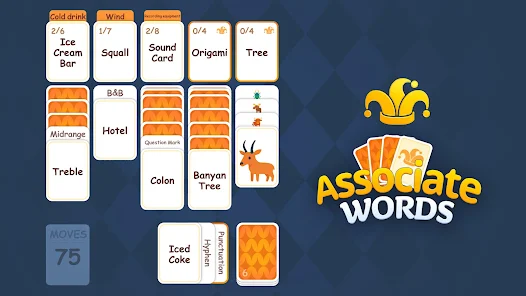
Associate Words: Solitaire offers a variety of game modes to keep you engaged, from classic solitaire to innovative twists that challenge your strategic thinking. Each mode presents unique rules and objectives, ensuring that no two gaming sessions feel the same, making it perfect for both casual and seasoned players.

Intuitive User Interface

The app features a clean and user-friendly interface that makes navigation a breeze, allowing players to focus on the game without distractions. With easily accessible controls and visually appealing graphics, it creates a delightful gaming experience that encourages players to dive right in and enjoy their time.

Advertisement

Pros & Cons

Pros
  • Experience endless fun with Solitaire
  • Engaging gameplay for all ages
  • Challenge your mind and skills
  • Beautiful graphics and smooth design
  • Play anytime, anywhere, offline
Cons
  • Limited game variations available
  • Can become repetitive quickly
  • Lacks multiplayer options
  • Occasional ads disrupt play

Real Experience Using Associate Words: Solitaire

Real Experience Application Scenarios

Associate Words: Solitaire is an app that seamlessly fits into various scenarios of everyday life. Whether you are commuting to work, waiting for an appointment, or enjoying a quiet evening at home, this app offers a perfect blend of relaxation and mental stimulation. The game’s design caters to both casual players looking for a quick game and dedicated solitaire enthusiasts seeking a more immersive experience. It can be used during short breaks to clear your mind or as a lengthy engagement to challenge your strategic thinking. The app's intuitive interface makes it easy to pick up and play at any moment, ensuring that you can dive into a game whenever the need arises.

User Experience

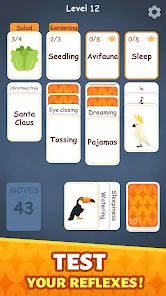
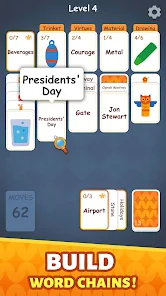
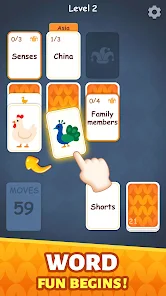
The user experience of Associate Words: Solitaire is crafted with attention to detail, providing a user-friendly interface that appeals to players of all ages. The graphics are clean and visually appealing, enhancing the overall aesthetic without being overwhelming. The gameplay is smooth, allowing for quick card movements and minimal lag, which is crucial for maintaining immersion. Players can customize their experience with various themes and card designs, making each session feel unique. Additionally, the app includes helpful hints and tutorials for newcomers, ensuring that even those unfamiliar with solitaire can easily grasp the rules. The social features, such as sharing scores and achievements, add a layer of competitiveness that encourages players to engage more with the app and their friends.

Pricing

Associate Words: Solitaire adopts a freemium model, allowing users to download and play the game for free with the option to purchase in-app items. The free version includes advertisements, which may interrupt the gameplay occasionally. However, players have the choice to upgrade to an ad-free experience through a one-time payment. The pricing is reasonable, making it accessible to a wide audience. Moreover, the app offers periodic sales and promotions, providing value for those who may want to enhance their gaming experience with additional features or content.

Updates & Support

The developers of Associate Words: Solitaire are committed to providing regular updates, ensuring that the app remains fresh and engaging. New features, improvements, and seasonal themes are introduced frequently, keeping the content dynamic and appealing to users. In terms of support, the app includes a comprehensive FAQ section and dedicated customer service channels, allowing users to report issues or seek help easily. Feedback from users is taken into account for future updates, which demonstrates the developers’ commitment to enhancing user satisfaction. Overall, the combination of regular updates and responsive support contributes to a positive experience for all players.

verified Security & Privacy Review

Security & Privacy Review The Associate Words: Solitaire app places a strong emphasis on user data security and privacy. The app implements robust encryption protocols to safeguard personal information, ensuring that any data transmitted is secure from unauthorized access. Users are informed about the types of data collected, which primarily include game statistics and usage patterns, essential for enhancing user experience. In terms of permissions, the app requires minimal access to device functionalities, primarily focusing on storage for saving game progress. Importantly, it does not request intrusive permissions such as location or contacts, which helps in maintaining user privacy. The app's privacy policy is transparent, outlining how data is collected, used, and shared, reassuring users of responsible data handling practices. Regular updates are provided to address potential vulnerabilities, and users are encouraged to report any suspicious activity. Overall, Associate Words: Solitaire demonstrates a commitment to safeguarding user information while offering an enjoyable gaming experience.
Advertisement

User Reviews

  • William Anderson
    2026/06/17

    I am on level 206 and have never had to unlock a row or extra space to beat a puzzle. some are more difficult, but thats where rhe challenge is. With said, the ads recently have been highly inappropriate for the age of this game. and I dont mean the "attractive ladies" type of games. full on XXX ads with..."action" happening. need to remove this as kids play this game.

  • Bam Bee
    2026/05/16

    Hard to give 5 stars when you cant play. It's designed to make you watch ads but when you get stuck the ads say they aren't ready. Which then leaves you at a standstill and your only option is to stop playing. This needs to be fixed since this is one of the better words solitaire games - when it's playable.

  • Geoffrey Dilg
    2026/04/14

    Fun game at first. Difficulty quickly ramped up so that levels were too difficult to compete without ads or paying. Tried an ad but there was no option to return to the game afterward. Instead I was stuck with either downloading the game or ... nothing. I don't understand the great reviews, maybe people are just comparing it to even worse alternatives.

  • Lorelei Andrews
    2026/04/20

    I like playing this, but there are 3 problems: many words don't match the catagory card. Sometimes, when I try a word with every catagory on screen, none will accept it, even if it actually DOES belong in that catagory. I think it does that so the player has to watch more ads. Problem 3: When one HAS to watch an ad, they go on FOREVER most times. There's rarely an X, or Close-nothing! l had to watch ads for over an hr & it wouldn't reward me, it'd just shut down & reload! UNINSTALLING!

  • Colton Shivers
    2026/02/16

    I liked the old version better when magnifying the picture cards gave them a label instead of just zooming in on the picture. It made it more clear what part of the picture we were meant to focus on. Also, while it's nit-picky, the red outline when you try to make a wrong move looks out-of-place. I'd rather the card just shake. And some of the categories often seem intentionally misleading. There's a fine line between challenge and cheap, and you all need to work a little harder to find it.

Review Source: Google Play store public user reviews.

FAQ

1

Are there different levels in the Associate Words: Solitaire app?

Yes, the Associate Words: Solitaire app features multiple levels with varying difficulties. As you progress, the levels introduce more complex word associations and challenges, keeping the gameplay fresh and engaging.

2

Are there in-app purchases in Associate Words: Solitaire?

Yes, Associate Words: Solitaire may offer in-app purchases for additional features, hints, or power-ups that can enhance your gameplay experience. These purchases are optional, and you can still enjoy the game without them.

3

Can I compete with friends in Associate Words: Solitaire?

Yes, the app often includes features that allow you to compete with friends or other players. You can challenge them to beat your score or complete levels faster, adding a competitive element to the gameplay.

4

Can I play Associate Words: Solitaire offline?

Yes, Associate Words: Solitaire can be played offline. Once the app is downloaded and installed, you can enjoy the game without needing an internet connection, allowing you to play anytime and anywhere.

5

How can I improve my skills in Associate Words: Solitaire?

To improve your skills in Associate Words: Solitaire, practice regularly, pay attention to word associations, and try to think creatively about connections. Additionally, reviewing hints and strategies within the app can help enhance your gameplay.

How to use Associate Words: Solitaire

1

How can I contact customer service for the Associate Words: Solitaire app?

You can reach customer service through the app's settings menu or visit our website for support options.

2

How do I activate my account if needed for the Associate Words: Solitaire app?

If activation is required, check your email for a confirmation link after registration and follow the instructions provided.

3

How do I log in to my account in the Associate Words: Solitaire app?

Open the app and click on the 'Log In' button, then enter your registered email and password.

4

Is activation necessary for the Associate Words: Solitaire app?

No activation is necessary; simply download the app and start playing.

5

What is the customer number for the Associate Words: Solitaire app?

The customer number can be found in the app under the Help section or on our official website.

What's New

Discover the word card game adventure with word associations and strategic solitaire challenges!

Editor's Choice