This site uses cookies to enhance your user experience. By clicking any link on this site you are giving your consent to our cookie policy. Read more
Reject
Accept All

Advertiser and Editorial Disclosures

Color Widgets, Theme: iWidgets

Color Widgets, Theme: iWidgets

verified

AI Photo Team

4.6
Rating
10,000,000+ Downloads
1.8.0 Version
Advertisement
  • category

    Category: Lifestyle

  • price

    Price: free

  • age rating

    Age Rating: Everyone

  • rating

    Rating: 4.6

  • available on

    Available on: /

  • updated on

    Updated on: Apr 21, 2026

Screenshot 1
Screenshot 2
Screenshot 3
Screenshot 4
Screenshot 5
Screenshot 6
Screenshot 7
Screenshot 8
Advertisement

Features & Highlights

Customizable Widgets

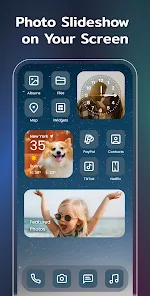
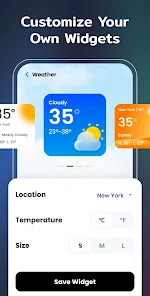
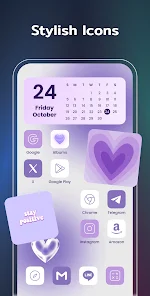
With Color Widgets, Theme: iWidgets, you can easily create personalized widgets that reflect your unique style. Choose from a variety of designs, colors, and sizes to perfectly match your home screen aesthetic and make your device truly yours.

Dynamic Themes

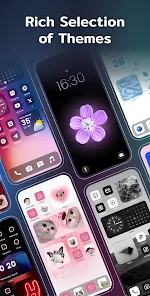
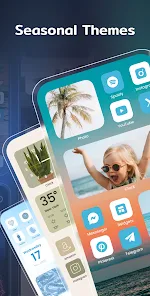
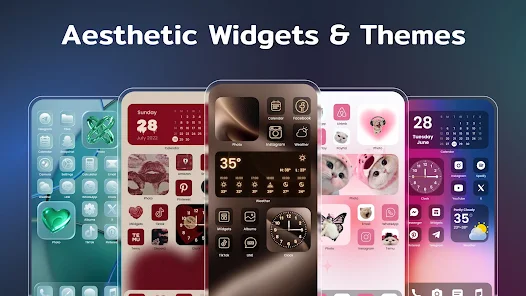
This theme offers dynamic themes that change throughout the day, providing a fresh look to your widgets. Enjoy a seamless transition from morning to night with colors and backgrounds that adapt to the time, keeping your home screen lively and engaging.

Rich Widget Options

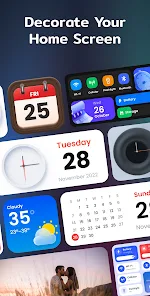
Explore an extensive selection of widget options, from clocks to calendars, and more. Each widget is designed to enhance functionality while adding a stylish touch to your interface, ensuring you have everything you need at a glance.

User-Friendly Interface

Color Widgets, Theme: iWidgets, boasts an intuitive interface that makes customization a breeze. Even if you're not tech-savvy, you'll find it easy to navigate and create stunning widgets that enhance your device experience effortlessly.

Advertisement

Pros & Cons

Pros
  • Transform your home screen
  • Customizable widget styles
  • Rich color palette options
  • User-friendly interface design
  • Seamless app integration
Cons
  • Limited customization options
  • Performance issues on older devices
  • Some widgets may lag
  • Not fully compatible with all themes

Real Experience Using Color Widgets, Theme: iWidgets

Real Experience Application Scenarios

The Color Widgets app excels in a variety of application scenarios, making it a versatile tool for users seeking to enhance their iPhone or iPad home screen. Whether you want to add a personal touch to your device or simply need to keep important information at a glance, Color Widgets has you covered. For instance, users can create customized widgets that display their calendar events, to-do lists, weather updates, or even motivational quotes. The app is particularly beneficial for those who appreciate aesthetic customizations, allowing for unique designs that reflect individual tastes. Additionally, Color Widgets can be used by students for managing their study schedules or by professionals who need quick access to work-related information. Its compatibility with the latest iOS features means that it can be seamlessly integrated into daily routines, making it a must-have for anyone looking to optimize their home screen experience.

User Experience

The user experience offered by Color Widgets is generally positive and intuitive. Upon opening the app, users are greeted with a clean and user-friendly interface that makes customization straightforward. The drag-and-drop functionality allows for easy widget placement, while the extensive library of pre-designed templates caters to various aesthetic preferences. Users can tweak colors, fonts, and styles, resulting in a personalized touch that enhances the overall device experience. The app also performs well, with minimal lag during widget updates, contributing to a smooth user experience. However, some users may find the initial learning curve slightly steep when exploring the app’s full range of features. Nevertheless, the vibrant community and helpful tutorials available online assist users in navigating any complexities.

Pricing

Color Widgets operates on a freemium model, providing users with a robust selection of features at no cost. The free version includes a variety of widgets and customization options, making it accessible for casual users. For those seeking premium features, such as exclusive designs or advanced customization tools, the app offers a subscription plan. The pricing is competitive compared to similar apps in the market, and the value it provides makes the premium version a worthwhile investment for avid users who wish to unlock the full potential of their home screen.

Updates & Support

Regular updates are a cornerstone of the Color Widgets app, ensuring that it remains relevant and functional with each new iOS release. The developers are active in addressing user feedback, often rolling out new features and improvements based on community suggestions. Additionally, the app includes a support section where users can find FAQs and troubleshooting tips. For more complex issues, customer support is readily available, providing assistance through email and social media platforms. This commitment to continuous improvement and user support enhances the overall experience, giving users confidence in their choice of app.

verified Security & Privacy Review

Security & Privacy Review Color Widgets prioritizes user security and privacy by implementing robust data protection measures. The app does not collect any personal information without explicit user consent, ensuring that your data remains private. The permissions required by the app are primarily related to widget functionality, such as accessing your device's home screen and displaying custom information. Users should be aware that while Color Widgets may access limited device data to enhance user experience, it does not store or share this information with third parties. Furthermore, the app adheres to industry-standard encryption protocols, safeguarding any data transmitted between the app and your device. Regular updates are provided to address potential vulnerabilities and enhance security features, reflecting the developers' commitment to maintaining a safe environment for users. Overall, Color Widgets demonstrates a strong dedication to protecting user privacy and ensuring secure handling of personal data.
Advertisement

User Reviews

  • Bethanie W.
    2025/03/14

    I like the layout of the app, how straightforward it is and how customizable it is! It's a lot of ads to wait through to do anything free, but if you have time to spare, it's a nice tradeoff for not having to pay. My biggest issue is the photo widgets. I added the widgets, but often when I go to my home, they revert back to saying "tap to add photo" and I have to fix it constantly. If this bug could be fixed, I'd rate it 5 stars! God bless 💛🙏🌻

  • Damien Thomas
    2025/10/26

    So. Many. Adverts... I open the app, advert. I click on a link, advert. That's over a minute of my time so far and all I've done is click on one link. Just avoid this app. It's not useful, it's just a vehicle for ads. I get it, the devs want to make money, but there are so many ads in this before you've even done anything that it shows that all they want to do is make money, not provide a worthwhile use experience. I don't think I've uninstalled an app quicker than this.

  • Ruth
    2025/09/05

    App will let you put up a widget but I think it's more useful in picking a theme-making your home screen look like an iPad. Tons of themes. Did find a stand-alone widget. But you have to pay for it with gems. You buy gems with IRL money or by watching ads. I chose a medium sized widget, it took up half my phone's screen. You can't resize it. Not a bad app, but you must also allow and leave up notifications. Installation was time-consuming and a little frustrating. Over 1900 tracking. Uninstall.

  • Leonardo Lopez
    2025/07/29

    This app is amazing, the best feature is definitely the wide customization of each widget as you can change colors, transparencies, and fonts. It's sleek and reliable. The only feature I miss and I look forward to see in the future is the custom app opening feature. For example, the clock widget could open the built-in phone clock app. That'd be awesome!

  • Ed Forsthoffer
    2026/06/10

    This is a fun way to jazz up your homescreen. I like the different widgets there is a nice variety that are well made and I found it's the best way to keep your phone from becoming boring. There are some Adds to navigate but not so much as to make it frustrating. Good job.

Review Source: Google Play store public user reviews.

FAQ

1

Are there any premium features in Color Widgets?

Yes, Color Widgets offers premium features that require a subscription. These features may include additional customization options, exclusive widget designs, and access to new themes and styles that are not available in the free version.

2

Can I create multiple widgets for different purposes?

Absolutely! Color Widgets allows you to create and customize multiple widgets for different purposes. You can have separate widgets for displaying the time, weather, calendar events, and more, each tailored to your specific needs.

3

Can I customize the size of my widgets in Color Widgets?

Yes, Color Widgets allows you to customize the size of your widgets. When you create or edit a widget, you can select from different sizes (small, medium, and large) to fit your home screen layout perfectly.

4

Can I use photos in my Color Widgets?

Yes, Color Widgets allows users to incorporate personal photos into their widgets. You can select images from your photo library and customize how they appear within the widget, adding a personal touch to your home screen design.

5

Does Color Widgets consume a lot of battery life?

Color Widgets is designed to be efficient and should not significantly impact your device's battery life. However, the battery consumption may vary based on the widgets you choose and how often they refresh. Generally, static widgets consume less battery than dynamic ones.

How to use Color Widgets, Theme: iWidgets

1

Can I delete my account in the iWidgets app?

Yes, you can delete your account by going to account settings and selecting the delete account option. Follow the prompts for confirmation.

2

Can I reset my password for the iWidgets app?

Yes, use the "Forgot Password" option on the login screen to reset your password via email.

3

How can I activate the Color Widgets app?

To activate Color Widgets, open the app, navigate to settings, and follow the prompts for activation using your account details.

4

How do I contact customer service for Color Widgets?

You can reach Color Widgets customer service through the app's settings menu or visit their website for support options.

5

How do I log in to the iWidgets app?

Open the iWidgets app and tap on the login button, then enter your credentials to access your account.

Editor's Choice