This site uses cookies to enhance your user experience. By clicking any link on this site you are giving your consent to our cookie policy. Read more
Reject
Accept All

Advertiser and Editorial Disclosures

Webmail App Secure Smart Inbox

Webmail App Secure Smart Inbox

verified

SoWebmail Developer

3.1
Rating
500,000+ Downloads
5.3 Version
Advertisement
  • category

    Category: Communication

  • price

    Price: free

  • age rating

    Age Rating: Everyone

  • rating

    Rating: 3.1

  • available on

    Available on: /

  • updated on

    Updated on: Jun 5, 2026

Screenshot 1
Screenshot 2
Screenshot 3
Screenshot 4
Screenshot 5
Screenshot 6
Screenshot 7
Advertisement

Features & Highlights

Customizable Notifications

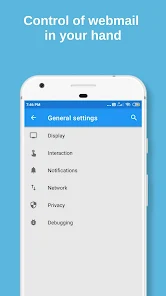
Customizable Notifications let you personalize how and when you receive alerts for new messages, ensuring you stay informed without being overwhelmed. Tailor your notification preferences to suit your workflow and never miss an important email again.

End-to-End Encryption

With End-to-End Encryption, your emails are secured from the moment you hit send until they reach the recipient. This ensures that your sensitive information remains private and protected from unauthorized access, giving you peace of mind while communicating.

Smart Filtering

The Smart Filtering feature intelligently sorts your emails, prioritizing important messages while filtering out spam and less relevant content. This helps you focus on what truly matters, reducing clutter and enhancing your productivity throughout the day.

User-Friendly Interface

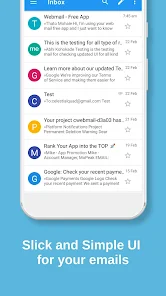
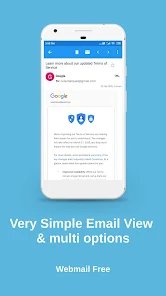
The User-Friendly Interface makes navigating your inbox a breeze, allowing users of all levels to quickly access their emails and manage tasks efficiently. With intuitive design elements, finding what you need is both simple and enjoyable, enhancing your overall experience.

Advertisement

Pros & Cons

Pros
  • Effortlessly organize emails with intelligent sorting and categorization features.
  • Enhance productivity with a user-friendly interface that streamlines email management.
  • Enjoy robust security features protecting your sensitive information from threats.
  • Access your inbox anytime, anywhere, with seamless mobile and web compatibility.
  • Receive real-time notifications for important emails to stay updated instantly.
Cons
  • Limited storage capacity can hinder email management efficiency.
  • User interface may feel cluttered and overwhelming for some.
  • Integration with other apps and services is often limited and inconvenient.

Real Experience Using Webmail App Secure Smart Inbox

Application Scenarios

The Webmail App Secure Smart Inbox is designed for various professional and personal scenarios where email management is critical. For busy professionals, the app serves as a centralized hub for organizing multiple email accounts, allowing users to streamline their communications without the hassle of switching between different platforms. In corporate environments, the app’s security features ensure that sensitive information remains protected, making it ideal for teams handling confidential data. Additionally, for students and academics, the smart inbox categorizes emails efficiently, helping them prioritize important messages amidst a flurry of notifications. Whether it's managing work-related correspondences or keeping up with personal communications, this app adapts to the user’s needs seamlessly.

User Experience

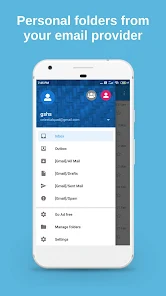
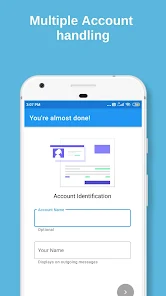
The user experience of the Webmail App Secure Smart Inbox is intuitive and user-friendly. Upon first launch, users are greeted with a clean interface that makes navigation straightforward. The app’s smart categorization system uses advanced algorithms to sort emails into various folders such as Promotions, Social, and Primary, simplifying the process of finding important messages. The search functionality is particularly robust, allowing users to quickly locate specific emails with ease. Notifications are customizable, enabling users to prioritize alerts for critical messages while silencing less important ones. Furthermore, the seamless integration of calendar and task management features enhances productivity, making it an all-in-one solution for managing both emails and schedules.

Pricing

The Webmail App Secure Smart Inbox offers a variety of pricing plans to suit different user needs. A free version is available, providing essential features for casual users who need basic email management capabilities. For those requiring additional functionalities, such as enhanced security options and advanced filtering tools, a premium subscription is offered at a competitive monthly rate. Discounts are available for annual subscriptions, making it a cost-effective choice for users committed to long-term use. The pricing structure is transparent, with no hidden fees, allowing users to choose the plan that best fits their needs without any surprises.

Updates & Support

The development team behind the Webmail App Secure Smart Inbox is committed to continuous improvement and user satisfaction. Regular updates are rolled out to enhance performance, introduce new features, and address any bugs or security vulnerabilities. Users can easily access the latest version of the app through their respective app stores. In addition, the support team is highly responsive, offering assistance through various channels such as email, live chat, and an extensive FAQ section on the official website. This dedication to support ensures that users can resolve any issues swiftly, maintaining a smooth and positive experience while using the app.

verified Security & Privacy Review

The Webmail App Secure Smart Inbox places a strong emphasis on security and privacy, ensuring that user data is well-protected. The app employs end-to-end encryption for emails, safeguarding messages from unauthorized access during transmission and storage. This feature is essential in an era where data breaches are increasingly common. In terms of permissions, the app requests only the necessary access to function effectively, minimizing potential vulnerabilities. Users are informed about the permissions required and can choose whether to grant them, promoting transparency. Additionally, the app does not track user activity or collect unnecessary personal information, aligning with best practices in data privacy. The developers adhere to stringent privacy policies, committing to not sell or share user data with third parties without explicit consent. Regular security updates are implemented to address potential threats and enhance overall protection. Overall, the Webmail App Secure Smart Inbox offers a robust framework for users seeking a secure and private email experience, making it a reliable choice for those prioritizing data security.
Advertisement

Compare APP

User Reviews

  • JiiT B.
    2026/06/16

    it's good but it can't control spam and showing too many ad's poster. but it's good

  • nautiguy
    2021/04/28

    You won't like this app. It shows you a full screen ad every time you open an email instead of the email you want to see. Then you have to close the app and reopen it to see that email which now shows as being read. Once an email shows as being read you can see it without an ad being shoved in your face. If you delete an email it's gone forever because it doesn't go into the trash folder. Whenever you open the trash folder always it shows as loading but nothing ever goes there, it's empty.

  • Irina Vic
    2026/03/01

    webmail works fine, but to reply or forward email is a big challenge... doesn't recognise email, but I've been using them before. The new email doesn't recognise and be impossible to email from the phone. I keep it just to read only, but I work with emails from the laptop. works only as read emails.

  • bobby seaton
    2023/11/15

    When I first set up the account, it worked. The customer called about an email they sent 2 days earlier. The email is in my inbox on my laptop but never came through to my phone. I have refreshed several times and nothing. Now, I am looking for other options, small business I can't afford to miss communications when I'm out in the field.

  • Redeeming Gardens
    2020/11/18

    Its functions ok, use for my business email, bad points are it continually gives me the option of buying or free app everytime I go on it but once I select free app it opens to my inbox as normal. Also I've had emails that have sat in the outbox and haven't been sent, don't know if that's due to the attachments, as other times with attachments they've been delivered?

Review Source: Google Play store public user reviews.

FAQ

1

Can I submit suggestions or feedback to Webmail App Secure Smart Inbox?

Yes, users can submit suggestions or feedback through the app's support feature or contact the development team via email, ensuring they can contribute to future updates and improvements.

2

Does Webmail App Secure Smart Inbox collect my personal data?

Webmail App Secure Smart Inbox prioritizes user privacy and does not collect unnecessary personal data. It may collect minimal information for functionality and support purposes, but this is detailed in the privacy policy.

3

Does Webmail App Secure Smart Inbox support offline use?

Yes, Webmail App Secure Smart Inbox supports offline access, allowing users to read and compose emails without an internet connection, with sync capabilities once reconnected.

4

How do I cancel my Webmail App Secure Smart Inbox subscription?

To cancel your subscription, users can navigate to the account settings within the app and follow the cancellation prompts, or they can manage their subscription through the app store used for the initial purchase.

5

How much does a subscription to Webmail App Secure Smart Inbox cost?

The subscription cost for Webmail App Secure Smart Inbox varies depending on the plan chosen, typically starting at a competitive monthly or annual rate, with discounts for longer commitments.

How to use Webmail App Secure Smart Inbox

1

Can I activate my account using my mobile device?

Yes, you can activate your account using any device with internet access by following the activation link sent to your email.

2

Can customer service assist me with activating my account?

Yes, customer service can help you with account activation. Please contact them directly for assistance.

3

How can I log in to my Secure Smart Inbox?

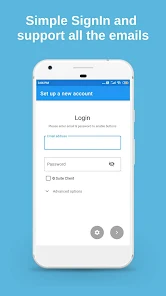
To log in, enter your email and password on the login page. If you have trouble, use the “Forgot Password” option.

4

How can I update my customer number if it’s incorrect?

To update your customer number, contact customer service with your details, and they will assist you in correcting the information.

5

How do I contact customer service for help with my account?

You can reach customer service by visiting our website and clicking on the "Contact Us" section for support options.

What's New

🚀 v5.6 — Faster email sync & smoother navigation 🔒 Enhanced privacy for Gmail & Outlook connections 🐞 Fixed login & auto-logout issues reported by users ✨ Improved smart inbox & notification reliability

Editor's Choice