This site uses cookies to enhance your user experience. By clicking any link on this site you are giving your consent to our cookie policy. Read more
Reject
Accept All

Advertiser and Editorial Disclosures

Video Meeting

Video Meeting

verified

Online Meetings - Video Conference

4.1
Rating
10,000+ Downloads
1.3 Version
Advertisement
  • category

    Category: Communication

  • price

    Price: free

  • age rating

    Age Rating: Everyone

  • rating

    Rating: 4.1

  • available on

    Available on: /

  • updated on

    Updated on: Jun 11, 2025

Screenshot 1
Screenshot 2
Screenshot 3
Screenshot 4
Screenshot 5
Screenshot 6
Screenshot 7
Screenshot 8
Screenshot 9
Screenshot 10
Screenshot 11
Screenshot 12
Screenshot 13
Screenshot 14
Screenshot 15
Screenshot 16
Advertisement

Features & Highlights

High-Quality Audio

Experience crystal-clear audio during your video meetings, ensuring that every word is heard without interruptions. With advanced noise cancellation technology, background sounds are minimized, allowing for focused conversations that enhance collaboration and productivity.

Record Meetings Effortlessly

Capture important discussions and presentations by recording your meetings with just a click. This feature allows you to revisit critical moments later, share insights with those who couldn’t attend, and ensures that valuable information is never lost.

Screen Sharing Made Easy

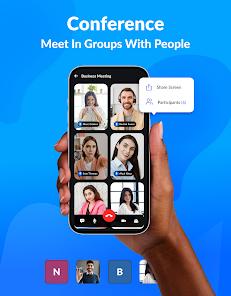
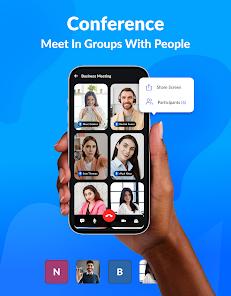
Seamlessly share your screen with participants to showcase presentations, documents, or applications. This feature makes it simple to collaborate in real-time, enabling everyone to stay on the same page and contributing to a more engaging meeting experience.

Virtual Background Options

Personalize your meeting space with a variety of virtual backgrounds that add a touch of professionalism or fun. Whether you want to hide clutter or simply express your personality, these options help create an inviting atmosphere for all attendees.

Advertisement

Pros & Cons

Pros
  • Connect from anywhere easily
  • High-quality video and audio
  • User-friendly interface design
  • Secure and private meetings
  • Supports large group calls
Cons
  • Poor internet connectivity issues
  • Limited screen sharing options
  • Privacy concerns with data
  • User fatigue from long sessions

Real Experience Using Video Meeting

Real Experience Application Scenarios

Video Meeting is designed to cater to a multitude of scenarios, making it a versatile tool for both personal and professional use. From hosting virtual team meetings to facilitating online classes, the app provides a seamless platform for communication. Small businesses can utilize Video Meeting for client presentations, while remote teams can engage in brainstorming sessions without geographical limitations. Additionally, social gatherings such as family reunions and virtual parties are made easier, allowing users to connect with loved ones regardless of distance. The app's flexibility extends to its integration capabilities, enabling users to connect with other productivity tools like calendars and task managers, ensuring a cohesive workflow.

User Experience

The user experience offered by Video Meeting is largely commendable. The interface is clean and intuitive, making it accessible for users of all skill levels. Upon launching the app, users are greeted with a straightforward dashboard that allows easy navigation between features such as scheduling meetings, inviting participants, and accessing chat functionality. The video and audio quality during calls is generally high, with minimal lag or disruptions, which is critical during important discussions. Users have reported appreciation for the screen-sharing functionality, which enhances collaboration during meetings. However, some have indicated occasional issues with connectivity, particularly during peak usage times, suggesting that improvements in server capacity could enhance overall performance.

Pricing

Video Meeting offers a competitive pricing structure that appeals to a wide range of users. There is a free tier available, which is ideal for casual users or small groups looking to test the app's capabilities. For those needing advanced features such as larger participant limits, cloud storage, and additional administrative controls, the premium subscription plans provide excellent value. These plans are reasonably priced and come with monthly and annual billing options. This flexibility allows users to choose a plan that best fits their needs and budget. The transparency in pricing ensures that users understand what they are paying for without any hidden fees, which is a significant advantage in today’s app marketplace.

Updates & Support

The development team behind Video Meeting is proactive in rolling out updates to enhance functionality and security. Regular updates introduce new features and improvements based on user feedback, demonstrating a commitment to user satisfaction. The support system is robust, offering various channels for assistance, including email support, a knowledge base, and live chat options. Users have praised the responsiveness of the support team, noting that inquiries are typically addressed in a timely manner. Furthermore, the app's community forums allow users to share tips and troubleshoot common issues, fostering a supportive user environment. Overall, the combination of regular updates and responsive support contributes to a positive user experience with Video Meeting.

verified Security & Privacy Review

Security & Privacy Review The Video Meeting app places a strong emphasis on security and privacy, utilizing end-to-end encryption to ensure that all video calls and shared content remain confidential. This encryption protects user data from unauthorized access, making it difficult for third parties to intercept communications. Users are required to grant specific permissions for features such as camera and microphone access, which are essential for functionality. The app transparently requests these permissions and provides clear explanations for their necessity. However, users should remain vigilant and review permissions periodically to ensure their privacy preferences are maintained. The app’s privacy policy outlines its data handling practices, stating that personal information is collected only when necessary and is not sold to third parties. Users have the option to delete their accounts and associated data at any time, ensuring control over their personal information. Overall, Video Meeting demonstrates a commitment to user security and privacy, making it a reliable choice for online communications.
Advertisement

User Reviews

  • itzkaiii
    2025/06/18

    user friendly easy for senior to use audio and video clear

  • Jacqueline Amoit
    2026/03/05

    I can't seem to get into the meetings. it keeps telling me invalid code,why?

  • Sridhar S
    2025/01/21

    to be made easier to participate !!

  • Musasizi
    2025/09/24

    nice and amazing

  • Nakintu Rashimah
    2026/01/07

    if I enter the meeting Id it's invalid

Review Source: Google Play store public user reviews.

FAQ

1

Are there any costs associated with using the Video Meeting app?

The Video Meeting app may offer both free and paid subscription plans. Free plans generally have limited features and participant capacity, while paid plans provide additional functionalities and greater participant limits. It's advisable to check the app’s official website for specific pricing details and plan comparisons.

2

Can I customize my meeting settings for each call?

Yes, the Video Meeting app typically allows you to customize your meeting settings for each call. Before starting a meeting, you can adjust options such as participant permissions, audio and video settings, and recording preferences. This level of customization helps tailor the meeting experience to your specific needs.

3

Can I integrate the Video Meeting app with other tools?

Yes, the Video Meeting app often supports integration with various productivity tools, such as calendar applications, project management software, and customer relationship management (CRM) systems. These integrations help streamline workflows and enhance collaboration, making it easier to manage meetings and tasks.

4

Can I record meetings in the Video Meeting app?

Yes, the Video Meeting app allows users to record meetings. You can start recording during the meeting, and the app will save the recording either locally or in the cloud, depending on your settings. This feature is useful for participants who may want to review the meeting later or for those who couldn't attend.

5

Can I use virtual backgrounds in the Video Meeting app?

Yes, the Video Meeting app offers the option to use virtual backgrounds. Users can select from preloaded backgrounds or upload their own images to create a personalized meeting environment. This feature is especially useful for maintaining privacy or adding a professional touch to meetings.

How to use Video Meeting

1

How can I activate my Video Meeting app account?

After downloading the app, follow the on-screen instructions to create an account and verify your email to activate.

2

How do I contact customer service for the Video Meeting app?

You can reach customer service by visiting the app's support section or calling the dedicated helpline listed on our website.

3

How do I log in to the Video Meeting app?

Open the app, enter your registered email and password, then tap 'Log In' to access your account.

4

What is the customer service number for the Video Meeting app?

The customer service number is available in the app's settings under 'Help' or on our official website.

Editor's Choice