This site uses cookies to enhance your user experience. By clicking any link on this site you are giving your consent to our cookie policy. Read more
Reject
Accept All

Advertiser and Editorial Disclosures

Permission Guard

Permission Guard

verified

VY Technology Services

4.7
Rating
500,000+ Downloads
2.5.0 Version
Advertisement
  • category

    Category: Business

  • price

    Price: free

  • age rating

    Age Rating: Everyone

  • rating

    Rating: 4.7

  • available on

    Available on: /

  • updated on

    Updated on: Mar 2, 2026

Screenshot 1
Screenshot 2
Screenshot 3
Screenshot 4
Screenshot 5
Screenshot 6
Advertisement

Features & Highlights

Alerts for Suspicious Activity

Receive timely alerts when apps request unusual permissions or exhibit suspicious behavior. Permission Guard helps you stay one step ahead of potential privacy threats, allowing you to take action before your data is compromised.

Custom Permission Management

Take control of your privacy by customizing permissions for each app. With Permission Guard, you can easily grant, restrict, or revoke permissions, tailoring the access level to suit your comfort while using your favorite applications.

Real-Time Permission Monitoring

Stay informed with real-time updates on app permissions. Permission Guard continuously monitors the permissions requested by your installed applications, ensuring you’re always aware of who has access to your data and which apps may be overreaching their boundaries.

User-Friendly Interface

Navigate through your app permissions effortlessly with Permission Guard's intuitive interface. Designed for users of all tech skill levels, the app provides a clear overview of permissions and makes managing them a simple and straightforward experience.

Advertisement

Pros & Cons

Pros
  • Unlock complete privacy control
  • Easily manage app permissions
  • Receive real-time alerts
  • Optimize device performance
  • User-friendly interface design
Cons
  • Limited customization options
  • Can be intrusive for users
  • May slow down device performance
  • Frequent updates required

Real Experience Using Permission Guard

Application Scenarios

Permission Guard is an invaluable tool for users who are increasingly concerned about their privacy and the permissions granted to various applications on their devices. In a world where apps often request access to sensitive information such as location, contacts, and camera, Permission Guard steps in to help users regain control. This app is particularly useful for individuals who frequently download new applications or for those who use social media platforms that tend to request extensive permissions. Whether you are a casual user wanting to secure personal information or a tech-savvy individual looking to optimize app permissions for better privacy, Permission Guard offers tailored solutions to fit your needs. It’s also beneficial for parents who wish to monitor their children's app usage and the permissions granted within those apps, ensuring a safer digital environment for younger users.

User Experience

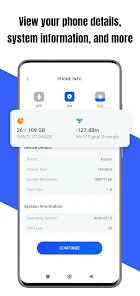
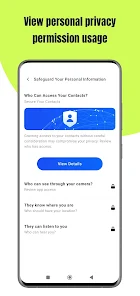
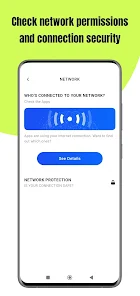
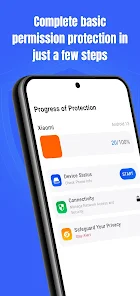
The user experience of Permission Guard is designed to be intuitive and straightforward. Upon launching the app, users are greeted with a clean interface that categorizes app permissions in a user-friendly manner. This allows users to quickly identify which apps have access to what information. The app features a simple toggle system for managing permissions, making it easy for users to restrict or allow access to specific features. Furthermore, Permission Guard provides detailed explanations for each permission, helping users understand the implications of allowing or denying access. The performance of the app is smooth, with minimal lag, and it integrates seamlessly with both Android and iOS devices. Notifications alert users to any changes in app permissions, ensuring they stay informed about their privacy settings.

Pricing

Permission Guard operates on a freemium model, providing a basic version at no cost while offering premium features for a fee. The free version includes essential functionalities such as permission management and app categorization, making it a great starting point for users who wish to explore the app's capabilities without financial commitment. For those looking for more advanced features, such as detailed reports on app behavior and priority support, the premium version is available through a subscription or a one-time purchase. This tiered pricing model ensures that users can choose the level of service that best fits their needs, whether they prefer a free solution or seek more comprehensive protection for their digital privacy.

Updates & Support

Permission Guard is committed to providing regular updates to enhance user experience and ensure compatibility with the latest operating systems and app versions. The development team actively listens to user feedback, implementing changes and new features based on community suggestions. Users can access a dedicated support section within the app, where they can find FAQs, troubleshooting tips, and direct contact options for more complex issues. The response time for support inquiries is generally quick, reflecting the team’s commitment to user satisfaction. Overall, frequent updates and accessible support contribute to a reliable and evolving application that meets the changing needs of its user base.

verified Security & Privacy Review

Security & Privacy Review Permission Guard prioritizes user security and privacy through a robust framework designed to manage app permissions effectively. The app allows users to gain granular control over which permissions are granted to individual applications, minimizing the risk of unauthorized access to sensitive information. The app employs encryption protocols to safeguard user data during transmission and storage, ensuring that personal information remains confidential. Permission Guard clearly outlines its data handling practices in its privacy policy, promoting transparency and user trust. The app does not collect unnecessary data, adhering to a strict policy of data minimization. Users are regularly notified of permission requests, allowing for informed consent before any data sharing occurs. Additionally, the app provides insights into how permissions impact privacy, enabling users to make educated decisions regarding their app usage. Overall, Permission Guard demonstrates a strong commitment to protecting user data while enhancing the overall privacy experience.
Advertisement

User Reviews

  • JohnZ
    2026/06/04

    The 'GUARD' in this is really just another word for UNinstall. It lists all the apps that have permissions to access it. If you are okay with the permission chosen for the app, you just click the TRUST button and the permission stays the same. Your ONLY other option is to click a trashcan. Doing so then brings you to the uninstall screen to REMOVE THE ENTIRE APP. Just because I don't want to let the app use the phone, I may NEED or want it, but NOT to UNINSTALL the entire app!! ONLY UNINSTALLS!!

  • Kandy Forester (Assweetaskandiland)
    2026/06/17

    I haven't gotten to see really how it works for I just down loaded it but so far what I have seen I like it its easy to understand & perform all I need to get my security working better..

  • Michael Kosec
    2026/05/03

    application warns randomly even when no permissions have changed. it is intended to operate as scareware for unsuspecting seniors, tricking them into downloading malicious content.

  • melody mickool
    2026/04/21

    not sure i am understanding how it works I turn it off and it seems like it is still running on cool cool air coming out of vents it turns it self on I'm constantly turning it off .I put it on 83 degrees next time I I check it the temp is lower than where I put it at 83 and it is on cool again. it turns itself on and runs on it own . I can't find where the instructions are in the app on how to run i don't want it on but it won't stay turned off. why isn't there any training to operating this

  • France Duvall
    2026/06/14

    this app is to intrusive. always blinking, demanding to stop apps. can't get things done it's annoying.

Review Source: Google Play store public user reviews.

FAQ

1

Can I restore permissions after revoking them?

Yes, users can easily restore permissions after revoking them using Permission Guard. The app allows users to re-enable permissions at any time, giving them flexibility in managing app access based on their current needs and preferences.

2

Can I use Permission Guard on any smartphone?

Permission Guard is primarily designed for Android devices, as permission management is a critical aspect of the Android operating system. Users should check the app's compatibility with their specific device and operating system version to ensure optimal functionality.

3

Can Permission Guard help improve my device's performance?

By allowing users to revoke unnecessary permissions, Permission Guard can contribute to improved device performance. Apps that have fewer permissions may consume less battery and run more efficiently, leading to a smoother overall experience. Additionally, reducing background activity from apps can free up system resources.

4

Does Permission Guard require special permissions to function?

Yes, Permission Guard requires certain permissions to access and manage the permissions of other apps on your device. These permissions are necessary for the app to function properly and provide users with accurate information about what each app can access. The app will typically explain why these permissions are needed during the installation process.

5

Does Permission Guard support batch permission management?

Yes, Permission Guard supports batch permission management, allowing users to modify permissions for multiple apps at once. This feature can save time and streamline the process of managing app permissions, making it easier for users to maintain control over their privacy settings.

How to use Permission Guard

1

How can I contact Customer Service for the Permission Guard app?

You can reach Customer Service through the app's support section or visit our website for contact details.

2

How do I activate the Permission Guard app?

To activate, download the app, create an account, and follow the on-screen instructions for activation.

3

How do I log in to the Permission Guard app?

Open the app, enter your registered email and password, then click on the 'Log In' button.

4

What is the Customer Number for the Permission Guard app?

Your Customer Number can be found in your account settings within the app.

Editor's Choice