This site uses cookies to enhance your user experience. By clicking any link on this site you are giving your consent to our cookie policy. Read more
Reject
Accept All

Advertiser and Editorial Disclosures

ADP Mobile Solutions

ADP Mobile Solutions

verified

ADP, INC.

4.5
Rating
10,000,000+ Downloads
25.50.3 Version
Advertisement
  • category

    Category: Business

  • price

    Price: free

  • age rating

    Age Rating: Everyone

  • rating

    Rating: 4.5

  • available on

    Available on: /

  • updated on

    Updated on: Jun 24, 2026

Screenshot 1
Screenshot 2
Screenshot 3
Screenshot 4
Screenshot 5
Screenshot 6
Screenshot 7
Screenshot 8
Advertisement

Features & Highlights

Benefits Enrollment

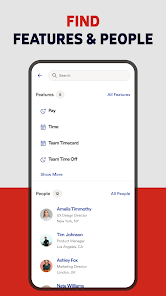
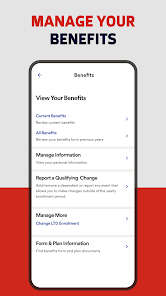
Navigating through benefits options has never been easier with ADP Mobile Solutions. Employees can explore, compare, and enroll in various benefits plans right from their mobile devices, empowering them to make informed decisions about their health and wellness without needing to visit HR in person.

Mobile Pay Statements

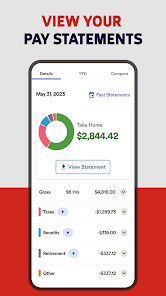
With ADP Mobile Solutions, users can easily access their pay statements on-the-go. This feature allows employees to review their earnings, deductions, and tax information anytime, ensuring transparency and convenience in managing their financial information from their mobile devices.

Schedule Management

Stay organized with the schedule management feature that lets employees view their work schedules at a glance. This capability ensures that users can keep track of their shifts, make necessary adjustments, and communicate with their managers, all while managing their work-life balance effectively.

Time Tracking

ADP Mobile Solutions simplifies the process of tracking work hours and requesting time off. Employees can log their hours directly from their smartphones, making it easier to stay on top of their schedules and ensuring accurate payroll processing without the hassle of paperwork.

Advertisement

Pros & Cons

Pros
  • Access your payroll information anytime, anywhere for ultimate convenience.
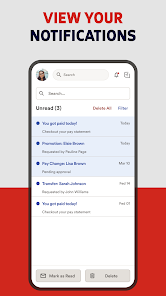
  • Stay updated with real-time notifications for important pay events.
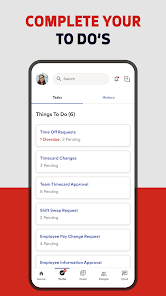
  • Easily manage time-off requests and approvals directly from your device.
  • View and download pay stubs and tax documents with just a few taps.
  • Securely update personal information to ensure accuracy and compliance.
Cons
  • Limited offline functionality can hinder access to important information.
  • User interface may be confusing for some users, leading to frustration.
  • Occasional syncing issues can result in outdated or missing data.

Real Experience Using ADP Mobile Solutions

Real Experience Application Scenarios

ADP Mobile Solutions is designed to cater to both employees and employers, making it versatile for various workplace scenarios. Employees can use the app to access their pay stubs, manage direct deposits, and review their benefits. This is especially useful for those who travel frequently or work remotely, as they can keep track of their financial information anytime, anywhere. Employers can also benefit from the app by managing payroll, approving time-off requests, and accessing employee information efficiently. The app is particularly advantageous during busy payroll periods or for companies with a mobile workforce, providing a streamlined approach to human resource management.

User Experience

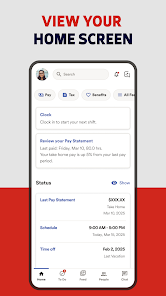
The user experience with ADP Mobile Solutions is generally positive, with a user-friendly interface that makes navigation intuitive. Users appreciate the app's sleek design, which is visually appealing and easy to understand. The dashboard provides a quick overview of essential information, and the touch-friendly features enhance interaction. However, some users have reported occasional glitches, particularly during peak usage times. The app is regularly updated, which helps address these issues, but occasional bugs can still disrupt the experience. Overall, users find that the convenience of accessing payroll and HR information on the go outweighs these minor inconveniences.

Pricing

ADP Mobile Solutions is typically offered as part of a broader ADP payroll and HR service package, meaning that the app itself does not have a standalone price. Instead, users must subscribe to ADP’s services, which vary in cost depending on the size of the business and the specific solutions chosen. While this may seem like a drawback for smaller businesses, many users report that the value provided by ADP's comprehensive suite justifies the investment. Additionally, the ability to streamline HR processes can lead to significant cost savings in the long run.

Updates & Support

ADP is known for its commitment to customer support and regularly rolling out updates to enhance app functionality. The company provides various resources, including FAQs, user guides, and a dedicated support team accessible through the app and website. Users can easily report issues or seek assistance, ensuring that help is readily available whenever needed. Regular updates not only address bugs but also introduce new features that keep the app competitive and aligned with user needs. This proactive approach to updates and support is a significant advantage for businesses relying on ADP Mobile Solutions.

verified Security & Privacy Review

Security & Privacy Review The ADP Mobile Solutions app prioritizes user security and privacy through robust data protection measures. The app employs advanced encryption protocols to safeguard sensitive information, ensuring that personal and financial data remains secure during transmission and storage. ADP is committed to transparency regarding user data handling practices. The app clearly outlines its privacy policy, detailing how user data is collected, used, and shared. Users can expect their information to be used solely for service-related purposes, without unauthorized third-party sharing. In terms of permissions, the app requires access to certain device features such as location and notifications, which are essential for providing a personalized experience. However, users are given control over these permissions and can modify them according to their preferences. Overall, ADP Mobile Solutions demonstrates a strong commitment to security and privacy, making it a trustworthy choice for managing payroll and personal financial information.
Advertisement

User Reviews

  • J Kaufman
    2025/10/11

    Horrible. You can't sync or display your schedule with your phone's calendar. There's no widget to easily see your work schedule. There's no notification that a new schedule is posted and no alarm or notification when you have an upcoming shift. You can't see what other coworkers you're scheduled to work with. You can't use the app to clock in, as it continuously says that you're NOT on the job location. All of these are standard features on other scheduling apps.

  • Elliot Hecht
    2024/12/14

    I need to download my pay stubs every 2 weeks, and I have to enter my password to constantly re-enable biometrics, it doesn't hold that, so the next time I log in I have to look up my password again making the biometric login basically useless. It has been this way for quite a number of updates, and when I do update, I also have to look up my password to re-enable biometric login which doesn't stay when I use the app again.

  • Imrich Kuric (Vibez)
    2025/08/29

    This app will tell you that you are offline when trying to use the 'quick clock' feature regardless of the reason. This means that if the app needs an update, you are having internet issues, or if you need to log back into your account, it will not tell you. You need to work through all of these frustrating options yourself while trying to clock in at a job you don't want to work. Also, when you log in, there is an unskippable animation that takes well over five seconds to finish playing.

  • Katherine N
    2024/10/09

    Update: after uninstalling it and reinstalling it, it still takes you to a web page to log in, then makes you verify but then you have to keep doing this, an endless hamster wheel... The app used to work, but now the login is messed up. I thought it would fix itself after I updated it but it has you login via website, and the page that is loaded, you have to do some looking around since it appears to load onto a blank web page but you have to scroll all the way up, don't know what is going on

  • Dr K
    2026/07/02

    Majority of the time it doesn't accept punch outs. It picks and chooses when it wants to load anything or even work in general. The website isnt much better. it goes down a lot. When you try to sign in you can't see the options of what you're wanting to select, it's just 5 dots and you hope you pick the right one. Sometimes the order of the selections change. The people running both need to do a way better job at maintaining these and making them functional.

Review Source: Google Play store public user reviews.

FAQ

1

Can I submit suggestions or feedback to ADP Mobile Solutions?

Yes, users can submit feedback and suggestions through the app or by contacting ADP customer support directly.

2

Does ADP Mobile Solutions collect my personal data?

Yes, the app collects personal data to provide services, but it prioritizes user privacy and data security in accordance with applicable laws.

3

Does ADP Mobile Solutions support offline use?

While some features may be accessible offline, the app primarily functions online to ensure real-time data updates and access.

4

How do I cancel my ADP Mobile Solutions subscription?

To cancel a subscription, users should contact their employer's HR department or the ADP customer support team for assistance.

5

How much does a subscription to ADP Mobile Solutions cost?

The cost of a subscription varies depending on the employer's plan and the services offered; users should check with their HR department for specific pricing.

How to use ADP Mobile Solutions

1

Can I activate my account through the mobile app?

Yes, you can activate your account by following the activation link sent to your email after registration.

2

How can I contact customer service for ADP Mobile Solutions?

You can reach customer service by calling the support number listed on the ADP website or through the app's help section.

3

How can I find my customer number in the app?

Your customer number is not displayed in the app; please contact customer service to obtain it.

4

How can I update my customer information in the app?

To update your customer information, log in to the app and navigate to the profile or settings section. Follow the prompts to make changes.

5

How do I log in to ADP Mobile Solutions?

Open the app, enter your user ID and password, and tap "Log In" to access your account.

What's New

This release of ADP Mobile contains minor features, usability enhancements, and bug fixes.

Editor's Choice