This site uses cookies to enhance your user experience. By clicking any link on this site you are giving your consent to our cookie policy. Read more
Reject
Accept All

Advertiser and Editorial Disclosures

Music Player - MP3 Player

Music Player - MP3 Player

verified

Red Sky Labs

3.6
Rating
100,000,000+ Downloads
7.6.2 Version
Advertisement
  • category

    Category: Music & Audio

  • price

    Price: free

  • age rating

    Age Rating: Everyone

  • rating

    Rating: 3.6

  • available on

    Available on: /

  • updated on

    Updated on: Jul 3, 2026

Screenshot 1
Screenshot 2
Screenshot 3
Screenshot 4
Screenshot 5
Screenshot 6
Screenshot 7
Screenshot 8
Screenshot 9
Screenshot 10
Screenshot 11
Screenshot 12
Screenshot 13
Screenshot 14
Screenshot 15
Screenshot 16
Screenshot 17
Screenshot 18
Screenshot 19
Screenshot 20
Screenshot 21
Screenshot 22
Screenshot 23
Screenshot 24
Advertisement

Features & Highlights

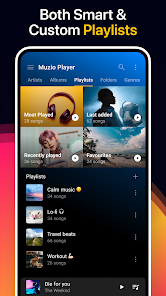
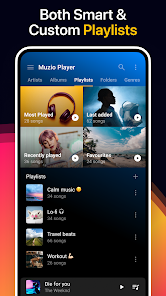
Custom Playlists

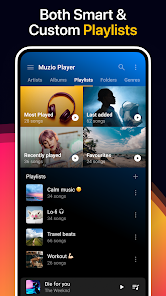
Create personalized playlists to suit your mood or activity with the custom playlists feature. Organize your music collection effortlessly by dragging and dropping tracks to craft the ultimate listening experience tailored just for you. It's a fun way to rediscover your music library and enjoy every moment.

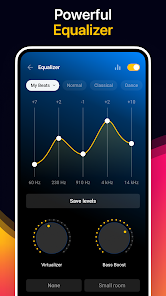
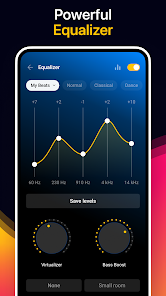
Equalizer Settings

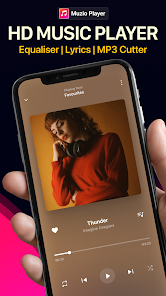
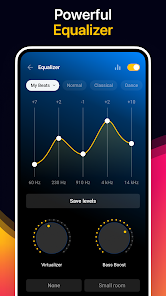
Take control of your sound with the built-in equalizer settings, allowing you to fine-tune audio output to match your listening preferences. Choose from various presets or customize your own settings for an enhanced auditory experience. Whether you prefer bass-heavy beats or crisp vocals, this feature has you covered.

Intuitive Interface

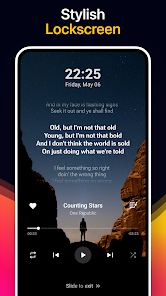
Navigate through your music library with ease thanks to the intuitive interface designed for a seamless user experience. The clean layout ensures that you can find your favorite songs quickly, while easy-to-use controls make playback effortless. Enjoy your music without the hassle of complicated menus.

Offline Playback

Enjoy your favorite music anytime, anywhere with the offline playback feature. Easily download your tracks and playlists, so you can listen without an internet connection, whether you're on a long trip or just want to save on data usage. Perfect for music lovers who are always on the go.

Advertisement

Pros & Cons

Pros
  • Experience high-quality sound
  • Create personalized playlists
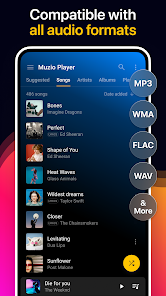
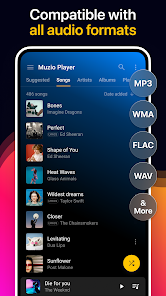
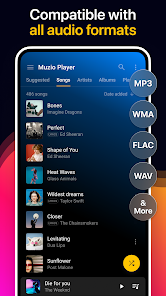
  • Supports various audio formats
  • User-friendly interface design
  • Offline music playback available
Cons
  • Limited audio format support
  • Occasional ads disrupt playback
  • User interface feels outdated
  • Lacks advanced equalizer options
  • No offline music library feature

verified Security & Privacy Review

Security & Privacy Review Music Player - MP3 Player prioritizes user security and privacy, implementing robust measures to protect personal data. The app requires minimal permissions, primarily focusing on access to local storage for music files. This limited access reduces the risk of unauthorized data exposure. All user data is stored locally on the device, ensuring that sensitive information is not transmitted over the internet. The app does not collect or share personal data with third parties, aligning with best practices in privacy protection. Additionally, there are no ads or in-app purchases that could compromise user security. Users have the option to customize privacy settings, enabling them to control data access further. Regular updates are provided to address any vulnerabilities and enhance security features. Overall, Music Player - MP3 Player demonstrates a commitment to safeguarding user information while delivering a seamless music experience.
Advertisement

User Reviews

  • Jonathan Mills
    2025/07/20

    Downloaded and started using this because it allowed me to create playlists over 1k songs (which Samsung player strangely was unable to do) and liked it enough to purchase the lifetime ad-free version. Loved it until a recent update now forces the app to have access to phone logs in order to use it. WHY?! You're a music player, not an app for managing phone calls! Stay in your lane, Muzio! This After Call "feature" that is required to use the app is the reason I'm looking for something else.

  • Hansum Squidward
    2025/02/24

    3/27/21 needed a replacement for google play music and this is way better. 02/25 Update: When I first found this app it was perfect. No ads and overall no issues. They've decide to bombard people with ads now, its ridiculous. When the change first happened, it was fine. A single ad that you could x out of immediately would pop up when the app first opened and never again. Now ads are constant and are difficult to x out of so you need to click multiple times. Going elsewhere.

  • N.C Thomas
    2025/03/04

    Had to go from a 5 star to 1 star. I've used this app for years cause for the longest time it was the best music player, but now you can't even click the back button without being spammed with ads on top of pummeling you asking for you to subscribe to their paid plan every time you pull the app up. So I think I'm gonna look for a different app. Also seeing reviews of people saying they paid for lifetime membership just to have it yanked away, that's bad business.

  • Keith Aguilar
    2025/07/10

    while I absolutely love and after ad, especially the ones you can't get out of and have to close the app down, the constant badgery of buying a subscription for music is highly annoying. Now the app is tied into my phone calls and I can't remove it so I am left with removing the app completely from my phone. You would like to think for 1K phone, you could have a simple music app strictly to play uploaded music without all the BS, but alas.... not in the cards.

  • Nia Ford
    2025/03/01

    When I originally got this app, it had no ads and worked great. I used it off and on for 4 months, but when I left it alone for roughly 3 months, it started having ads afterwords. I disable Auto Update because many groups bloat or entirely re-design their apps to be worse, so make of that what you will. If you still see 3 stars on this review, then ads haven't started interrupting my music audio yet.

Review Source: Google Play store public user reviews.

How to use Music Player - MP3 Player

1

How can I contact customer service for the Music Player - MP3 Player app?

You can reach customer service through the app's settings or visit our website for support options.

2

How do I log in to the Music Player - MP3 Player app?

Open the app, tap on the login button, and enter your registered email and password.

3

Is there a way to activate the Music Player - MP3 Player app?

If activation is required, follow the instructions in the app after installation or check your email for an activation link.

4

What is the customer number for the Music Player - MP3 Player app?

The customer number is available in the app's help section or on our official website.

Editor's Choice