This site uses cookies to enhance your user experience. By clicking any link on this site you are giving your consent to our cookie policy. Read more
Reject
Accept All

Advertiser and Editorial Disclosures

MobileSheets

MobileSheets

verified

Zubersoft

4.4
Rating
100,000+ Downloads
3.9.33 (Build 576) Version
Advertisement
  • category

    Category: Music & Audio

  • price

    Price: $15.99

  • age rating

    Age Rating: Everyone

  • rating

    Rating: 4.4

  • available on

    Available on: /

  • updated on

    Updated on: May 29, 2026

Screenshot 1
Screenshot 2
Screenshot 3
Screenshot 4
Screenshot 5
Screenshot 6
Screenshot 7
Screenshot 8
Screenshot 9
Screenshot 10
Screenshot 11
Screenshot 12
Screenshot 13
Screenshot 14
Screenshot 15
Screenshot 16
Advertisement

Features & Highlights

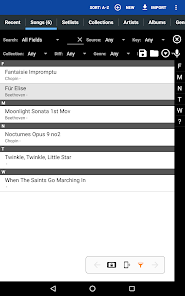
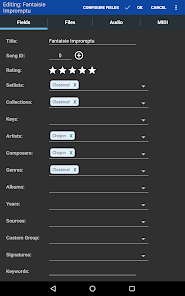
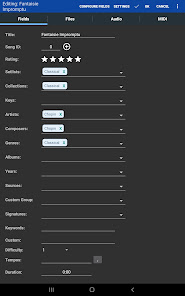
Customizable Library Organization

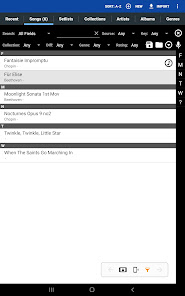
With MobileSheets, users can easily organize their music library using custom categories, tags, and setlists. This flexibility ensures that musicians can quickly find the pieces they need, whether they're preparing for a gig or just practicing at home.

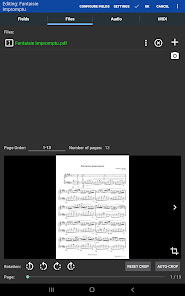
PDF Import and Management

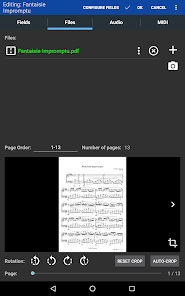
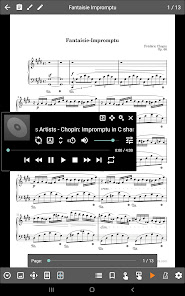
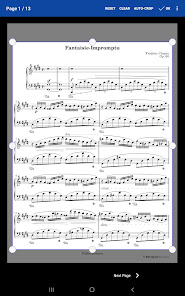
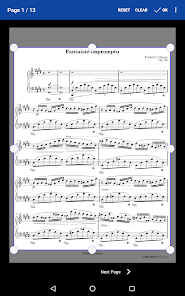
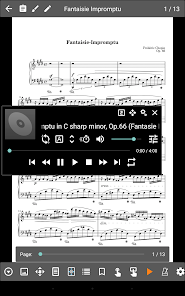
The app allows seamless PDF import, enabling musicians to easily add their sheet music into MobileSheets. Once imported, users can manage their PDFs with options for cropping, reordering, and even adding audio files, creating a comprehensive digital library.

Smart Annotation Tools

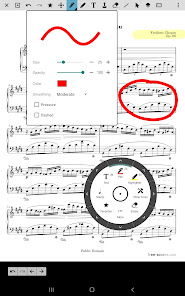
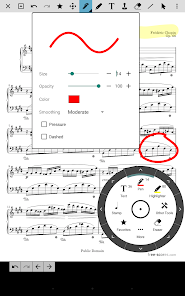
MobileSheets offers intuitive annotation tools that allow users to highlight, underline, and add comments to their sheet music. This feature enhances practice sessions by enabling musicians to mark important sections, making it easier to revisit specific notes or passages during rehearsals and performances.

Sync Across Devices

MobileSheets provides a robust syncing feature that keeps your music library up to date across all devices. Whether you're switching from a tablet to a smartphone, your annotations, setlists, and organization will remain consistent, making practice and performance hassle-free.

Advertisement

Pros & Cons

Pros
  • Organize sheet music effortlessly in customizable collections.
  • Sync your library across multiple devices seamlessly.
  • Annotate scores with digital tools for easy editing.
  • Access music offline without an internet connection.
  • Enjoy an intuitive interface designed for musicians.
Cons
  • Limited compatibility with certain file formats may restrict usage.
  • User interface can be overwhelming for new users.
  • Occasional syncing issues may disrupt access to sheet music.

Real Experience Using MobileSheets

Application Scenarios

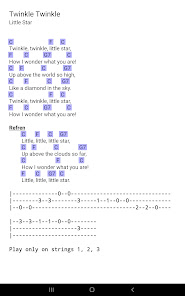
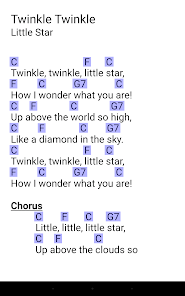
MobileSheets is a versatile app designed for musicians, educators, and performers who require an efficient way to manage their sheet music and performance materials. It is especially beneficial for those who play in bands, orchestras, or solo performances. Users can import a variety of file formats, including PDFs, images, and audio files, allowing for a comprehensive library that can be accessed on-the-go. Whether you’re practicing at home, rehearsing with a group, or performing live, MobileSheets offers the tools necessary to enhance your musical experience. The app’s setlist feature enables users to organize their repertoire effectively, making it easy to switch between songs during performances. Additionally, educators can utilize MobileSheets to share materials with students, making it an ideal choice for music classrooms.

User Experience

The user experience of MobileSheets is designed to be intuitive and user-friendly. Upon launching the app, users are greeted with a clean interface that allows for easy navigation through their library. The ability to annotate sheet music directly within the app is a standout feature, enabling musicians to highlight sections, add notes, and mark changes as needed. The synchronization feature ensures that all devices are updated with the latest versions of songs and annotations, providing a seamless experience across platforms. Furthermore, the app is compatible with Bluetooth foot pedals, allowing users to turn pages hands-free, which is particularly advantageous during live performances. Overall, MobileSheets provides a comprehensive and enjoyable experience, making it a go-to solution for managing music sheets.

Pricing

MobileSheets offers a competitive pricing model that caters to a wide range of users. The app is available as a one-time purchase, which eliminates the need for ongoing subscription fees. This model is particularly appealing for musicians who prefer to invest in a single app rather than committing to recurring payments. The pricing is reasonable, considering the extensive features and functionalities offered. Additionally, there are options for in-app purchases, such as additional cloud storage or premium features, which provide flexibility for users looking to enhance their experience further. Overall, MobileSheets strikes a balance between affordability and value, making it accessible for both amateur and professional musicians alike.

Updates & Support

MobileSheets is regularly updated to improve functionality and introduce new features based on user feedback. The developers are committed to maintaining the app’s performance and ensuring compatibility with the latest operating systems. Users can easily access support through the official website, which includes a comprehensive FAQ section, user guides, and tutorial videos. For more personalized assistance, users can contact the support team directly via email. The active community surrounding MobileSheets also provides a platform for users to share tips, tricks, and suggestions, fostering a collaborative environment. This dedication to updates and customer support enhances the overall user experience and ensures that MobileSheets remains a top choice in the digital sheet music market.

verified Security & Privacy Review

Security & Privacy Review MobileSheets takes user security and privacy seriously, implementing various measures to protect sensitive data. The app does not require unnecessary permissions, ensuring that users can maintain control over their personal information. It primarily requires access to storage for importing and exporting files, which is essential for its functionality. Data is stored locally on the device, minimizing exposure to external threats. MobileSheets also offers features like password protection for individual sets of sheets, allowing users to secure their content further. Synchronization options are available, but users are informed about data handling practices, ensuring transparency. Regular updates are provided to address potential vulnerabilities, and the developers encourage users to report any security concerns. Overall, MobileSheets demonstrates a commitment to safeguarding user privacy while providing an efficient platform for managing sheet music.
Advertisement

User Reviews

  • Jeremy Crabtree
    2026/07/04

    Why is the E-Ink version a separate app that has to be purchased from a (sketchy) third-party app store? Why is it not simply a preference toggle? Why do I only find out about the E-Ink version AFTER purchasing the regular version with no option to convert my purchase? It also did a terrible job of picking titles from my music and I had to delete and reimport my entire library, forcing it to use filenames as titles for the reimport. You didn't say why I can't convert or why it's not in Play.

  • Alex Brenchley
    2025/02/20

    I was enjoying the free version, I got the full version so I could sync my library across all my devices, and immediately found problems with syncing the library. If I change the name of a song on one device and hit sync, then when I hit sync on the other device, instead of changing the name, it creates a duplicate with the changed name. Syncing the library is also a pretty big pain because of a few other reasons that are too big to fit in this review.

  • A Google user
    2019/02/05

    I've used virtually every other Android-compatible sheet music viewer/reader out there, paid or free. I finally landed on MobileSheets. I used the free version first and discovered this is the best music reader out there. Knowing this, I was absolutely OK with paying what seemed to be a steep price for anything in the Play Store. Truth is you get what you pay for with the Pro version. When I download charts from our church's scheduling app, they are imported directly into MobileSheets, saving me the extra work of copying from one place to another. The cropping feature is handy, too, as it allows me to make the image as large as possible for easier viewing. I also use it with my Bluetooth page turner without problems. It does way more than I need, but with the alternatives, I had to settle for less, so I'm pleased. MobileSheets has a steeper-than-usual learning curve, but is powerful and worth the effort you put into learning how to use it. I only wish I'd been able to start here instead of wading through all the others.

  • Joel
    2023/06/24

    Good sheet music app for storing digital music. It's so nice to have most of my piano music on my tablet. The app lets you crop the file & save all the meta data that you need to easily search anything. You can also sync your library which is fantastic. The one feature I hope they eventually add is the ability to add non-pdf music to your library. All my old sheet music is fine since they are PDFs but any new digital sheet music I've bought is epub & can't be added. Hope this gets fixed soon.

  • Mike Barber
    2024/08/17

    This app had been great. I'm a professional musician, and use it for my big band, my brass quintet, and especially my broadway show books at my theater. Recently though, the app just closes in the middle of my show. It will only happen one time a show. Never for smaller pdf music files. I even purchased a new chromebook with much larger striated m storage, hoping it would fix this, but it didn't. There is no repair available, so I'm kind of stuck.

Review Source: Google Play store public user reviews.

FAQ

1

Does MobileSheets collect my personal data?

MobileSheets values user privacy and does not collect personal data unless explicitly provided for account creation or support purposes. Always review the privacy policy for specific details.

2

Does MobileSheets offer a free trial or free version?

MobileSheets offers a free trial period for new users to explore the app's features, but it does not have a completely free version.

3

Does MobileSheets require an internet connection?

MobileSheets does not require an internet connection for most features, as you can access and use your stored sheet music offline. However, some features may require connectivity for updates or cloud services.

4

How can I contact support or send feedback for MobileSheets?

You can contact MobileSheets support or send feedback through the app's help section or by visiting their official website for additional support options.

5

How do I manage or cancel my MobileSheets subscription?

To manage or cancel your subscription, you can go to the app store from which you purchased MobileSheets and follow the specific steps for subscription management.

How to use MobileSheets

1

Can I activate my account on multiple devices?

Yes, you can activate your account on multiple devices using the same customer number and credentials. Just log in on each device.

2

Can I change my login credentials?

Yes, you can change your login credentials in the account settings section after logging in. If you have issues, contact customer service for assistance.

3

How can I log in to my MobileSheets account?

To log in, open the app, enter your email and password, and tap the login button. If you encounter issues, ensure your credentials are correct.

4

How can I update my customer number if it changes?

If your customer number changes, please contact customer service to update your account information. They'll guide you through the process.

5

How do I activate my MobileSheets account?

To activate your account, follow the activation link sent to your email after purchase. If you didn't receive it, check your spam folder or reach out to customer service.

What's New

- Fixed issue with the collections dropdown not showing new collections under some situations- Fixed issue with night mode not working with .abc files- Fixed issue that could occur with page layouts and page turns when using ChordPro files with gaps removed and the next song bar is displayed- Added some safety checks to prevent crashes with audio files- See release notes for full list of changes

Editor's Choice