This site uses cookies to enhance your user experience. By clicking any link on this site you are giving your consent to our cookie policy. Read more
Reject
Accept All

Advertiser and Editorial Disclosures

Instabridge: WiFi Hotspot Map

Instabridge: WiFi Hotspot Map

verified

Degoo Backup AB - Cloud

4.2
Rating
/ Downloads
22.2024.11.10.0721 Version
Advertisement
  • category

    Category: others

  • price

    Price: 0

  • age rating

    Age Rating: Teen•Diverse Content: Discretion Advised

  • rating

    Rating: 4.2

  • available on

    Available on: /

  • updated on

    Updated on: Jun 29, 2026

Screenshot 1
Screenshot 2
Screenshot 3
Screenshot 4
Screenshot 5
Screenshot 6
Screenshot 7
Advertisement

Features & Highlights

Crowdsourced Network

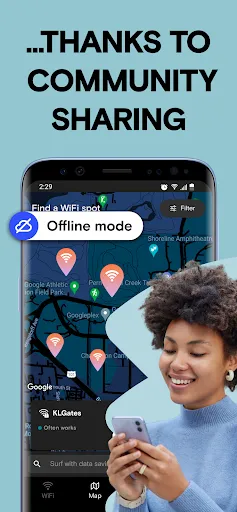
The app relies on a community-driven approach, allowing users to share and update WiFi information in real-time. This means you can benefit from the latest hotspot data, ensuring you always have access to the best available WiFi options in your area.

Offline Access

With the ability to download maps and hotspot information for offline use, Instabridge ensures you stay connected even when you're out of service range. This feature is perfect for travelers and adventurers who need reliable access without relying on mobile data.

Seamless Connection

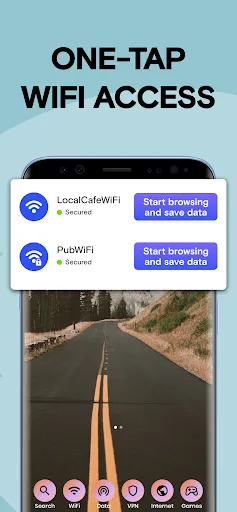
Instabridge simplifies the process of connecting to WiFi networks by automatically logging you in to previously saved hotspots. Forget the hassle of manually entering passwords; the app remembers your credentials, making internet access smoother and more convenient.

WiFi Hotspot Map

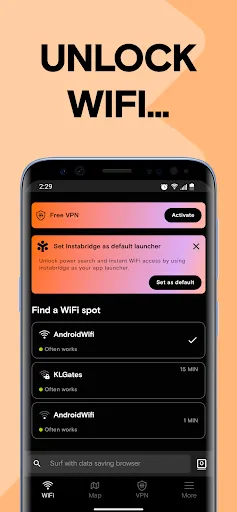
Instabridge offers an extensive map of WiFi hotspots, making it easy for users to find free and reliable internet access wherever they go. With a user-friendly interface, you can quickly locate nearby connections and enjoy browsing without the hassle of data charges.

Advertisement

Pros & Cons

Pros
  • Instabridge offers a vast, user-generated WiFi network for easy access.
  • Enjoy offline access to saved WiFi passwords and locations.
  • Seamlessly connect to WiFi without needing to ask for passwords.
  • Discover nearby hotspots and community-shared connections effortlessly.
  • Enhance travel experiences with global WiFi access in various locations.
Cons
  • Limited coverage in rural areas reduces accessibility for users.
  • User-contributed passwords may be unreliable or outdated.
  • Potential privacy concerns arise from sharing personal WiFi information.

Real Experience Using Instabridge: WiFi Hotspot Map

Real Experience Application Scenarios

Instabridge is a versatile app that serves a variety of users, from travelers seeking free WiFi in unfamiliar cities to remote workers looking for dependable internet connections. The app excels in urban environments where public WiFi is abundant yet often poorly documented. For instance, a tourist in Paris can seamlessly locate nearby coffee shops, parks, or libraries offering free access, allowing them to stay connected without incurring high data roaming charges. Additionally, locals can benefit from the app’s extensive user-generated database, which continually updates WiFi hotspots in real-time, ensuring that they always have access to reliable internet, whether at home, work, or on the go.

User Experience

The user experience of Instabridge is intuitive and user-friendly. Upon launching the app, users are greeted with a clean interface that makes navigation easy, even for those who may not be tech-savvy. The map feature is particularly impressive, displaying hotspots with clear icons and color coding to indicate connectivity strength. Users can also filter results based on their preferences, such as password-protected networks or those that require no login. Moreover, the ability to connect to hotspots automatically is a significant plus, facilitating a hassle-free experience. The social aspect of the app, where users can contribute to the WiFi database by adding new hotspots or sharing passwords, fosters a sense of community and enhances the overall functionality of the app.

Pricing

One of the standout features of Instabridge is its pricing model—or lack thereof. The app is completely free to download and use, making it accessible to everyone, regardless of budget constraints. Users do not face ads that disrupt their experience, a common issue in many free applications. The absence of a subscription model or hidden fees allows users to focus on connecting to WiFi without worrying about costs. This free model is particularly appealing for travelers and students, who often seek cost-effective solutions for their connectivity needs.

Updates & Support

Instabridge is committed to providing excellent support and regular updates to enhance user experience. The development team frequently rolls out updates that improve app performance, fix bugs, and expand the database of available hotspots. Users can easily report issues or suggest improvements through the app, and the responsive support team is dedicated to addressing user concerns promptly. This commitment to continuous improvement ensures that users can rely on the app for consistent performance and an ever-growing repository of WiFi locations, making it a staple tool for anyone in need of internet access.

verified Security & Privacy Review

Security & Privacy Review Instabridge prioritizes user security and privacy, ensuring that shared WiFi passwords and hotspot locations are handled responsibly. The app employs encryption protocols to protect sensitive information while in transit, minimizing the risk of unauthorized access. When it comes to permissions, Instabridge requires access to location services to provide users with accurate hotspot maps. However, it is essential for users to review these permissions and adjust them according to their comfort level. The app does not collect unnecessary personal data, focusing instead on offering a seamless experience without compromising user privacy. Instabridge maintains a transparent privacy policy that outlines data collection practices and how user information is utilized. Users can expect regular updates to the app, which often include security enhancements to further safeguard their data. Overall, Instabridge demonstrates a commitment to maintaining user trust through robust security measures and clear privacy practices.
Advertisement

User Reviews

  • Eric Meyer
    2026/02/02

    this app actually does a lot. however, it fails to deliver on some of it's key elements and functions. The fact is, it's misleading in a number of ways. firstly, although I was offline instabridge seemed to know my proximity and impressively offered me an array of wi-fi signals seemingly related to my location. However, no, I could not connect to any of them as indicated via instabridge, nor was the key wi fi signal I wanted to connect to currently transmitting a signal according to my phone.

  • Jazzysilva_4177
    2026/04/09

    As for free data, their system decides it automatically, & the option comes & goes depending on eligibility. So if the tab to watch ads for free MB is gone that's why. They say "we can't see or change when the offers return, but you may get them again later". If you've done something in their rules to somehow not be qualified there is no way to kno. I've had the app for nearly a year n it always worked fine. Now w the *sim app* combo it's come to this? DELETE!!!

  • Sylvia Rodriguez
    2024/10/02

    I never saw so many ads in my life pop up after downloading this and then it wouldn't allow you to uninstall easily. Had to stop use the hard way....ugh!!!! Whatever you do, do not set it as your default. It just wants your money to buy an adstopper. Ugh, had a horrible experience. It did do what it said, did find wifi spots and show locations and even gave you passwords...but that's all the good it did. Not worth the bombardment of ads.

  • Mrs.
    2024/12/21

    Most disturbing app I've ever used. The "wifi" comes with a search engine and etc. that takes over your phone without any permissions. It's like a virus. An ad is shown before search results. Before granting access to other apps, and when phone is not in use. Even after manually denying access. I couldn't even remove the app right away once I realized I no longer wanted the application in my phone.

  • whybother757
    2020/06/11

    The app plots WiFi locations, but nearly all of them are locked down. Of the open locations, most either don't work (if you dig for more info), or haven't been used in a long time. The only working WiFi I found was through trial and error, on my own. This app may be useful in Europe as it appears the primary user base is there, but in the US, it's worthless.

Review Source: Google Play store public user reviews.

FAQ

1

Can I submit suggestions or feedback to Instabridge: WiFi Hotspot Map?

Yes, users are encouraged to submit suggestions or feedback through the app’s support or contact features, helping improve future versions of the app.

2

Does Instabridge: WiFi Hotspot Map collect my personal data?

Instabridge takes user privacy seriously and does not collect personal data; however, it may collect non-personal data for app improvement purposes.

3

Does Instabridge: WiFi Hotspot Map support offline use?

Yes, Instabridge allows users to save WiFi hotspots for offline access, enabling connection even without an internet connection.

4

How do I cancel my Instabridge: WiFi Hotspot Map subscription?

Users can cancel their subscription through the app store settings on their device, following the standard cancellation process for subscriptions.

5

How much does a subscription to Instabridge: WiFi Hotspot Map cost?

Instabridge offers a premium subscription option, which typically costs a monthly fee, but specific pricing can vary based on promotions and updates.

How to use Instabridge: WiFi Hotspot Map

1

Can I access customer support without logging in?

Yes, you can access customer support through our website or by emailing us directly, no login required.

2

Can I change my customer number?

Unfortunately, you cannot change your customer number once it’s assigned. Contact customer service for assistance with any issues.

3

How can I contact customer service for Instabridge?

You can reach our customer service via the app's support section or email us directly at support

4

How do I activate my account for Instabridge?

Check your email for an activation link after signing up and click it to activate your account.

5

How do I log in on a new device?

Download the app, enter your email and password, and you’ll be able to log in on your new device.

What's New

• Enhanced WiFi finder for quicker hotspot connections. • Improved Caller ID accuracy for better spam blocking. • Faster VPN for smoother private browsing. • Optimized browser for reduced data usage. • Bug fixes and performance improvements.

Editor's Choice