This site uses cookies to enhance your user experience. By clicking any link on this site you are giving your consent to our cookie policy. Read more
Reject
Accept All

Advertiser and Editorial Disclosures

Gametime - Last Minute Tickets

Gametime - Last Minute Tickets

verified

Gametime

4.8
Rating
5,000,000+ Downloads
2026.1.1 Version
Advertisement
  • category

    Category: Events

  • price

    Price: free

  • age rating

    Age Rating: Everyone

  • rating

    Rating: 4.8

  • available on

    Available on: /

  • updated on

    Updated on: Jul 2, 2026

Screenshot 1
Screenshot 2
Screenshot 3
Screenshot 4
Screenshot 5
Screenshot 6
Screenshot 7
Screenshot 8
Advertisement

Features & Highlights

Flash Sales & Promotions

Stay on the lookout for exciting flash sales and exclusive promotions that Gametime frequently offers. These limited-time deals make attending your favorite events even more affordable, allowing you to enjoy live entertainment without breaking the bank. It's a great way to save while having fun!

Interactive Seat Map

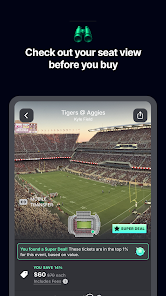
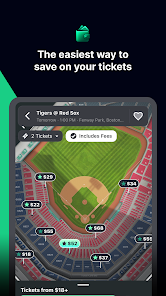
Get a better sense of your experience with Gametime's interactive seat map feature. This lets you visualize your seating options, helping you choose the best view for concerts, sports events, and more. You can easily compare prices and select seats that fit your budget and preferences.

Last Minute Deals

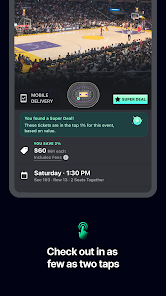
Gametime specializes in providing incredible last-minute ticket deals for various events, ensuring you never miss out on spontaneous fun. With a user-friendly interface, you can snag affordable tickets just hours before the show, making it perfect for on-the-go plans and spontaneous adventures.

User Reviews & Ratings

Make informed decisions with user reviews and ratings available for each event and venue. Gametime integrates real feedback from fellow fans, ensuring you have the insights needed to choose the perfect experience. This feature fosters a sense of community and helps you find the best events that suit your taste.

Advertisement

Pros & Cons

Pros
  • Discover unbeatable last-minute deals on tickets for events nationwide.
  • Enjoy a user-friendly app for seamless ticket purchasing.
  • Access exclusive offers and discounts not available elsewhere.
  • Experience instant delivery for hassle-free entry to your event.
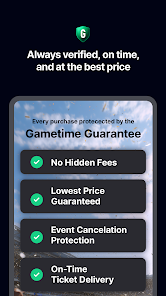
  • Benefit from a money-back guarantee for peace of mind.
Cons
  • Limited ticket availability can lead to higher prices at the last minute.
  • The app may experience technical issues during peak times, affecting user experience.
  • Some events may have restrictive refund policies, limiting flexibility for buyers.

Real Experience Using Gametime - Last Minute Tickets

Application Scenarios

The Gametime app is ideal for spontaneous event-goers looking to snag last-minute tickets to concerts, sports events, theater performances, and more. Whether you're in a new city and want to catch a local game or you suddenly find yourself free on a Friday night, Gametime caters to your last-minute plans. The app's intuitive design allows users to browse events happening in their vicinity and purchase tickets within minutes. It is particularly useful during peak seasons or major events where ticket availability can change rapidly, allowing users to grab a seat before they sell out.

User Experience

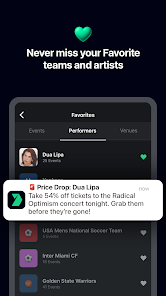
Users often commend Gametime for its user-friendly interface and seamless ticket purchasing process. Upon opening the app, users are greeted with a clean layout that showcases events based on their location and preferences. The use of high-quality images and detailed event descriptions further enhances the browsing experience. One of the standout features is the interactive seating chart, which allows users to visualize their options before making a purchase. Additionally, the quick checkout process, with multiple payment options, ensures that users can secure their tickets in real-time without unnecessary delays. Notifications for ticket price drops and exclusive offers add to the overall user satisfaction, making it a go-to app for last-minute event planning.

Pricing

Gametime’s pricing strategy is designed to appeal to budget-conscious consumers who may be looking for deals on last-minute tickets. The app often features discounted prices compared to traditional ticket vendors, making it a competitive choice. However, users should be aware that prices can vary significantly depending on demand and proximity to the event date. While there may be additional service fees, many users find that the savings on the ticket price itself often outweighs these costs. For those who frequently attend events, Gametime's loyalty program offers rewards that can further enhance the value of using the app.

Updates & Support

Gametime is committed to providing a robust support system for its users. Regular updates are pushed to enhance app functionality and address any bugs, ensuring a smooth experience for all users. The customer support team is accessible through the app, offering assistance via chat and email for any issues related to purchases or account management. Users have reported positive experiences with the support team, noting quick response times and helpful resolutions. The app also includes a comprehensive FAQ section, which provides answers to common questions and helps users navigate their inquiries efficiently.

verified Security & Privacy Review

The Gametime app prioritizes user security and privacy, ensuring that personal information is handled with care. The app employs advanced encryption technologies to protect sensitive data during transactions, minimizing the risk of unauthorized access. Users are encouraged to set up strong passwords and enable two-factor authentication for an added layer of security. In terms of permissions, Gametime requires access to location services to provide users with tailored ticket options based on their proximity to events. However, users can manage these permissions according to their preferences, allowing for a customizable experience while maintaining privacy. The app also limits data collection to only what is necessary for its functionality, ensuring minimal intrusion into personal lives. Gametime's privacy policy is transparent, detailing how user data is collected, stored, and utilized. The app commits to never selling user information to third parties, reinforcing its dedication to protecting user privacy. Overall, Gametime provides a secure environment for purchasing last-minute tickets, balancing convenience and user confidentiality effectively.
Advertisement

User Reviews

  • Tony F
    2026/02/27

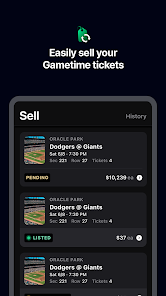
    Can't get a full refund for my ticket, I have to resell them at a lower price instead. Meanwhile ticketmaster pretty much guaruntees a full refund if you can't make your event. On top of that, reselling your ticket is very complicated, and everything is done YOURSELF. The sale, the ticket transfer, handled by YOU, with zero instructions on how to do anything. Customer Service is also completely useless. This app is made to steal people's money, and I will tell everyone this.

  • Kourtney Emerick
    2025/09/04

    Awful app and worse customer service. They don't actually follow through on any of their "guarantees" and you'll be lucky to get any tickets you already paid for before the event. They'll change the delivery date any time you try to get assistance, and refuse to price match even though it's their biggest advertisement. Don't waste your time or money with this freaking app.

  • James Bray
    2026/06/23

    The resell experience is hell! I just wanted to refund my tickets, but instead, they make you resell your tickets. That might be okay, but between the 10% they take from what you sell it for and the extra 10% they tack on to the next buyer as a "convenience fee" or something, they either kill the seller, the buyer, or both. I'm grateful that I was able to buy the tickets from them in the 1st place before the change of plans happened, so I won't give them 1 star.

  • Kandyce Cox
    2026/05/29

    Overall, I have had a great experience. The only problems I have had is when it's time to get tickets that I have purchased. It seems to be difficult retrieving tickets. I always have to download another app, and half the time the purchased tickets wont show up. The last show I went to, we got turned away, because the online tickets wouldn't scan.

  • Jake Riddell
    2026/05/24

    My go-to ticket app, but the numbers/prices remain small when you zoom in... and most importantly, right when I'm finalizing a purchase, I'll often get a pop-up that says I can't complete the purchase because I'm using an email already associated with an existing account. That account belongs to me and is the one I use to log into the app. It's important because it's not immediately clear whether my money has been taken, which is obviously an unsettling and negative experience.

Review Source: Google Play store public user reviews.

FAQ

1

Can I submit suggestions or feedback to Gametime - Last Minute Tickets?

Yes, users can submit suggestions or feedback through the app's support or contact feature, allowing the team to improve the overall experience.

2

Does Gametime - Last Minute Tickets collect my personal data?

Yes, Gametime - Last Minute Tickets collects personal data necessary for processing transactions, improving user experience, and for marketing purposes, as outlined in their privacy policy.

3

Does Gametime - Last Minute Tickets support offline use?

While certain features may be limited, you can access previously purchased tickets offline through the app, but an internet connection is required for browsing and purchasing new tickets.

4

How do I cancel my Gametime - Last Minute Tickets subscription?

Since there is no subscription fee for using the app, there is no need to cancel a subscription; users simply pay for tickets as needed.

5

How much does a subscription to Gametime - Last Minute Tickets cost?

Gametime - Last Minute Tickets does not require a subscription to access its services; users only pay for the tickets they buy.

How to use Gametime - Last Minute Tickets

1

Can I change my customer number?

Unfortunately, customer numbers cannot be changed. If you have concerns, please contact customer service for more information.

2

How can I activate my account after signing up?

To activate your account, check your email for a confirmation link and follow the instructions. If you didn't receive it, please contact customer service.

3

How do I contact customer service for help?

You can reach our customer service through the help section in the app or website, where you can chat with an agent or find our support number.

4

How do I update my customer information?

You can update your customer information in your account settings. If you need help, contact customer service for guidance.

5

I forgot my customer number. How can I retrieve it?

If you've lost your customer number, please check your account settings or contact customer service for assistance.

What's New

This release contains minor bug fixes and improvements.

Editor's Choice