This site uses cookies to enhance your user experience. By clicking any link on this site you are giving your consent to our cookie policy. Read more
Reject
Accept All

Advertiser and Editorial Disclosures

Game booster GFX Fire Fix

Game booster GFX Fire Fix

verified

Royal Games Boosters

4.6
Rating
500,000+ Downloads
25.09.27 Version
Advertisement
  • category

    Category: Libraries & Demo

  • price

    Price: free

  • age rating

    Age Rating: Everyone

  • rating

    Rating: 4.6

  • available on

    Available on: /

  • updated on

    Updated on: Mar 24, 2026

Screenshot 1
Screenshot 2
Screenshot 3
Screenshot 4
Screenshot 5
Screenshot 6
Screenshot 7
Advertisement

Features & Highlights

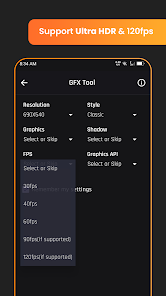
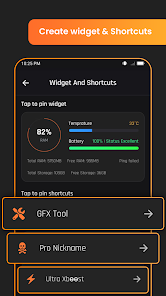
Customizable Graphics Settings

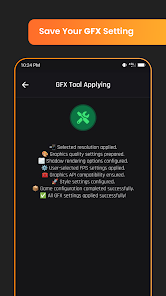
The app offers a wide range of customizable graphics settings that allow you to enhance visual quality without sacrificing performance. You can adjust resolution, texture quality, and frame rates, tailoring the graphics to match your device's capabilities and personal preferences for an optimized gaming experience.

One-Tap Optimization

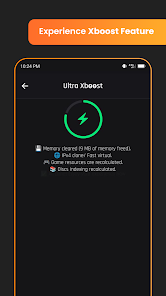
With its one-tap optimization feature, Game booster GFX Fire Fix simplifies the process of enhancing your gaming performance. Just a single tap activates a series of background processes that free up resources, ensuring your games run smoothly and efficiently without the hassle of manual adjustments.

Real-Time Monitoring

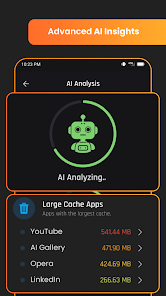
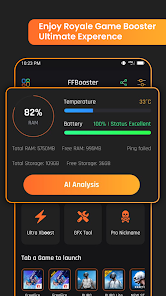
Stay informed about your device's performance with the real-time monitoring feature. This capability provides insights into CPU and GPU usage, temperature, and memory consumption, allowing you to make informed adjustments and keep your device running at its best while gaming.

Smooth Gameplay Experience

Game booster GFX Fire Fix optimizes your device's performance, ensuring a smoother gameplay experience by reducing lag and stuttering. With its advanced settings, you can tweak graphics and performance parameters to suit your gaming style, making every session more enjoyable and immersive.

Advertisement

Pros & Cons

Pros
  • Experience smoother gameplay
  • Enhance graphics performance
  • Reduce lag and stuttering
  • Optimize device resources
  • Easy-to-use interface
Cons
  • Limited compatibility issues
  • May not significantly improve FPS
  • Potential for system instability
  • Ads can be intrusive for users

Real Experience Using Game booster GFX Fire Fix

Real Experience Application Scenarios

Game Booster GFX Fire Fix is designed for mobile gamers looking to enhance their gaming experience. It caters particularly to users who play graphic-intensive games that demand high performance from their devices. Whether you are engaging in battle royale games, racing simulations, or expansive RPGs, this app promises to optimize your gameplay by improving frame rates and reducing lag. It is especially useful in scenarios where you need to maximize your device’s capabilities, such as during competitive matches or while exploring vast open worlds. Players can easily switch between different graphic settings to find the perfect balance between visual quality and performance, making it a versatile tool for any gaming session.

User Experience

The user experience offered by Game Booster GFX Fire Fix is intuitive and user-friendly. Upon launching the app, users are greeted with a clean interface that clearly displays the various settings available for optimization. The process of boosting game performance is straightforward, allowing users to adjust settings without requiring technical expertise. Many users report a noticeable improvement in game responsiveness and visual quality after using the app. The ability to customize resolutions and frame rates has been particularly praised, as it allows gamers to tailor the experience to their specific device capabilities. Furthermore, the app runs smoothly in the background, ensuring that gameplay is uninterrupted. However, some users have noted occasional compatibility issues with certain games, which can be frustrating during gameplay.

Pricing

Game Booster GFX Fire Fix adopts a freemium model, allowing users to download and access basic features for free. This is an appealing aspect for gamers who want to test the app before committing to any financial investment. For those seeking advanced features, a premium subscription is available, offering additional settings and optimizations. The pricing structure is competitive compared to similar apps in the market, making it an attractive option for budget-conscious gamers. Overall, the pricing strategy aligns well with the app's offerings, providing good value for both casual and serious gamers.

Updates & Support

The developers of Game Booster GFX Fire Fix are committed to providing regular updates, which is crucial in the ever-evolving gaming landscape. Users can expect periodic enhancements and bug fixes that improve functionality and compatibility with new games and device models. The support system is also commendable, with a dedicated customer service team that addresses user inquiries and issues promptly. Feedback from users is actively considered for future updates, ensuring that the app continues to meet the needs of the gaming community. Overall, the combination of consistent updates and responsive support contributes positively to the overall user experience.

verified Security & Privacy Review

Security & Privacy Review The Game Booster GFX Fire Fix app prioritizes user security and privacy by implementing standard data protection measures. The app requires certain permissions to function effectively, including access to storage and network connectivity. However, it does not request unnecessary permissions that could compromise user privacy. Data handling practices appear to be transparent, with no indication of collecting personal information beyond what is essential for the app’s operation. The developers have not specified any data sharing with third parties, which is a positive aspect for privacy-conscious users. Additionally, the app includes features that enhance gaming performance without compromising device security. Regular updates are expected to address any potential vulnerabilities, ensuring that user data remains secure. Overall, Game Booster GFX Fire Fix demonstrates a commitment to maintaining user privacy while providing an optimized gaming experience.
Advertisement

User Reviews

  • Hannah Zan Arlert
    2026/05/11

    Highly recommended. I have an mid end device and I was super laggy at Roblox and I have tried many booster apps and this one was only working. my FPS goes to 20 to 60+(sorry if my english is bad)

  • mim mansura
    2026/06/01

    It works 100% for me! Tip: Don't try to apply settings. Just choose your gfx settings, click on "remember my settings", press the back button and finally launch FF or FF max from this app. Done

  • HK MEL
    2026/04/21

    The best game booster i have ever used till now, for my current network and it's free to use.

  • Luis
    2026/05/25

    garbage garbage garbage. Why is their ads in a fps booster. And also why dose it say booster call of duty and other game and i don't have them I tried roblox and nothing. It made me from 120 fps to. 80 fps. And also I am in my house. so this is why I gave this a 1 star. I wish I can make this 0 stars

  • abtahi eban
    2026/05/25

    It is my fast app. I like it very much. I play free fire very fast.

Review Source: Google Play store public user reviews.

FAQ

1

Can I customize settings within the app?

Yes, the Game Booster GFX Fire Fix app allows users to customize various settings based on their preferences. Users can adjust graphics quality, resolution, and other parameters to optimize performance according to their device capabilities and gaming needs.

2

Can this app be used on all mobile games?

The Game Booster GFX Fire Fix app can be used on a wide range of mobile games, particularly those that are graphics-intensive. However, the effectiveness may vary depending on the game's optimization and the device's hardware capabilities. Some games might not see significant improvements.

3

Do I need a high-end device to use this app?

No, you do not necessarily need a high-end device to use the Game Booster GFX Fire Fix app. While the app is designed to enhance performance, even mid-range or entry-level devices can benefit from its optimizations. However, the extent of improvement may vary based on the device's specifications.

4

Does the app require an internet connection to function?

The Game Booster GFX Fire Fix app does not require a constant internet connection to function. However, some features, such as downloading updates or accessing online settings, may need an internet connection. For offline gaming, the app can still optimize performance.

5

How do I uninstall the app if I no longer need it?

Uninstalling the Game Booster GFX Fire Fix app is straightforward. Simply go to your device's settings, navigate to the 'Apps' section, find the app, and select 'Uninstall.' Alternatively, you can long-press the app icon on your home screen and drag it to the uninstall option that appears.

How to use Game booster GFX Fire Fix

1

How can I contact customer service for the Game Booster GFX Fire Fix app?

You can reach customer service through the app's support section or visit their official website for assistance.

2

How do I activate the premium features of the Game Booster GFX Fire Fix app?

To activate premium features, purchase a subscription through the app’s settings and follow the prompts to complete the transaction.

3

How do I log in to the Game Booster GFX Fire Fix app?

Open the app and enter your credentials or sign in using your linked social media account.

4

Is there a customer number I can call for support?

The app typically does not provide a direct phone number; support is usually handled via email or in-app chat.

What's New

👍 Crashes fixed.💪 App performance improved.🔥 User Interface Improved.

Editor's Choice