This site uses cookies to enhance your user experience. By clicking any link on this site you are giving your consent to our cookie policy. Read more
Reject
Accept All

Advertiser and Editorial Disclosures

Customuse: Skins Maker Roblox

Customuse: Skins Maker Roblox

verified

Customuse

4.7
Rating
10,000,000+ Downloads
1.75.0 Version
Advertisement
  • category

    Category: Art & Design

  • price

    Price: free

  • age rating

    Age Rating: Everyone

  • rating

    Rating: 4.7

  • available on

    Available on: /

  • updated on

    Updated on: Jun 22, 2026

Screenshot 1
Screenshot 2
Screenshot 3
Screenshot 4
Screenshot 5
Screenshot 6
Screenshot 7
Screenshot 8
Screenshot 9
Screenshot 10
Screenshot 11
Screenshot 12
Screenshot 13
Screenshot 14
Screenshot 15
Screenshot 16
Screenshot 17
Screenshot 18
Screenshot 19
Screenshot 20
Screenshot 21
Screenshot 22
Screenshot 23
Screenshot 24
Advertisement

Features & Highlights

Customizable Skin Designs

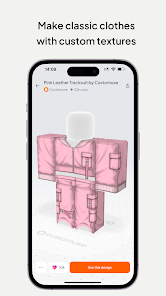
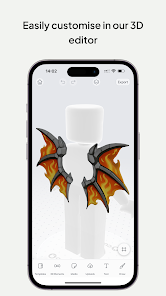
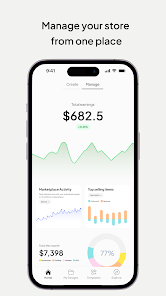
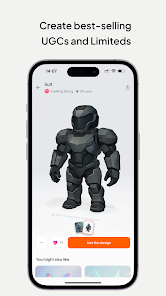
With Customuse, you can unleash your creativity by designing unique skins for your Roblox characters. The app offers a variety of tools and templates to help you create personalized looks that stand out in the game, ensuring your avatar reflects your individual style.

In-App Sharing Options

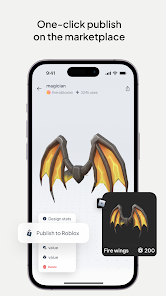
Once you've crafted the perfect skin, sharing it with friends is just a tap away. Customuse provides seamless options to showcase your designs within the Roblox community, making it easy to gain feedback and inspire others with your creations.

Regular Updates & New Features

Customuse keeps the creativity flowing with regular updates that introduce new tools and features. This ensures that you always have access to the latest design elements and trends, so your skins never go out of style and you can continuously enhance your creative skills.

User-Friendly Interface

Navigating through Customuse is a breeze thanks to its intuitive interface. Whether you’re a seasoned designer or a beginner, the streamlined design makes it easy to access all features, allowing you to focus on creating stunning skins without any hassle.

Advertisement

Pros & Cons

Pros
  • Create unique skins effortlessly
  • Customize designs with intuitive tools
  • Access a vast library of assets
  • Share creations with the community
  • Enjoy regular updates and new features
Cons
  • Limited customization options hinder creativity.
  • High costs for premium features deter users.
  • User interface can be confusing for beginners.
  • Slow updates affect the latest trends.

Real Experience Using Customuse: Skins Maker Roblox

Application Scenarios

Customuse: Skins Maker Roblox is designed for Roblox enthusiasts who want to express their creativity through personalized avatars. This app allows users to create unique skins that can be applied directly to their Roblox characters, making it ideal for gamers looking to stand out in the vast Roblox universe. Whether you're a casual player wanting to add a personal touch to your avatar or a dedicated gamer aiming to develop intricate designs, Customuse provides the tools necessary for a wide range of customization. Users can explore different styles, colors, and patterns, making it an excellent option for both individual expression and social sharing among friends. The app is particularly useful when preparing for special events or themed games within Roblox, as it allows for timely and relevant skin creation.

User Experience

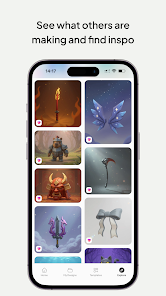
The user experience in Customuse is generally positive, with an intuitive interface that simplifies the design process. Upon opening the app, users are greeted with a clear layout that guides them through creating their skins step-by-step. The drag-and-drop functionality allows for easy placement of elements, and the extensive library of pre-made designs offers inspiration and a base for customization. Users have reported that the color picker and layering features are particularly well-designed, providing a professional touch to amateur designs. However, some users may find the learning curve steep when attempting to create more complex skins. Overall, the app strikes a good balance between accessibility for beginners and depth for advanced users.

Pricing

Customuse: Skins Maker Roblox operates on a freemium model, allowing users to download and access basic features at no cost. However, to unlock premium tools and exclusive content, users can opt for a subscription or make in-app purchases. The pricing is reasonable considering the extensive features offered, but some users have expressed a desire for a one-time purchase option rather than ongoing payments. Overall, the app's pricing structure is competitive within the realm of customization tools for gaming.

Updates & Support

The developers of Customuse are committed to providing regular updates, which enhances the app's functionality and keeps up with the latest trends in Roblox. Users can expect new features, design elements, and bug fixes to be rolled out frequently. Additionally, the support system is responsive, with a dedicated help center and community forums where users can seek assistance and share tips. Feedback from the community is actively encouraged, making users feel valued and involved in the app's ongoing development. This dedication to user support and continuous improvement significantly enhances the overall experience of using Customuse.

verified Security & Privacy Review

Security and privacy are paramount concerns for users of Customuse: Skins Maker Roblox. The app implements standard security measures to protect user data, including encryption protocols to safeguard personal information during transmission. However, users should remain vigilant as the app may require access to certain permissions on their devices, such as storage and internet connectivity, to function effectively. Customuse maintains a privacy policy that outlines the types of data collected, including user-generated content and preferences. While the app does not explicitly state the sharing of personal information with third parties, users should be aware of the potential for data to be aggregated for analytics purposes. It is advisable for users to review the privacy policy in detail to understand how their data is handled. Furthermore, users are encouraged to manage their privacy settings within the app and on their devices to limit data access as needed. Overall, while Customuse appears to prioritize user security, a cautious approach to data sharing is recommended for all users.
Advertisement

User Reviews

  • Chicken Nuggie Chan
    2026/06/14

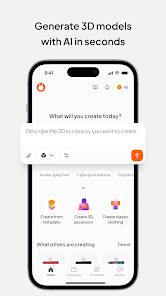
    Really bad app, has no way to DIY, you can't create anything customly or originally, they force you into a 14$ subscription the moment you join and the only way for you to make anything remotely even possible it's through AI, there's no way to make your own items, It also costs credits to generate anything 3D so this app is really useless if you buy the subscription, don't buy it because you will also need to buy credits. You're better off putting your money towards a PC.

  • Deyser Mirada
    2024/03/05

    If you're on a budget like me then you would find being on the basic plan. I would find things more limited than only being able to upload once. This would be the struggles making your own clothing on a game than paying for a subscription you possibly might leave it on without using for a long period of time. Loosing 💵. Also the AI does not accurately load anything of what I really wanted. For example, when using it and used the word "Money" you would rather find a symbol rather than money.

  • Daisha Harris
    2025/07/11

    so far seems pretty good, if anything really goes wrong I'll probably edit my review ofc! 🫶 Edit: constantly bombarded by pro!! it was kinda really hard to figure everything out even with help, then again my mind is a little slow so, but there were very few things for 3D editing and to upload stuff you need a computer or something at least! and I don't have that! so it's a bit sad but, i guess it's fine. My cousin is trying it out and he likes it, he's creating tons of things for me now lol.

  • Bram Neely
    2025/07/06

    Absolute complete and utter waste of time. Don't make any designs on this "free" platform unless you plan on spending tons of money. they say only some features are locked behind the paywall but they mean the IMPORTANT features cost money. anything pointless, you can do for free. Spent tons of time making some shorts and pants and then could not download to upload unless I went pro.

  • Felix Lovekin
    2024/03/04

    Although I somewhat enjoyed using it, the fact that the "cancel subscription" is SO hard to find is what brings me to a one star. Because honestly, there is NO point to have it as hidden as it is, especially when going through settings. You HAVE an area that already says I'm "Subscription: Pro" yet no way to cancel it. I'll change this review when I'm actually able to FIND the cancel subscription button. Because guess what? Still haven't found it!

Review Source: Google Play store public user reviews.

FAQ

1

Does Customuse: Skins Maker Roblox collect my personal data?

Yes, Customuse: Skins Maker Roblox may collect some personal data as outlined in their privacy policy, primarily to enhance user experience and improve app functionality.

2

Does Customuse: Skins Maker Roblox offer a free trial or free version?

Customuse: Skins Maker Roblox typically offers a free version with limited features, while additional premium features may require a subscription.

3

Does Customuse: Skins Maker Roblox require an internet connection?

While some features may require an internet connection for downloading assets or sharing designs, many functionalities can be accessed offline.

4

How can I contact support or send feedback for Customuse: Skins Maker Roblox?

Users can contact support or send feedback through the app's help section or visit the official website for additional support options.

5

How do I manage or cancel my Customuse: Skins Maker Roblox subscription?

Users can manage or cancel their subscription through the app settings or the app store where the purchase was made, following the provided instructions.

How to use Customuse: Skins Maker Roblox

1

How can I contact customer service for Customuse: Skins Maker?

You can reach customer service through the app’s settings or the official website for support inquiries.

2

How do I log in to my Customuse account?

To log in, open the app, enter your credentials, and tap the login button.

3

Is there a way to activate my Customuse account?

If required, you can activate your account through an email confirmation sent upon registration. Check your inbox for the activation link.

4

What is the customer number for support?

The customer number can typically be found in the app under the Help or Support section.

Editor's Choice