Home
Home  Apps
Apps  Games
Games  Windows
  Terms of Service
  Cookies & Privacy Policy
  Disclaimer
 Card Lock Feature
Gain peace of mind with the ability to lock and unlock your credit card instantly. If your card is lost or stolen, simply use this feature to prevent unauthorized charges while you search for your card or wait for a replacement.


Capital One Services, LLC
 4.5
4.5 
Category: Finance

Price: free

Age Rating: Everyone

Rating: 4.5

Available on: /

Updated on: Jul 6, 2026
Gain peace of mind with the ability to lock and unlock your credit card instantly. If your card is lost or stolen, simply use this feature to prevent unauthorized charges while you search for your card or wait for a replacement.
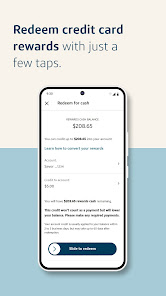
Pay your bills effortlessly through the Capital One Mobile app with just a few taps. You can set up one-time or recurring payments, helping you maintain a hassle-free financial routine while avoiding late fees and keeping your credit score intact.
Utilize interactive budgeting tools that help you track your spending patterns and set financial goals. By analyzing your expenses, you can make informed decisions, save more effectively, and ultimately gain better control over your financial health.
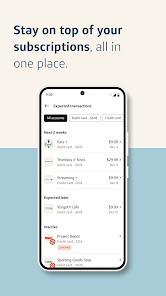
Stay on top of your finances with real-time alerts that notify you about your account activity, transactions, and payment reminders. This feature helps you manage your spending and stay informed, ensuring you never miss a critical update about your money.

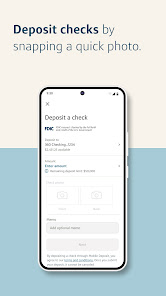
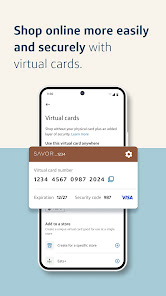
 Easily track your spending in real-time for better budgeting. Access your accounts securely with advanced encryption technology. Quickly deposit checks using your mobile device's camera. Receive personalized alerts for important account activity and offers. Enjoy seamless integration with digital wallets for easy payments.
 Limited customer support options can lead to frustrating experiences. App performance may suffer during high traffic times. Some features may not work seamlessly with all devices.
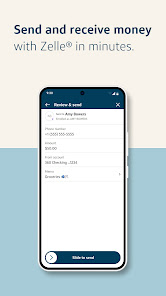
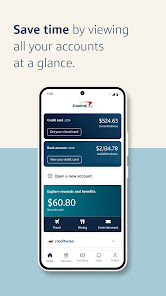
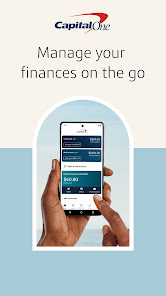
 The Capital One Mobile app serves as a versatile tool for managing your finances on the go. Whether you are checking your account balance before making a purchase, reviewing your transaction history, or paying your credit card bill, this app covers all your banking needs in one place. Users can also use the app to monitor their credit score, which is a valuable feature for those actively working on improving their financial health. Additionally, the app is particularly useful for travelers, as it allows you to manage your cards, set travel notifications, and even freeze or unfreeze your card instantly if it gets misplaced. This versatility makes it an essential companion for anyone looking to take control of their financial life.
The user experience on the Capital One Mobile app is designed to be intuitive and user-friendly. The interface is clean and modern, allowing users to navigate through various features with ease. Upon logging in, users are greeted with a dashboard that provides a snapshot of their accounts, recent transactions, and personalized insights. The app's features are organized logically, making it easy to find what you need without unnecessary clicks. Moreover, the security measures in place, such as biometric login options and two-factor authentication, provide users with peace of mind while managing their finances. Overall, the app combines functionality with a pleasing aesthetic, ensuring that users can manage their money efficiently.
The Capital One Mobile app is free to download and use for all Capital One customers. There are no hidden fees associated with using the app itself, and it offers a wide range of features at no additional cost. Users can access their account information, make payments, and utilize budgeting tools without paying a subscription fee. This makes it an attractive option for those looking for a comprehensive banking solution without the burden of monthly charges. However, it’s important to note that while the app is free, standard banking fees may apply to certain transactions or account types, so users should remain aware of their specific account agreements.
Capital One is committed to continuously improving its mobile app experience. Regular updates are rolled out to enhance functionality, fix bugs, and introduce new features based on user feedback. These updates ensure that the app remains relevant and user-friendly in a rapidly evolving digital landscape. In terms of customer support, the app provides various channels for assistance, including a comprehensive FAQ section, live chat options, and the ability to contact customer service directly. This level of support ensures that users can resolve any issues they encounter swiftly and efficiently, making the overall experience more satisfactory.
Security & Privacy Review
 Google Play
  App Store


Account details no longer opening so I can no longer see interest rate, etc for accounts which is frustrating. PLEASE FIX THIS! I rarely use bill pay after it was "updated" but I have moved on to other ways to pay so I can live with that. I do like how easy it is to open and close accounts and see them all in one place and the ease of accessing the app. Editing rating because the issue with the account details button was fixed. Thank you!
Would like to like this app, but it has three annoying problems. The first is that managing eno virtual numbers is just not possible. The second is organization - finding what I want isn't easy... in part because eno is a dumb bot, as well as a virtual card manager. You end up wasting time trying to get the right text only to land on an unexpected web page. If you try to use the web, it cycles back through the app. 2fa is a hassle. I really don't want to have to have my phone to bank online.
I've banked with Capital One for many years and have always been very happy with them and the app....until recently. I do not understand the logic of making me have to receive a code for two part authentication when I'm signing in with biometrics. It's a little frustrating and makes it take longer to do what used to be super quick. Everything else is still great.
So the main reason I use this app is to make my monthly credit card payment. More than often the due date falls on the weekend and a few times now I forgot to make the payment on a Friday. Conveniently Capital One will not let you schedule a payment to be processed over the weekend. All my other accounts let me why not you guys??? I've been getting late fees because of it and auto pay will not even give you the option to pay full amount!! I'm about to cancel my account because of this nonsense!
App is broken. Can't report fraud, can't get a replacement card, just an error message and a phone number. They want you want to spend hours on hold trying to fix an issue that should take 30 seconds in the app. It's inexcusable to have such an important security feature be unavailable for months! I've locked my capital one account and will no longer be using this bank. Every other bank can resolve these issues instantly through an app or website, forcing customers to sit on hold is unacceptable
Review Source: Google Play store public user reviews.
Yes, users can submit suggestions or feedback through the app's support section or by contacting Capital One customer service directly.
Yes, Capital One Mobile collects personal data to enhance user experience, improve services, and ensure security, but it adheres to privacy policies to protect your information.
Capital One Mobile requires an internet connection to access most features, but certain information may be viewable offline if previously downloaded.
Since Capital One Mobile does not have a subscription model, there is no need to cancel; you can simply uninstall the app if you no longer wish to use it.
There is no subscription cost associated with Capital One Mobile, as it is free to use for all Capital One account holders.
Yes, you can access Customer Service through the app by selecting the "Help" or "Support" section for assistance.
Yes, you can activate your account by selecting the "Activate Account" option on the app's login screen.
You’ll need to contact Customer Service for help in updating your Customer Number. They can guide you through the process.
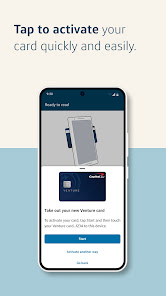
To activate your debit card, log in to the app, select "Activate Card" from the menu, and follow the instructions provided.
You can reach Customer Service by calling the number on the back of your card or through the app’s support section.
Thanks for using Capital One Mobile. We make regular updates to our app to ensure your mobile banking experience is top notch. Each new version of our app includes improvements to make it faster and more reliable, bug fixes and new features which we'll highlight here so you know what's new!