This site uses cookies to enhance your user experience. By clicking any link on this site you are giving your consent to our cookie policy. Read more
Reject
Accept All

Advertiser and Editorial Disclosures

Yuka - Food & Cosmetic Scanner

Yuka - Food & Cosmetic Scanner

verified

Yuka App

4.8
Rating
10,000,000+ Downloads
4.54.1 Version
Advertisement
  • category

    Category: Health & Fitness

  • price

    Price: free

  • age rating

    Age Rating: Everyone

  • rating

    Rating: 4.8

  • available on

    Available on: /

  • updated on

    Updated on: Jul 1, 2026

Screenshot 1
Screenshot 2
Screenshot 3
Screenshot 4
Screenshot 5
Screenshot 6
Advertisement

Features & Highlights

Community Insights

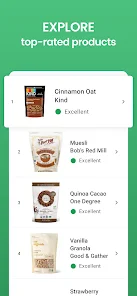
With a robust community of users sharing their experiences and product reviews, Yuka fosters a sense of collective knowledge and support. This feature allows you to see ratings from fellow users, helping you to choose products that are not only safe but also well-loved by others.

Personalized Recommendations

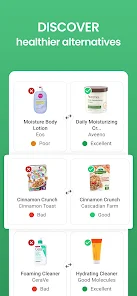
Based on your scanned products and preferences, Yuka offers personalized suggestions for healthier alternatives. This feature empowers you to switch to better options, enhancing your overall well-being while shopping for food and cosmetics.

Real-Time Scanning

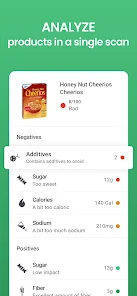
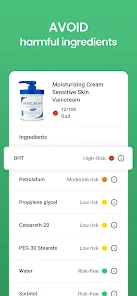
Yuka allows users to scan barcodes of food and cosmetic products in real-time, providing instant access to detailed information about their ingredients. This feature helps you make informed choices by revealing hidden additives, allergens, and nutritional values, all at your fingertips.

User-Friendly Interface

Yuka boasts an intuitive and easy-to-navigate interface that makes scanning and browsing products a breeze. With simple design elements and clear visuals, even those new to the app can quickly learn how to use it effectively for their health goals.

Advertisement

Pros & Cons

Pros
  • Easily scan products for health ratings
  • Discover natural alternatives for better choices
  • Access detailed ingredient information instantly
  • Make informed decisions for your family’s wellness
  • Track personal preferences and favorites effortlessly
Cons
  • Limited database for certain local products
  • Scanning accuracy can vary significantly
  • User ratings may not reflect true quality
  • No comprehensive ingredient explanations provided

Real Experience Using Yuka - Food & Cosmetic Scanner

Application Scenarios

The Yuka app is designed for health-conscious consumers who want to make informed choices about the food they eat and the cosmetics they use. Whether you are grocery shopping, preparing a meal, or browsing the beauty aisle, Yuka serves as a reliable companion. Users can scan product barcodes to quickly access detailed information about their nutritional value and ingredient safety. This feature is particularly useful for individuals with specific dietary needs, such as those avoiding allergens or seeking organic options. Moreover, the app is ideal for beauty enthusiasts keen on understanding the impact of ingredients in their skincare and makeup products. By providing ratings based on health impacts, Yuka empowers users to select healthier alternatives, making it an invaluable tool in daily living.

User Experience

The overall user experience with Yuka is largely positive, marked by its intuitive interface and seamless functionality. Upon opening the app, users are greeted with a clean, minimalistic design that makes navigation easy. The scanning process is quick, and the app typically returns results in a matter of seconds, providing a detailed breakdown of the scanned item. Users appreciate the transparency of the ratings system, which ranges from green (good) to red (bad), making it easy to grasp at a glance. The app also features a personalized profile where users can track their favorite products and receive tailored recommendations. However, some users have noted that the database, while extensive, may lack certain niche or local products. Overall, the engaging user interface combined with informative content makes for an enjoyable experience.

Pricing

Yuka operates on a freemium model, allowing users to access a substantial portion of its features for free. The free version includes barcode scanning, product information, and health ratings. For those seeking additional features, a premium subscription is available, which unlocks advanced functionalities such as personalized food recommendations based on dietary preferences and a more extensive product database. The premium subscription is reasonably priced, making it accessible for most users. This model ensures that everyone can benefit from the core features while offering enhanced capabilities for those who want to dive deeper into health and wellness.

Updates & Support

Yuka is committed to continuous improvement, regularly updating its database and app features to enhance user experience. The development team actively listens to user feedback and implements changes based on suggestions and reported issues. Users can expect frequent updates that not only refine existing functionalities but also introduce new features that expand the app's capabilities. Customer support is readily available through the app, with a dedicated team that responds promptly to inquiries and concerns. The app's FAQ section also provides helpful information for common questions, ensuring users have access to the resources they need for a smooth experience.

verified Security & Privacy Review

The Yuka app prioritizes user security and privacy by implementing robust data protection measures. It ensures that personal information is encrypted both in transit and at rest, minimizing the risk of unauthorized access. The app does not require an account to use its core functionalities, allowing users to scan products without providing personal details, which enhances privacy. Yuka requests minimal permissions, primarily accessing the camera for scanning barcodes and, if desired, location services to improve product recommendations. Users are informed about these permissions, and they can choose to grant or deny them based on their comfort level. Regarding user data handling, Yuka adheres to strict privacy policies, ensuring that any collected data is used solely for enhancing user experience and is not shared with third parties without consent. The app does not display intrusive ads, further protecting user data from potential tracking by advertisers. Overall, Yuka demonstrates a strong commitment to maintaining user privacy and security, making it a trustworthy choice for consumers concerned about their data.
Advertisement

User Reviews

  • Douglas Lawson
    2025/01/04

    Excellent! See what you're eating! Greatly exceeds my expectations. Simple to use. Scan the bar code of any food item - it quickly provides a score with a breakdown of the good and bad. I quickly scanned most of the things in my pantry used regularly and immediately identified 3 or 4 things to eliminate/reduce/replace in my diet. Some scores are obvious - butter is bad with high fat, calories. But, my "healthy" non-butter spread was much worse! It suggests healthier alternatives. Great app!

  • Debbie Medina
    2024/12/27

    It's a great app! Free version. The work behind the scenes saves me the time from having to do the research. There's a breakdown of ingredients and explain the risk factors. They provide healthier alternatives as well. No ads, a plus! I look forward to seeing more products added. For a small yearly subscription, there's more. Thank you, Yuka Team!

  • Asher Madalena
    2025/08/05

    Great app. Very useful, it informs you of all of the positives and negatives of each product on your health. The only problem I have, is that it takes points off the total score if there are any additives at all, even if they are no-risk. Which, isn't much of a problem for me because I can decipher that myself, but it may not be accurate for people who base their judgement, purely off the number.

  • Kevin R
    2024/11/14

    Overall all great app and very eye-opening the chemicals in our foods. One thing I would suggest is the ability to see what grocery stores carry the products listed under the (alternative) Recommendations, or even a filter where I can select only recommendations that are available at a particular grocery store. That would be very helpful as I don't know if my store carries all the ones that are listed.

  • Jay
    2026/07/02

    I've used Yuka for a long time, and for the most part, it is a great app, but more and more I've noticed that there are often different scores for the same product people have posted in the app. Ex: Body lotion that's listed 2 or more times when searched for a specific brand, and there will sometimes be different scoring or ingredients listed on the same product. It's annoying and unreliable in that sense.

Review Source: Google Play store public user reviews.

FAQ

1

Does Yuka - Food & Cosmetic Scanner collect my personal data?

Yuka is designed to prioritize user privacy and does not collect personal data unless you choose to share it, such as when creating an account or providing feedback.

2

Does Yuka - Food & Cosmetic Scanner offer a free trial or free version?

Yuka offers a free version with basic features, allowing users to scan products and access essential information, while additional features may require a subscription.

3

Does Yuka - Food & Cosmetic Scanner require an internet connection?

Yes, Yuka requires an internet connection to access its database for real-time product information and updates, although some features may be available offline once data is cached.

4

How can I contact support or send feedback for Yuka - Food & Cosmetic Scanner?

You can contact Yuka support or send feedback via the app’s settings menu or by visiting their official website, where you can find additional contact information and support resources.

5

How do I manage or cancel my Yuka - Food & Cosmetic Scanner subscription?

You can manage or cancel your Yuka subscription through your device’s app store settings, where you can follow the prompts for subscriptions and billing.

How to use Yuka - Food & Cosmetic Scanner

1

How can I contact customer service for Yuka?

You can reach Yuka's customer service via the app's contact form or through their official website. Look for the "Help" section for more details.

2

How do I log in to my Yuka account?

Open the app, tap on "Log In," and enter your registered email and password. If you don’t have an account, you can sign up directly from the app.

3

Is activation required for Yuka?

No activation is required; simply download the app and start scanning products immediately. Registration is optional for saving preferences.

4

What is the customer number for Yuka support?

Yuka does not provide a specific customer number; instead, use the in-app support or the contact form on their website for assistance.

What's New

We're still improving the app and fixing the bugs you report! 🛠🥕

Editor's Choice