This site uses cookies to enhance your user experience. By clicking any link on this site you are giving your consent to our cookie policy. Read more
Reject
Accept All

Advertiser and Editorial Disclosures

Voi - AI Avatar Portrait Maker

Voi - AI Avatar Portrait Maker

verified

Codeway Dijital

2.2
Rating
100万+ Downloads
2.0.2 Version
Advertisement
  • category

    Category: Photo

  • price

    Price: Free

  • age rating

    Age Rating: 4+

  • rating

    Rating: 2.2

  • available on

    Available on: /

  • updated on

    Updated on: /

Screenshot 1
Screenshot 2
Screenshot 3
Screenshot 4
Screenshot 5
Screenshot 6
Screenshot 7
Screenshot 8
Screenshot 9
Screenshot 10
Screenshot 11
Screenshot 12
Screenshot 13
Screenshot 14
Screenshot 15
Screenshot 16
Screenshot 17
Screenshot 18
Screenshot 19
Screenshot 20
Screenshot 21
Advertisement

Features & Highlights

AI-Driven Portrait Generation

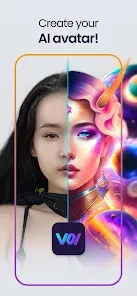
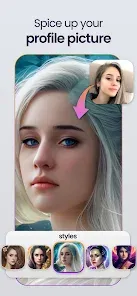
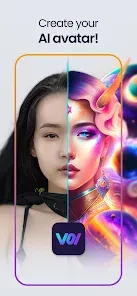
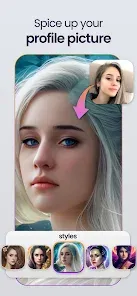
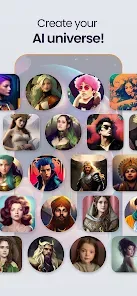
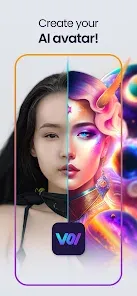
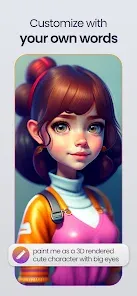
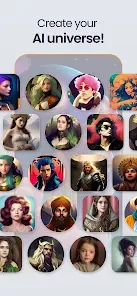
Harnessing advanced AI technology, Voi quickly transforms your photos into stunning avatar portraits. The intelligent algorithms analyze your images to create lifelike representations, ensuring that each avatar captures your essence while adding an artistic flair.

Customizable Art Styles

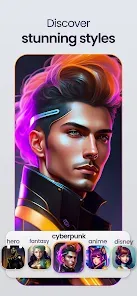
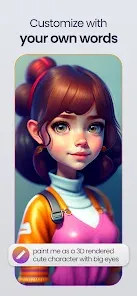
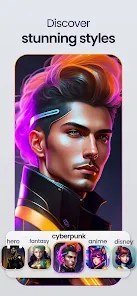
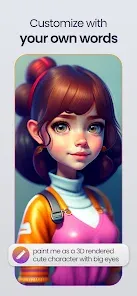
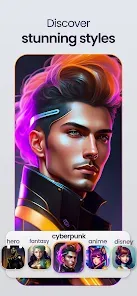
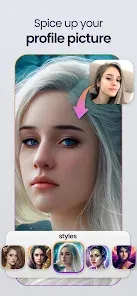
Voi offers a variety of customizable art styles, allowing users to create unique and personalized avatars that reflect their personality. Whether you prefer a cartoonish look or a more realistic portrayal, the app provides numerous options to suit your taste and style.

Social Sharing Integration

Voi makes it easy to share your newly created avatars with friends and family. With built-in social sharing features, you can instantly post your portraits on social media platforms, allowing you to showcase your creativity and unique style with just a few clicks.

User-Friendly Interface

Navigating Voi is a breeze, thanks to its intuitive and user-friendly interface. Even if you're not tech-savvy, you can effortlessly upload photos, select styles, and generate your avatar in just a few taps, making the creative process enjoyable and accessible for everyone.

Advertisement

Pros & Cons

Pros
  • Create stunning avatars in minutes with user-friendly tools.
  • Customize unique features for personalized portraits easily.
  • Access a vast library of styles and templates for creativity.
  • Enjoy high-resolution outputs suitable for various platforms.
  • Experience seamless sharing options for social media and online profiles.
Cons
  • Limited customization options may restrict personal expression in avatars.
  • Slow processing times can hinder user experience and satisfaction.
  • The app may struggle with diverse skin tones, affecting inclusivity.

Real Experience Using Voi - AI Avatar Portrait Maker

Real Experience Application Scenarios

Voi - AI Avatar Portrait Maker is an innovative application that caters to a variety of scenarios. Whether you are a social media enthusiast looking to enhance your online presence, a gamer wanting to create a unique avatar, or a professional in need of a distinctive profile picture, Voi has you covered. The app allows users to transform their photos into stunning AI-generated portraits that can be used across multiple platforms. From personalizing virtual meetings to crafting eye-catching graphics for content creation, Voi's versatility shines through. Additionally, artists and designers can leverage the app's capabilities for inspiration, creating unique character designs or illustrations based on the generated avatars.

User Experience

The user experience offered by Voi is seamless and intuitive. Upon launching the app, users are greeted with a clean interface that simplifies the process of creating avatars. The step-by-step guidance provided makes it easy for users of all skill levels to navigate through the various features. Uploading a photo is straightforward, and the app's AI technology quickly generates a portrait that is both creative and personalized. The customization options are plentiful, allowing users to tweak elements such as facial features, hairstyles, and backgrounds to their liking. Furthermore, the real-time preview feature enhances the experience, enabling users to see changes immediately. Overall, Voi delivers an engaging and satisfying experience that encourages creativity and exploration.

Pricing

Voi offers a competitive pricing model that caters to different user needs. The app provides a free version with basic features, allowing users to create and save a limited number of avatars. For those seeking more advanced functionalities, such as high-resolution downloads and additional customization options, a subscription plan is available. This premium version unlocks the full potential of the app, making it an attractive option for frequent users or professionals who require high-quality outputs. The pricing is reasonable compared to similar apps in the market, making it accessible for casual users and serious creators alike.

Updates & Support

The development team behind Voi is committed to continuous improvement, regularly releasing updates that enhance performance and introduce new features. Users can expect periodic enhancements and bug fixes that keep the app running smoothly. Additionally, Voi provides robust customer support, including a comprehensive FAQ section and responsive assistance through email. This ensures that users can resolve any issues they encounter promptly. The active community around the app also fosters user engagement, with forums and social media channels where users can share their creations and tips, further enriching the overall experience.

verified Security & Privacy Review

Security & Privacy Review The Voi - AI Avatar Portrait Maker app prioritizes user security and privacy by implementing robust data protection measures. The app collects minimal personal information, primarily focusing on user-generated content for avatar creation. Users are advised to review the app’s privacy policy to understand data collection practices fully. Voi requires several permissions, including access to the device’s camera and storage. These permissions are necessary for capturing images and saving avatars. However, users should be cautious when granting access and can choose to limit permissions based on their comfort level. To safeguard user data, Voi employs encryption protocols during data transmission. The app does not share personal information with third parties without explicit consent, ensuring that user data remains confidential. Regular updates are provided to address any security vulnerabilities, demonstrating a commitment to ongoing data protection. Overall, Voi - AI Avatar Portrait Maker takes appropriate steps to secure user data and maintain privacy, making it a reliable choice for those looking to create personalized avatars.
Advertisement

FAQ

1

Can I submit suggestions or feedback to Voi - AI Avatar Portrait Maker?

Yes, users can submit suggestions or feedback through the app's support section or by contacting customer service directly.

2

Does Voi - AI Avatar Portrait Maker collect my personal data?

Voi may collect certain personal data as outlined in its privacy policy, but it is designed to prioritize user privacy and data security.

3

Does Voi - AI Avatar Portrait Maker support offline use?

Voi requires an internet connection to process images and generate avatars, so offline use is not supported.

4

How do I cancel my Voi - AI Avatar Portrait Maker subscription?

Users can cancel their subscription through their account settings in the app or via the app store where they purchased it.

5

How much does a subscription to Voi - AI Avatar Portrait Maker cost?

Subscription costs for Voi may vary based on the plan chosen, typically offering monthly or yearly payment options.

How to use Voi - AI Avatar Portrait Maker

1

Can I change my login information?

Yes, you can change your login information by going to your account settings and selecting the option to update your email or password.

2

Can I update my email address after logging in?

Yes, you can update your email address in your account settings once you are logged in. Just navigate to the profile section.

3

How can I contact customer service for Voi?

You can reach our customer service team via email at support

4

How do I activate my Voi account?

To activate your account, check your email for the activation link we sent you after registration. Click the link to complete the activation process.

5

How do I reach customer service if I have billing issues?

For billing inquiries, please contact our customer service team via email or the live chat feature on our website for quick resolution.

Editor's Choice