This site uses cookies to enhance your user experience. By clicking any link on this site you are giving your consent to our cookie policy. Read more
Reject
Accept All

Advertiser and Editorial Disclosures

Starlink

Starlink

verified

Space Exploration Technologies Corp.

4.9
Rating
10,000,000+ Downloads
2026.03.0 Version
Advertisement
  • category

    Category: Tools

  • price

    Price: free

  • age rating

    Age Rating: Everyone

  • rating

    Rating: 4.9

  • available on

    Available on: /

  • updated on

    Updated on: Jul 7, 2026

Screenshot 1
Screenshot 2
Screenshot 3
Screenshot 4
Screenshot 5
Screenshot 6
Advertisement

Features & Highlights

Easy Setup Process

Setting up Starlink is a breeze, thanks to its user-friendly kit that comes with a satellite dish, Wi-Fi router, and simple instructions. Users can quickly get online within minutes, making it accessible for everyone, regardless of technical expertise.

Global Coverage

With its network of satellites orbiting the Earth, Starlink provides global coverage, allowing users in rural and underserved regions to access reliable internet services. This makes it a game-changer for communities that have historically struggled with connectivity issues.

High-Speed Internet

Starlink offers high-speed internet connectivity that can reach download speeds of up to 200 Mbps, making it ideal for streaming, gaming, and video conferencing. Its low latency ensures a smooth online experience, even in remote areas where traditional broadband options may fall short.

Regular Software Updates

Starlink continuously improves its service through regular software updates, enhancing performance and user experience. These updates ensure that users benefit from the latest features and optimizations, keeping their internet connection fast and reliable.

Advertisement

Pros & Cons

Pros
  • Global coverage in remote areas
  • High-speed internet with low latency
  • Easy and quick installation process
  • Reliable connection during emergencies
  • Affordable plans for various users
Cons
  • High latency affects real-time applications
  • Limited availability in some regions
  • Service interruptions during adverse weather
  • Expensive equipment and subscription costs

Real Experience Using Starlink

Application Scenarios

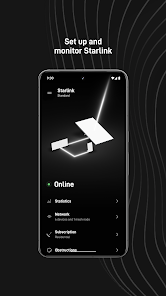
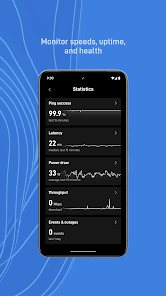
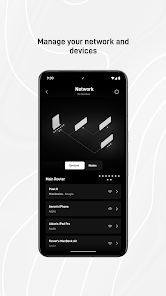
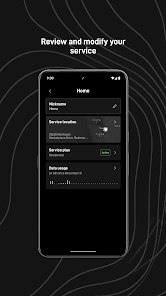
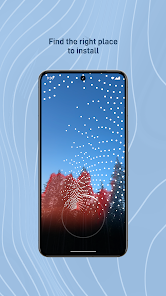
The Starlink app serves as a crucial tool for users of SpaceX's satellite internet service. It is particularly useful for individuals residing in rural or underserved areas where traditional internet options may be limited or unreliable. Users can utilize the app to check the status of their internet connection, monitor data usage, and troubleshoot common connectivity issues. The app also provides a simple interface for managing their Starlink hardware, including the satellite dish and Wi-Fi router. Additionally, it helps users identify optimal locations for their satellite dish installation, ensuring they receive the best possible signal. Whether you are a remote worker, a gamer, or simply someone who enjoys streaming movies and shows, the Starlink app enhances the overall experience by providing real-time updates and insights into performance.

User Experience

The user experience of the Starlink app is generally positive, characterized by its straightforward design and functionality. Users appreciate the intuitive interface that allows for easy navigation between different features. The app offers a seamless onboarding process, guiding new users through setup and configuration. Many find the speed test feature particularly valuable, as it gives them an instant snapshot of their internet performance. However, some users have reported occasional glitches, such as slow loading times or connectivity issues with the app itself. Despite these minor setbacks, the overall sentiment remains favorable, with users valuing the ability to manage their Starlink service directly from their smartphones.

Pricing

Starlink's pricing model is competitive, particularly for users in locations with limited internet options. The initial cost includes a one-time fee for the satellite dish and router, which is often seen as a worthwhile investment given the service's performance. Monthly subscription fees are comparable to other internet service providers, making it an attractive option for those seeking reliable connectivity. The app does not have any additional costs associated with its use, which means users can access all features without hidden fees. Overall, the pricing structure is transparent, and many users feel they receive good value for the service offered.

Updates & Support

SpaceX is committed to improving the Starlink app through regular updates that enhance functionality and user experience. Users can expect periodic improvements that address bugs, enhance performance, and introduce new features. Customer support is readily available through the app, offering a range of resources, including FAQs, troubleshooting guides, and direct contact options for personalized assistance. Many users report positive experiences with customer support, noting prompt responses and helpful solutions to their inquiries. This dedication to support and continuous improvement plays a significant role in maintaining user satisfaction and loyalty.

verified Security & Privacy Review

The Starlink app prioritizes user security and privacy, implementing robust measures to protect personal information. The app employs end-to-end encryption for data transmission, ensuring that user data remains confidential and secure from potential breaches. In terms of permissions, Starlink requires access to location services to provide optimal connectivity and performance. Users are given clear notifications regarding the data being collected, and the app follows a transparent policy on how this data is used. Starlink does not sell user data to third parties, adhering to strict data protection regulations. Furthermore, the app allows users to manage their privacy settings easily, enabling them to control what information is shared and with whom. Regular updates are provided to address any security vulnerabilities promptly, and users are encouraged to maintain strong passwords and enable two-factor authentication for added protection. Overall, the Starlink app demonstrates a strong commitment to safeguarding user data while ensuring a seamless and efficient user experience.
Advertisement

User Reviews

  • Frank Acosta
    2026/06/08

    Everything about this app appears very highly polished. It works exceptionally well at everything. The one thing I do wish they could add is notifications when your connection slows down significantly. This is totally a me problem but I was experiencing buffering and slow connection issues in parts of my home but I know it was more of an installation issue. It would have been a much faster process to fix the connection issues if the app would have let me know some of the nodes had poor signal.

  • Cory Theroux
    2026/06/21

    Coming from Centrylink to Starlink, and I'm over the moon with it. the service is fantastic, and the app is so nice, easy to work with and I have full control of my internet settings without having to flip the router over and find the login and be directed to a website to do everything. 11/10 Wish this service existed 10 years ago when I was traveling the world.

  • Amber Adams
    2026/04/14

    Works exceptionally well at my home & is easy to setu. Plan prices are expensive. The fastest & best plan available costs $150+ monthly. The other plans are cheaper but don't offer the speed, data or features the fastest one has. I would give Starlink 5 Stars if pricing were cheaper, outdoor receivers were smaller & more discounts & etc were available. With Starlink being one of the ONLY providers available to me, it would be nice if they'd take into consideration not everyone is rich!

  • Ron Seals
    2026/05/17

    I can't speak on the service, but I'm a new user and I had to order a dish mount and adapter, so I have activated my dish yet, but not even 2 months and star link wants to increase price from $39.00 to $55.00, Starlink must be doing really well and that's nice, but not going to pay the $55.00 after I was told that the $39.00 would be in effect for 6 months, so I'll be cancelling my service!

  • Tash Hepting
    2026/03/07

    Don't bother getting it for occasional use. The company is clearly hurting for cash because they keep arbitrarily "changing the deal" to screw me out of the original use case they sold me on. It hasn't even been a year and they completely reworked standby mode so now it has a monthly fee (was free before), and more recently they speed-limited it so the "unlimited low speed data" they allowed you on standby now doesn't work when traveling more than 10mph. Can't trust them.

Review Source: Google Play store public user reviews.

FAQ

1

Does Starlink collect my personal data?

Yes, Starlink collects some personal data such as account information and usage statistics to improve their service and comply with legal requirements, but they have measures in place to protect your privacy.

2

Does Starlink offer a free trial or free version?

Starlink does not currently offer a free trial or free version of their service, but they have a straightforward subscription model with no long-term contracts.

3

Does Starlink require an internet connection?

Starlink does not require a traditional internet connection; instead, it uses a network of satellites to provide internet access directly to your location.

4

How can I contact support or send feedback for Starlink?

You can contact Starlink support through the Starlink app, the official website, or by email, and they also provide a help center with FAQs and troubleshooting tips.

5

How do I manage or cancel my Starlink subscription?

You can manage or cancel your Starlink subscription through the Starlink app or the official website, where you can access your account settings and subscription details.

How to use Starlink

1

How do I activate my Starlink service?

To activate your Starlink service, connect your dish, download the Starlink app, and follow the on-screen instructions to complete the setup.

2

How do I contact Starlink customer service?

You can reach Starlink customer service through the Starlink app or by visiting their website for support options.

3

How do I find my Starlink customer number?

Your Starlink customer number can be found in the Starlink app under your account settings or on your billing statements.

4

How do I log in to the Starlink app?

Open the Starlink app and enter your registered email and password. If you forgot your password, use the 'Forgot Password?' link to reset it.

What's New

Bug fixes and improvements.

Editor's Choice