This site uses cookies to enhance your user experience. By clicking any link on this site you are giving your consent to our cookie policy. Read more
Reject
Accept All

Advertiser and Editorial Disclosures

Scanner Radio - Police Scanner

Scanner Radio - Police Scanner

verified

GordonEdwards.net LLC

4.7
Rating
10,000,000+ Downloads
8.21.1 Version
Advertisement
  • category

    Category: News & Magazines

  • price

    Price: free

  • age rating

    Age Rating: Everyone

  • rating

    Rating: 4.7

  • available on

    Available on: /

  • updated on

    Updated on: Jun 26, 2026

Screenshot 1
Screenshot 2
Screenshot 3
Screenshot 4
Screenshot 5
Screenshot 6
Advertisement

Features & Highlights

Extensive Channel Selection

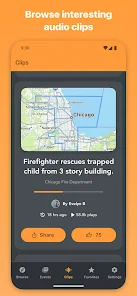
Access a vast array of police, fire, and emergency service channels from across the globe. With thousands of streams available at your fingertips, you can customize your listening experience to suit your interests and stay engaged with local happenings or explore distant emergencies.

Real-Time Alerts

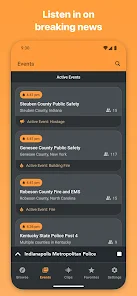
Stay informed with real-time alerts for nearby emergencies and incidents. Scanner Radio - Police Scanner notifies you instantly about significant events in your area, ensuring you never miss crucial updates when it matters most. This feature keeps you connected and aware of what's happening around you.

Sleep Timer Functionality

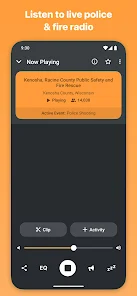
Enjoy your favorite scanner feeds without worrying about battery drain, thanks to the built-in sleep timer. You can set a specific time for the app to automatically turn off, allowing you to drift off to sleep while still catching the latest updates, all tailored to your preferences.

User-Friendly Interface

Navigate effortlessly through the app with its intuitive design and user-friendly interface. Whether you're a seasoned scanner enthusiast or a new user, you'll find it easy to search for channels, set favorites, and adjust settings without any hassle, making your experience enjoyable and straightforward.

Advertisement

Pros & Cons

Pros
  • Access real-time police and emergency broadcasts for timely information.
  • Enjoy a user-friendly interface for easy navigation and use.
  • Stay informed with customizable alerts for specific frequencies.
  • Discover diverse channels, including fire, EMS, and amateur radio.
  • Connect with a vibrant community of scanner enthusiasts for shared insights.
Cons
  • Limited coverage can miss critical incidents in certain areas.
  • User interface may feel outdated and confusing for new users.
  • Audio quality may vary, making it hard to follow conversations.

Real Experience Using Scanner Radio - Police Scanner

Real Experience Application Scenarios

Scanner Radio - Police Scanner is an essential app for anyone intrigued by real-time communication and public safety. Users can listen to live audio streams from police, fire, and emergency services across various regions. This app is particularly useful during emergencies, natural disasters, or local events where police presence is heightened, allowing users to stay informed about ongoing situations. Hobbyists and scanner enthusiasts can use the app to explore different frequencies and enjoy the thrill of monitoring communications. Additionally, the app serves as a useful tool for journalists and researchers who require timely information about local incidents, making it a versatile application for both casual listeners and serious users.

User Experience

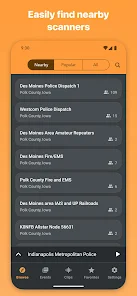
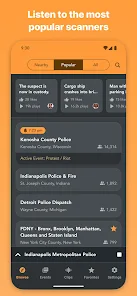
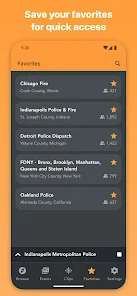
The user experience of Scanner Radio is designed to be intuitive and engaging. Upon opening the app, users are greeted with a straightforward interface that allows for easy navigation through various channels. The ability to search by location or browse through popular feeds makes it simple to find the desired scanner. Users appreciate the option to create custom favorites, which enhances accessibility to frequently monitored channels. Additionally, the audio quality is impressive, providing clear and uninterrupted streams for an immersive listening experience. However, some users have reported occasional buffering during peak times, which can detract from the overall experience. The inclusion of a chat feature also allows users to interact, share information, and enhance their understanding of events as they unfold.

Pricing

Scanner Radio - Police Scanner offers a free version supported by advertisements, which provides access to a wide range of channels. For users seeking an ad-free experience and additional features, a premium subscription is available at a reasonable monthly or yearly rate. This subscription unlocks advanced functionalities such as the ability to record streams, access premium feeds, and enjoy an enhanced user experience without interruptions. Overall, the pricing of Scanner Radio is competitive, offering good value for both casual listeners and dedicated users who wish to delve deeper into the world of public safety communications.

Updates & Support

The developers of Scanner Radio prioritize keeping the app updated and user-friendly. Regular updates are released to enhance performance, introduce new features, and fix any bugs reported by users. The support team is responsive and provides assistance through various channels, including social media and email. Users can also access an extensive FAQ section on the app's website, which addresses common concerns and troubleshooting tips. This commitment to updates and user support ensures that Scanner Radio remains a reliable tool for those interested in real-time public safety communications.

verified Security & Privacy Review

Security & Privacy Review Scanner Radio - Police Scanner prioritizes user privacy and employs several measures to ensure data security. The app does not require users to create an account, minimizing personal data collection. However, it does request permissions for accessing the device's microphone and location, which are essential for streaming live police radio feeds and providing local content. The app's privacy policy outlines how user data is handled, emphasizing that no personally identifiable information is collected or shared without consent. Users can choose to disable location services if they prefer not to share their whereabouts. Additionally, the app does not display intrusive ads that could compromise user privacy. While Scanner Radio does take steps to protect user data, it is advisable for users to remain cautious about sharing sensitive information and to review app permissions regularly. Overall, the app demonstrates a commitment to maintaining user security and privacy while offering a valuable service.
Advertisement

User Reviews

  • Steven Pingel
    2026/06/05

    I downloaded this one fully intending to pay to remove ads because of that top review that says it's a one-time $3 fee. Yeah, that's an old review. Now it is $4/month or $30/year. Nah... Too many of these apps try to get us with these subscriptions. I'd be willing to pay a one-time fee, up to around $15 or so for this, but never a subscription. That said, the ads aren't HORRIBLE, I just don't like ads. 🤷🏻‍♂️

  • Darlene Leslie
    2026/06/09

    it works, for a fee they don't tell you about. A week ago I downloded this app, I didn't even make an account and listened for about 30 min and then deleted it and today it charged two of my cards that I never even gave them the info on, for $31.79. So now I have to open two disputes on 2 separate cards and I'm out using either for at least a week while I wait for replacements to come in.

  • D. Kirkpatrick (Dennis K.)
    2026/05/02

    I have always found this application enjoyable. Also I don't mind the advertising. However, recent versions will start an advertisement and it hijacks the entire operating system of my phone. I have not been able to switch over to medical software I need to access, and I missed multiple phone calls. As a result I'm using it far less than I used to. You need to be able to disconnect especially if it's an emergency. The help file says to avoid this buy the pro version. What if I needed to call 911

  • Amanda Smith
    2026/03/09

    All I hear for my county now is an error code like I would on my computer while it is streaming on my phone. As if I clicked on something wrong with Microsoft Windows. It is constant and annoying enough to remove this app after trying to see if the noise went away after 4 days. May be an error on the subscriber's end but not sure.

  • Matt Hill
    2026/01/19

    Ads Block Phone Use. This app would be fine if the ads didn't cover the entire screen and make you wait to clear them. The workaround to lock screen and unlock does not always work. This has gotten progressively worse and it seems to be a developer trick to force clicks. The X that may eventually appear on the ad also doesn't necessarily work and just results in an ad click.

Review Source: Google Play store public user reviews.

FAQ

1

Can I submit suggestions or feedback to Scanner Radio - Police Scanner?

Yes, users can submit suggestions or feedback through the app’s support section or via the developer's contact information provided in the app.

2

Does Scanner Radio - Police Scanner collect my personal data?

Yes, the app may collect certain personal data to enhance user experience and provide relevant services, but it typically adheres to privacy policies regarding data usage.

3

Does Scanner Radio - Police Scanner support offline use?

Scanner Radio - Police Scanner requires an internet connection to stream live audio feeds, so it does not support offline use.

4

How do I cancel my Scanner Radio - Police Scanner subscription?

To cancel your Scanner Radio - Police Scanner subscription, you can do so through your app store account settings or the subscription management section within the app.

5

How much does a subscription to Scanner Radio - Police Scanner cost?

The subscription cost for Scanner Radio - Police Scanner varies based on the plan chosen, typically around $1.99 per month or $14.99 per year.

How to use Scanner Radio - Police Scanner

1

Can I activate my Scanner Radio account through the app?

Yes, you can activate your account directly within the app by following the prompts during the setup process.

2

Can I change my email address after I log in?

Yes, you can change your email address in the account settings once you are logged in.

3

How can I contact customer service for help with my Scanner Radio account?

You can reach our customer service team via the support section in the app or by emailing support

4

How do I log in to my Scanner Radio account?

To log in, open the app, tap on the login option, and enter your registered email and password.

5

How do I retrieve my login information?

You can retrieve your login information by using the "Forgot Password" option on the login screen or by contacting customer service.

What's New

• Player screen now shows time when scanner last had audio. Initially it'll primarily display the time for the current listening session.• Fixed a bug that caused the app to not recognize a paid subscription after tapping on a notification.

Editor's Choice