This site uses cookies to enhance your user experience. By clicking any link on this site you are giving your consent to our cookie policy. Read more
Reject
Accept All

Advertiser and Editorial Disclosures

Phone Locator: Family Location

Phone Locator: Family Location

verified

WeFindertools

4.3
Rating
/ Downloads
1.2.11 Version
Advertisement
  • category

    Category: Maps & Navigation

  • price

    Price: 0

  • age rating

    Age Rating: Everyone

  • rating

    Rating: 4.3

  • available on

    Available on: /

  • updated on

    Updated on: Feb 9, 2026

Screenshot 1
Screenshot 2
Screenshot 3
Screenshot 4
Screenshot 5
Screenshot 6
Advertisement

Features & Highlights

Geofencing Alerts

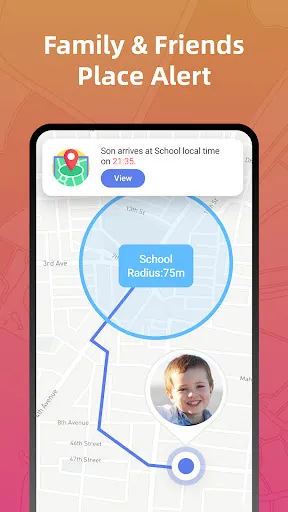
Set up customizable geofences to receive instant notifications when family members enter or leave designated areas. This is perfect for keeping track of kids at school or ensuring that elderly relatives stay within safe zones. You'll always know when they're where they should be, adding an extra layer of security.

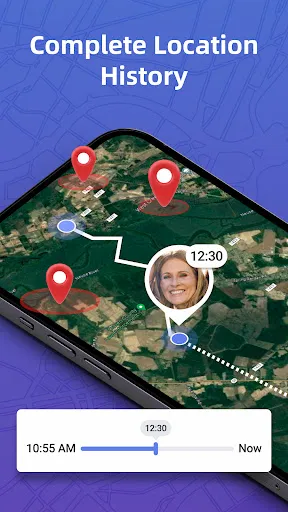
Location History

Access a detailed history of past locations visited by your family members, giving you insights into their routines and activities. This feature is great for understanding patterns and ensuring that everyone is safe. With just a few taps, you can review where they've been and when, fostering peace of mind.

Real-Time Location Tracking

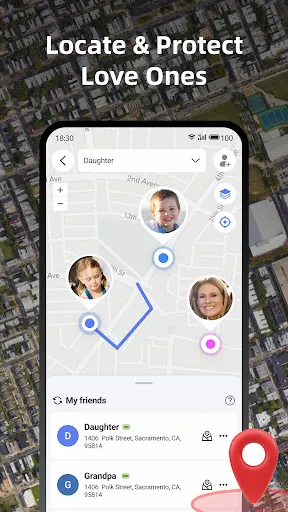
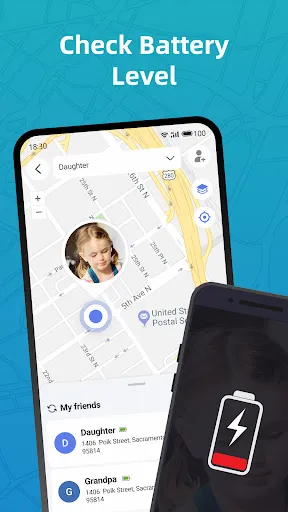
Stay connected with your loved ones by using real-time location tracking. This feature allows you to see where family members are at any given moment, ensuring peace of mind whether they're at school, work, or out with friends. It's like having a virtual safety net right in your pocket.

SOS Button

In case of emergencies, the SOS button allows users to send immediate alerts to designated contacts. This feature ensures that help is just a click away, providing an added layer of security for family members. Knowing that support is readily available can make all the difference in critical situations.

Advertisement

Pros & Cons

Pros
  • Real-time location tracking ensures family safety.
  • Geofencing alerts notify you of location boundaries.
  • Emergency SOS feature provides immediate assistance.
  • User-friendly interface makes navigation effortless.
  • History tracking helps review past locations easily.
Cons
  • Limited accuracy in tracking locations
  • May drain device battery quickly
  • Privacy concerns with location sharing
  • Requires constant internet access

Real Experience Using Phone Locator: Family Location

Application Scenarios

Phone Locator: Family Location excels in various real-life scenarios, making it an indispensable tool for families and close-knit groups. One of the most common applications is ensuring the safety of children. Parents can track their kids in real-time as they navigate to school, friends' houses, or extracurricular activities. This feature provides peace of mind, allowing parents to know their children's whereabouts at all times. Additionally, the app is useful during family outings, ensuring no one gets lost in crowded places like amusement parks or shopping malls. It also serves as a reliable tool for coordinating meetups with friends, allowing users to share their location instantly to find each other without hassle. Moreover, in emergency situations, the app’s location sharing capabilities can assist in quickly locating a family member who may need help.

User Experience

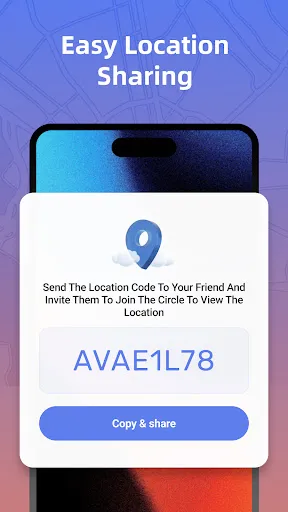
The user experience of Phone Locator: Family Location is generally positive, thanks to its intuitive interface and straightforward navigation. Upon opening the app, users are greeted with a clean layout that makes it easy to access various features. Setting up location sharing is a breeze, allowing users to invite family members or friends with just a few taps. The real-time tracking feature works seamlessly, updating locations accurately and promptly. Notifications for arrivals or departures from designated places enhance the experience, keeping users informed without constant checking. However, some users have reported occasional lag in location updates, which can be concerning in urgent situations. Overall, the app fosters a sense of security and connection among family members, making it a trusted companion for many.

Pricing

Phone Locator: Family Location operates on a freemium model, offering both free and premium subscription options. The free version provides essential location-sharing features, which are adequate for casual users. However, for those seeking advanced functionalities such as location history, geofencing, and unlimited alerts, a premium subscription is necessary. The pricing for the premium service is competitive, with monthly, quarterly, and annual plans available, making it flexible for users to choose according to their needs. The option to try the premium features through a free trial also allows users to assess the value before committing to a paid plan.

Updates & Support

The developers of Phone Locator: Family Location are proactive in rolling out updates, addressing bugs, and enhancing features based on user feedback. Regular updates ensure that the app remains compatible with the latest mobile operating systems and devices. Furthermore, the app includes a dedicated support section, where users can find FAQs, troubleshooting tips, and contact information for personalized assistance. The responsiveness of the customer support team has been noted positively by users, who appreciate the timely help provided for any issues encountered while using the app.

verified Security & Privacy Review

The Phone Locator: Family Location app takes user privacy and data security seriously, implementing several measures to protect personal information. The app requires location permissions to function effectively, but it allows users to control when and how their location is shared with family members. Users can choose to enable or disable location sharing at any time, providing flexibility and control over their data. To further enhance security, the app employs encryption protocols for transmitting data, ensuring that location information remains confidential during transfer. Additionally, user data is stored securely, with strict access controls in place to limit who can view this information. Moreover, the app's privacy policy is transparent, outlining how user data is collected, used, and shared. It emphasizes that personal information will not be sold to third parties, reinforcing the commitment to user privacy. Overall, Phone Locator: Family Location offers a robust framework for protecting user data, making it a reliable choice for families seeking to stay connected while prioritizing security.
Advertisement

Compare APP

User Reviews

  • Jennifer Beeber
    2025/06/01

    I'm not really sure what this app does except show ads. You can't locate your own phone on it. You can share your location with friends. Update: The response from the company had absolutely nothing to do with my problem with their app. 6/1/25 In response to the game makers comment. I know that free apps make their money off of ads, but the amount of ads that you show to use you app is ridiculous. You play more ads than any other game or app I've ever used. Because of that, I uninstalled your app

  • Douglas Parent
    2025/02/26

    User interface for sharing location and setting up friends is confusing. Location was not accurate (not even in the right state) although that may have been the phone's fault. But what made me uninstall it was a very intrusive ad that made an alarm sound with a voice that was warning about an attack. The app was in the background at the time so it seemed like some kind of phone warning. I don't need my family freaking out because of some stupid ad. I immediately uninstalled the app.

  • Sabia Sultana Tumpa
    2024/12/14

    We go out of the house for various purposes every day. We have to go to different places every day. We have to find the locations of various places. And we can easily find the locations of these various places from Google Location. Through Google phone Location, we can easily find any place, very easily, just through Google Location. Many, many thanks to Google phone Location Apps. ❤️😊👍

  • Sherrieannjosephinetadachwild Duncan
    2025/03/29

    You can't track anyone unless you all have the app installed on everyone's equipment they use what's the point of tracking if the people you are tracking have to install the same app there are so many much better apps out there for free that you just type a person's number in & pinpoint them immediately immediately without there permission or knowledge you're checking on their safety

  • Abdul Rahim
    2024/11/19

    It is absolutely fake application, redirects to keep on installing more useless applications. I am going to uninstall it just now. They are just achieving the goal to increase number of installions.

Review Source: Google Play store public user reviews.

FAQ

1

Does Phone Locator: Family Location collect my personal data?

Phone Locator: Family Location may collect personal data to provide its services, but it adheres to strict privacy policies to ensure that your information is secure and used responsibly.

2

Does Phone Locator: Family Location offer a free trial or free version?

Yes, Phone Locator: Family Location offers a free version with limited features, as well as a free trial of its premium features for new users to explore the app's full capabilities.

3

Does Phone Locator: Family Location require an internet connection?

Yes, Phone Locator: Family Location requires an internet connection to function properly, as it relies on GPS and mobile data to provide accurate location updates.

4

How can I contact support or send feedback for Phone Locator: Family Location?

You can contact support or send feedback for Phone Locator: Family Location through the in-app support feature, or by visiting the app's official website, where you can find contact details and a help center.

5

How do I manage or cancel my Phone Locator: Family Location subscription?

You can manage or cancel your Phone Locator: Family Location subscription through your account settings within the app or by visiting the app store where you purchased the subscription, depending on your device's platform.

How to use Phone Locator: Family Location

1

How can I activate the Phone Locator: Family Location app?

After downloading, create an account and follow the on-screen instructions to activate location tracking.

2

How do I contact customer service for the Phone Locator: Family Location app?

You can contact customer service through the app's settings or visit their official website for support options.

3

How do I log in to the Phone Locator: Family Location app?

Open the app, enter your registered email and password, then click "Log In" to access your account.

4

What is the customer service number for the Phone Locator: Family Location app?

The customer service number can typically be found in the app's help section or on their official website.

Editor's Choice