This site uses cookies to enhance your user experience. By clicking any link on this site you are giving your consent to our cookie policy. Read more
Reject
Accept All

Advertiser and Editorial Disclosures

ID.me Authenticator

ID.me Authenticator

verified

ID.me

3.5
Rating
5,000,000+ Downloads
1.12.0-2025082916 Version
Advertisement
  • category

    Category: Productivity

  • price

    Price: free

  • age rating

    Age Rating: Everyone

  • rating

    Rating: 3.5

  • available on

    Available on: /

  • updated on

    Updated on: Sep 10, 2025

Screenshot 1
Screenshot 2
Screenshot 3
Screenshot 4
Screenshot 5
Screenshot 6
Advertisement

Features & Highlights

Multi-Factor Authentication

ID.me Authenticator offers robust multi-factor authentication to enhance security for your accounts. By requiring a second verification step, it significantly reduces the risk of unauthorized access, giving you peace of mind that your personal information is well protected in today's digital landscape.

Seamless Account Linking

Easily link your existing accounts to the ID.me Authenticator app for streamlined access. This feature simplifies the login process by allowing you to manage multiple accounts in one place, eliminating the hassle of remembering various passwords and security codes.

Secure Backup Options

ID.me Authenticator provides secure backup options, ensuring that your authentication data is safe even if you lose your device. This feature allows you to restore your accounts quickly and easily, minimizing downtime and keeping you connected to your important services.

User-Friendly Interface

The app boasts a clean, intuitive interface that makes navigation a breeze, even for those who aren't tech-savvy. With clear prompts and straightforward design, users can quickly set up and start using the app without feeling overwhelmed by complex settings or features.

Advertisement

Pros & Cons

Pros
  • Enhances security with multi-factor authentication for your accounts.
  • Streamlines identity verification for quick and easy access.
  • User-friendly interface simplifies the authentication process.
  • Compatible with various services, increasing convenience and accessibility.
  • Supports secure document storage for added peace of mind.
Cons
  • Limited compatibility with certain devices and operating systems can hinder access.
  • Users may face challenges during the identity verification process, causing frustration.
  • The reliance on mobile devices can exclude those without smartphones.
  • Frequent updates may disrupt user experience and create confusion.

Real Experience Using ID.me Authenticator

Real Experience Application Scenarios

The ID.me Authenticator app is designed primarily for streamlining the verification process for various online services, particularly in sectors like government, healthcare, and finance. Users often find themselves needing to prove their identity securely when accessing sensitive information or services. The app is especially helpful for individuals applying for unemployment benefits, tax services, or healthcare programs that require stringent identity verification procedures. By using ID.me, users can quickly authenticate their identities without the hassle of traditional methods, such as mailing documents or visiting physical locations. The app performs particularly well in scenarios where time is of the essence, such as job applications or urgent benefit claims, making it an essential tool for anyone navigating complex verification processes.

User Experience

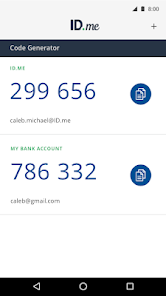
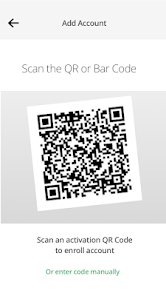
In terms of user experience, the ID.me Authenticator app boasts an intuitive interface that simplifies the authentication process. Users appreciate the straightforward setup, which typically involves scanning a QR code or entering a code provided by the service they wish to access. The app also incorporates biometric authentication options, such as fingerprint or facial recognition, enhancing both security and convenience. The overall speed of the app is commendable, as most users report quick access to their accounts after completing the verification steps. However, some users have noted occasional glitches, particularly during high-traffic periods when the servers might be under strain. Despite these minor setbacks, the app generally offers a seamless and efficient user experience, which is crucial for time-sensitive applications.

Pricing

The ID.me Authenticator app is free to download and use, making it accessible to a wide range of users. There are no hidden fees or subscription costs associated with the app, which is a significant advantage compared to other identity verification solutions that may charge for premium features. This pricing model allows individuals to take advantage of secure authentication without financial barriers. For organizations and businesses that require advanced features, ID.me offers tailored solutions that come at a cost, but these are generally aimed at enhancing operational efficiency in larger setups rather than affecting individual users.

Updates & Support

The development team behind ID.me is proactive in providing regular updates to the app, enhancing its functionality and security features. Users can expect to see improvements in performance, bug fixes, and new features rolled out periodically. The support resources available for users are extensive, including a detailed FAQ section, user guides, and customer service options via chat and email. Feedback from users indicates that the support team is responsive and helpful, addressing issues efficiently. Overall, the combination of regular updates and reliable support contributes significantly to the app's positive reputation among its users.

verified Security & Privacy Review

Security & Privacy Review The ID.me Authenticator app prioritizes user security and privacy through robust measures designed to protect sensitive information. Utilizing two-factor authentication (2FA), the app enhances account security, ensuring that only authorized users can access their accounts. The use of time-based one-time passwords (TOTPs) adds an extra layer of protection against unauthorized access. In terms of privacy practices, ID.me adheres to stringent data handling policies. The app collects minimal user data, focusing on information necessary for authentication purposes. Data is encrypted both in transit and at rest, safeguarding it from potential breaches. The app also implements secure storage practices to protect user credentials. When it comes to permissions, ID.me Authenticator requires access to the device’s camera for QR code scanning, but it does not request unnecessary permissions, minimizing potential privacy risks. Users are encouraged to review their privacy settings regularly, reinforcing their control over personal information. Overall, ID.me Authenticator demonstrates a strong commitment to maintaining user security and privacy while providing a reliable authentication solution.
Advertisement

User Reviews

  • Oscar Prather
    2021/05/29

    It took me approximately 325 logins and about 30 uploads of the three (3!!!) items of identification required to be accepted by ID. me! Not a fun way to spend a weekend trying to get EDD verified!! Thanks a lot... because of the delay, I was unable to make the window required to get accepted! For anyone reading this review, I suggest you get verified some other way. As for customer support services are concerned... good luck with that...

  • James Jarvis
    2021/06/01

    The most frustration experience ever! This APP is slow, hard to work with & glitchy. You have to constantly repeat the login process over & over again. Not because it's required as much as it is needed, because the APP just won't verify you. You need it for unemployment, so you have to stick with it, but that only makes the experience worse. It doesn't like certain phones & you much use your phone. You can't do it all on your computer. It's simply a painful process.

  • Adam Baldwin
    2022/09/14

    I should have read the reviews first. I figured push notifications would be the easiest way to log in since I constantly have trouble receiving text codes from id.me. Their website says "open the app and follow prompts." I open the app and there are no prompts. After wasting a couple minutes trying to do anything, I went back to the website and did what I should have done in the first place, I used one of the two authenticator apps that I already have. Apps that actually work. This is useless.

  • Kirsten Omar
    2021/02/22

    How the hell does this app make verifying yourself so much easier??? seriously??? All this app does is generate 6 digits numbers & then your to add to the link. And when I do that it sends me back to the app that generates the numbers again. I wasted over 3 hours going around in circles & still haven't been completely verified in order to recieve my unemployment benefits!!! This app sure hasn't made any if this any easier all it's done is made me even more agitated than I was in the 1st place.

  • Nicole Rondon
    2021/04/27

    the worst ever! I've been trying to get verified for over a month. The wait is usually over 5hrs but the app always kicks you off after 2hrs! Can't get any help. whenever you try to contact them you get a email saying will be with you shortly then 2 days later you get another email saying they are working as hard as they can. it's absolutely ridiculous!

Review Source: Google Play store public user reviews.

FAQ

1

Does ID.me Authenticator collect my personal data?

ID.me Authenticator does not collect personal data from users; it only generates and stores the necessary information to facilitate two-factor authentication for your accounts.

2

Does ID.me Authenticator offer a free trial or free version?

Yes, ID.me Authenticator is available as a free app without any trial period, allowing users to access its core functionalities without any cost.

3

Does ID.me Authenticator require an internet connection?

No, ID.me Authenticator does not require an internet connection to generate one-time codes, as it uses time-based algorithms to create codes that work offline.

4

How can I contact support or send feedback for ID.me Authenticator?

You can contact support or send feedback for ID.me Authenticator through the app's settings section, where you will find options to reach customer support or provide your feedback directly.

5

How do I manage or cancel my ID.me Authenticator subscription?

Since ID.me Authenticator is a free app without a subscription model, there is no need to manage or cancel a subscription. You can simply uninstall the app if you choose not to use it anymore.

How to use ID.me Authenticator

1

How can I find my customer number for ID.me?

Your customer number is typically found in your ID.me account settings or welcome email after registration.

2

How do I activate the ID.me Authenticator app?

To activate, download the ID.me Authenticator app, scan the QR code provided during the setup process on the ID.me website, and follow the on-screen instructions.

3

How do I contact customer service for the ID.me Authenticator app?

You can reach ID.me customer service through their support page on the ID.me website or by calling their customer support number listed there.

4

How do I log in to my ID.me account?

To log in, visit the ID.me website or app, enter your email and password, and follow the prompts to authenticate if needed.

What's New

- Bug fixes and performance improvements

Editor's Choice