This site uses cookies to enhance your user experience. By clicking any link on this site you are giving your consent to our cookie policy. Read more
Reject
Accept All

Advertiser and Editorial Disclosures

Cast for Chromecast & TV Cast

Cast for Chromecast & TV Cast

verified

iKame Applications - Begamob Global

3.9
Rating
50,000,000+ Downloads
4.1.7 Version
Advertisement
  • category

    Category: Tools

  • price

    Price: free

  • age rating

    Age Rating: Everyone

  • rating

    Rating: 3.9

  • available on

    Available on: /

  • updated on

    Updated on: Jul 2, 2026

Screenshot 1
Screenshot 2
Screenshot 3
Screenshot 4
Screenshot 5
Screenshot 6
Advertisement

Features & Highlights

Multi-Device Support

Cast for Chromecast & TV Cast supports a wide range of devices, making it easy for you to connect your smartphone or tablet to your TV. This versatility means you can share content from different platforms, providing convenience and flexibility for all your streaming needs.

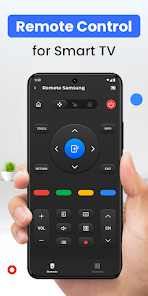
Remote Control Functionality

Transform your smartphone into a remote control with this app, giving you the ability to manage playback directly from your device. This feature allows you to pause, play, or skip tracks without needing to get up, making your binge-watching sessions even more comfortable.

Seamless Streaming

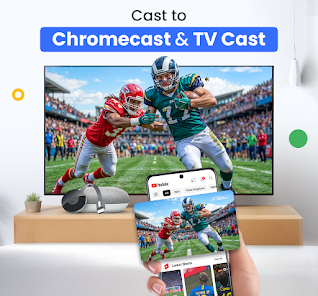
Enjoy a smooth streaming experience with Cast for Chromecast & TV Cast, allowing you to effortlessly cast videos, music, and photos from your device to your TV. Whether it's a movie night or a family gathering, this app ensures high-quality playback without the hassle of complicated setups.

User-Friendly Interface

With its intuitive design, the app makes navigating through content a breeze, even for those who aren't tech-savvy. You can easily find your favorite shows or music with just a few taps, enhancing your overall viewing experience without overwhelming you with options.

Advertisement

Pros & Cons

Pros
  • Easily stream videos from your device to your TV screen
  • Supports various formats for seamless playback
  • User-friendly interface for quick and easy navigation
  • Compatible with multiple devices for versatile streaming options
  • Enjoy high-quality streaming for an enhanced viewing experience
Cons
  • Limited compatibility with certain apps and devices can hinder streaming options.
  • Frequent buffering issues may disrupt viewing experiences unexpectedly.
  • User interface can be confusing, making navigation less intuitive for some users.

Real Experience Using Cast for Chromecast & TV Cast

Real Experience Application Scenarios

The "Cast for Chromecast & TV Cast" app caters to a wide array of scenarios that make streaming content seamless and enjoyable. Users can effortlessly cast videos, photos, and music from their mobile devices to a Chromecast-enabled TV or other compatible devices. Whether you're hosting a movie night, sharing vacation photos with family, or enjoying a gaming session on a big screen, this app enhances the experience. It supports various platforms, allowing you to stream content from popular services like YouTube, Netflix, and local media files stored on your device. The versatility of the app means it can be used in different settings, from casual home entertainment to professional presentations, making it a valuable tool for both personal and business use.

User Experience

User experience with "Cast for Chromecast & TV Cast" is generally positive, highlighted by its intuitive interface and user-friendly design. Upon launching the app, users are greeted with a well-organized layout that simplifies navigation. The casting process is straightforward; with just a few taps, you can connect to your Chromecast device and begin streaming. Users appreciate the quick response time and minimal buffering, providing a smooth watching experience. However, some users have reported occasional connectivity issues, especially when multiple devices are connected to the same network. Despite this, the app's overall performance and reliability make it a popular choice among streaming enthusiasts.

Pricing

Updates & Support The developers of "Cast for Chromecast & TV Cast" are committed to providing regular updates to enhance functionality and address user feedback. Users can expect frequent improvements and bug fixes, ensuring that the app remains compatible with the latest Chromecast devices and streaming services. Support is readily available through the app's help section, which includes FAQs and troubleshooting tips. Additionally, users can reach out to the support team via email for more complex inquiries. The responsiveness of the support team has been praised by users, contributing to an overall sense of reliability and customer satisfaction.

verified Security & Privacy Review

Security & Privacy Review The "Cast for Chromecast & TV Cast" app prioritizes user security and privacy with a clear focus on data protection. The app employs encryption protocols to safeguard any data transmitted during casting sessions. It minimizes the collection of personal information and ensures that users are informed about data usage through its privacy policy. In terms of permissions, the app requests access only to essential features, such as network connectivity and local device storage. This limited permission model helps to reduce the risk of unauthorized data access. Additionally, the app does not require users to create accounts or share sensitive information, further enhancing its privacy stance. Users can manage their data preferences easily, with options to clear cached data and disconnect from previously used devices. Overall, "Cast for Chromecast & TV Cast" demonstrates a commitment to maintaining user privacy and security while providing a seamless casting experience.
Advertisement

User Reviews

  • Kayla Kurczek
    2025/02/07

    The ads are OBNOXIOUS. They pop up after every single thing you click on. Some of the ads don't have an exit button to click on, so you have to close the app completely and re-start it again. I spent more time exiting out of the ads on this app than I spent downloading and trying 4 other mirroring apps before it. It also didn't work for me, but even if it had, I still would've deleted it because of all that. Good luck, ya'll.

  • Bill Toner
    2022/02/02

    I havent figured out how to use this to cast to my android TV. All I see is ad after ad after ad, and there also ads to install this app in a few places. Duh, I already have it! The most frequent full-screen obtrusive ad is for premium, and says their price is $25.99/week. No way in heck will I pay over $100/month for something I can barely see through all these ads. And like someone else, eventually I got an ad that won't go away, it's now stuck forever on that ad. This is garbage.

  • Jaymes Ybanez
    2022/08/17

    All the ads after every button press. The previous app I used did that to a lesser extent then this. It's like Google said, "hold my beer" and made it so unbearable that I uninstalled after 2 minutes of use. Also it didn't support some of the videos I wanted to stream. There is a rating option for ads shown in the app, and I think it's very misleading. I'm giving it one star because it has a lot of ads.

  • Ed
    2022/09/05

    The ads are so nonstop that it makes exploration impossible. And the ads are deceptively like they might be a feature of the app. Irritating to the point that even if I might consider the premium version of this app, I never would now as this creator obviously doesn't want us to feel it's functionality. You can see the bells and whistles, but not get a feel for it. Like they are saying, take our word for it. This is just a prolonged irritating advertisement for the premium app.

  • N A
    2022/12/03

    Had this app for about a minute, I had around 20 ads and it do what it said it would do. Several ads even popped up at once. It's just someone messing with everyone, using the Google colors and making it an ad at the top of the search results so that dummies (ie: me) who don't read the creator name would be tricked into thinking it's a Google app. Scammy.doesnt work. Tons of ads for an app that's broken

Review Source: Google Play store public user reviews.

FAQ

1

Does Cast for Chromecast & TV Cast collect my personal data?

Cast for Chromecast & TV Cast may collect certain data to enhance user experience and improve app functionality, but it typically adheres to privacy policies to protect users' personal information.

2

Does Cast for Chromecast & TV Cast offer a free trial or free version?

Yes, Cast for Chromecast & TV Cast usually offers a free version with limited features, and users may also have the option to try premium features through a trial period.

3

Does Cast for Chromecast & TV Cast require an internet connection?

Yes, Cast for Chromecast & TV Cast requires an internet connection to stream content, as it connects your device to the TV or Chromecast through your local Wi-Fi network.

4

How can I contact support or send feedback for Cast for Chromecast & TV Cast?

You can contact support or send feedback for Cast for Chromecast & TV Cast through the app's settings menu, where you will find options for customer support, FAQs, and feedback forms.

5

How do I manage or cancel my Cast for Chromecast & TV Cast subscription?

You can manage or cancel your Cast for Chromecast & TV Cast subscription through your app store account settings, where you can find subscription options and follow the necessary steps.

How to use Cast for Chromecast & TV Cast

1

Can I log in on multiple devices?

Yes, you can log in to your account on multiple devices. Just ensure you use the same login credentials.

2

How can I contact customer service for assistance?

You can reach customer service by calling our support line or using the chat feature in the app.

3

How can I update my customer number if it changes?

Contact customer service to update your customer number. They will guide you through the process.

4

How do I activate my account after signing up?

To activate your account, follow the link sent to your email after registration. If you didn't receive it, check your spam folder or contact customer service.

5

How do I reset my password if I can’t log in?

Click on the "Forgot Password" link on the login page and follow the instructions sent to your registered email.

Editor's Choice