Home
Home  Apps
Apps  Games
Games  Windows
  Terms of Service
  Cookies & Privacy Policy
  Disclaimer
 Easy Fuel Rewards
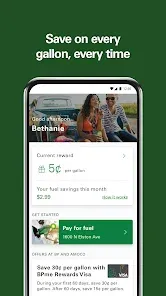
With BPme, earning rewards has never been simpler. Just fill up your tank and watch your points accumulate, allowing you to save on future gas purchases. It's a straightforward way to make every drive a little more rewarding.


BP Products North America Inc Old
 4.2
4.2 
Category: Navigation

Price: 0

Age Rating: 4+

Rating: 4.2

Available on: /

Updated on: /
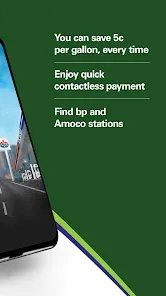
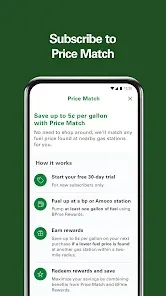
With BPme, earning rewards has never been simpler. Just fill up your tank and watch your points accumulate, allowing you to save on future gas purchases. It's a straightforward way to make every drive a little more rewarding.
Unlock special deals and promotions tailored just for BPme users. From bonus points to limited-time offers, you can maximize your savings and enjoy perks that enhance your fuel experience. It's like having a VIP pass to great savings every time you fill up.
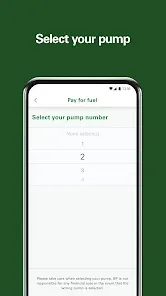
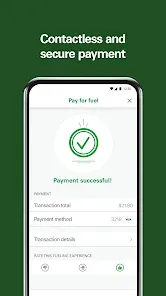
Say goodbye to fumbling for cash or cards at the pump. BPme enables you to pay directly through the app, making your refueling experience quick and hassle-free. Just tap, pay, and you're on your way in no time.
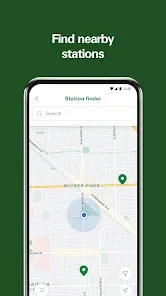
Finding the nearest BP or Amoco station is a breeze with the BPme app. Not only can you locate stations quickly, but you can also check for amenities like car washes and food options, ensuring you get everything you need during your fuel stop.

 Earn points on every fuel purchase for discounts on future fill-ups Enjoy exclusive offers and promotions tailored for members Access to real-time fuel prices to save more at the pump Easy tracking of rewards and transactions through the mobile app Convenient locations to redeem rewards at BP and Amoco stations
 Limited redemption options may restrict how rewards can be utilized. Complicated sign-up process can deter potential users from joining. Inconsistent fuel pricing can undermine the value of earned rewards.
 The BPme app serves as an essential tool for anyone who frequents BP and Amoco gas stations, making it easy to manage fuel purchases and rewards on the go. Whether you're commuting to work, embarking on a road trip, or just running errands, this app simplifies the fueling process. Users can locate nearby gas stations, view real-time fuel prices, and check for available promotions or rewards before filling up. Additionally, it caters to fleet managers who can conveniently manage fuel expenses and track usage across multiple vehicles. The app also includes features that allow users to prepay for gas, saving time and enhancing convenience during busy travel days.
Upon downloading the BPme app, users are greeted with a sleek, user-friendly interface that makes navigation intuitive. The onboarding process is straightforward, allowing users to quickly set up their accounts and link their payment methods. The app’s map feature is particularly helpful, providing easy access to the closest BP or Amoco locations along with directions. Users can seamlessly track their reward points, view transaction history, and receive personalized offers based on their buying habits. Feedback from users highlights the app's efficiency in processing transactions and its reliability in updating rewards balances. The ability to receive notifications about promotions or special deals also enhances the overall user experience, keeping customers engaged and informed.
The BPme app is free to download and use, which is a major advantage for customers looking to save on fuel costs. While the app itself incurs no charges, users benefit from various promotions and discounts offered through the rewards program. By accumulating points through fuel purchases or in-store transactions, users can redeem them for discounts on future fuel purchases or even select merchandise. Additionally, the app provides insights into fuel prices at different locations, helping users make informed decisions that can lead to savings. Overall, the absence of subscription fees combined with potential rewards makes the BPme app a cost-effective choice for regular BP and Amoco customers.
BPme developers are committed to enhancing user experience through regular updates that introduce new features and fix existing bugs. Users can expect periodic improvements that optimize performance and usability. The app's support section is also quite robust, offering FAQs, troubleshooting tips, and a direct line to customer service for more complex inquiries. Feedback from users has indicated a responsive support system, ensuring that concerns are addressed promptly. Overall, the continuous focus on updates and customer support makes BPme a reliable app for managing fuel purchases and rewards, fostering a loyal user base.
Security & Privacy Review
 Google Play
  App Store
 Yes, users can submit suggestions or feedback through the app or the official BP and Amoco customer service channels to help improve the app's features and functionality.
Yes, the app collects personal data such as location and transaction history to enhance user experience, but it adheres to privacy policies to protect user information.
Some features of BPme: BP & Amoco Gas Rewards may be available offline, but full functionality typically requires an internet connection for transactions and updates.
Since there is no subscription fee for the app, users do not need to cancel anything; they can simply uninstall the app if they no longer wish to use it.
There is no subscription cost for using BPme: BP & Amoco Gas Rewards, as it is a free app with no hidden fees.
Unfortunately, customer numbers cannot be changed. If you have issues, contact customer service for help.
To report an issue, please contact customer service through the app or website, and provide details about the problem.
To activate your BPme account, open the app and follow the prompts after entering your customer number and personal information.
You can reach BPme customer service by calling the number listed in the app or visiting the BP website for more options.
You can update your customer information by logging into your account and navigating to the settings section of the app.