This site uses cookies to enhance your user experience. By clicking any link on this site you are giving your consent to our cookie policy. Read more
Reject
Accept All

Advertiser and Editorial Disclosures

AVG AntiVirus & Security

AVG AntiVirus & Security

verified

AVG Mobile

4.6
Rating
100,000,000+ Downloads
25.22.0 Version
Advertisement
  • category

    Category: Tools

  • price

    Price: free

  • age rating

    Age Rating: Everyone

  • rating

    Rating: 4.6

  • available on

    Available on: /

  • updated on

    Updated on: Jun 26, 2026

Screenshot 1
Screenshot 2
Screenshot 3
Screenshot 4
Screenshot 5
Screenshot 6
Screenshot 7
Screenshot 8
Advertisement

Features & Highlights

Device Optimization

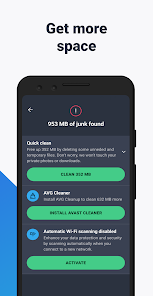
AVG AntiVirus & Security doesn't just protect; it also enhances your device's performance. The built-in optimization tools help clean up unnecessary files and manage battery usage, ensuring your device runs smoothly while maintaining strong security measures.

Privacy Protection

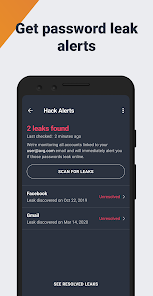
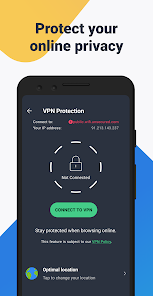
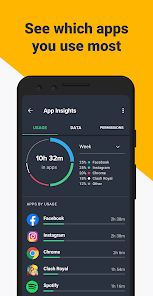
With AVG's Privacy Protection, your personal information stays shielded from prying eyes. This feature includes a VPN and advanced settings to manage app permissions, so you can browse the web without worrying about data leaks or unauthorized access to your sensitive data.

Real-Time Protection

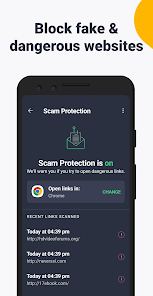
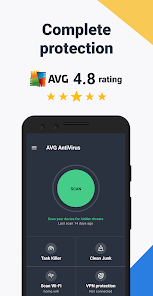
AVG AntiVirus & Security offers robust real-time protection that continuously scans your device for threats. This feature helps detect and neutralize malware, ransomware, and phishing attempts before they can cause harm, ensuring your online activities remain safe and secure at all times.

User-Friendly Interface

Navigating AVG AntiVirus & Security is a breeze thanks to its intuitive user interface. Designed for users of all skill levels, the app makes it easy to access key features, run scans, and customize settings, all while providing clear guidance for optimal security.

Advertisement

Pros & Cons

Pros
  • Real-time protection against malware and viruses
  • User-friendly interface for easy navigation
  • Regular updates ensure the latest security measures
  • Lightweight design minimizes system resource usage
  • Advanced features like VPN for online privacy
Cons
  • Slower system performance during full scans
  • Frequent pop-up ads for upgrades
  • Limited features in the free version
  • Inconsistent malware detection rates reported

Real Experience Using AVG AntiVirus & Security

Application Scenarios

AVG AntiVirus & Security is designed to cater to a variety of user needs, whether you are a casual smartphone user or a business professional. The app effectively protects against malware, spyware, and phishing attacks, making it an essential tool for anyone who frequently browses the internet or downloads apps. For users who often connect to public Wi-Fi networks, AVG offers a secure VPN feature that encrypts your data, ensuring safety in potentially risky environments. Additionally, the app includes a performance booster that helps optimize device memory and storage, which can be particularly useful for those with older devices or those who rely on their smartphones for multitasking.

User Experience

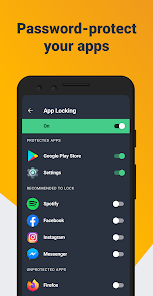
The user interface of AVG AntiVirus & Security is intuitive and user-friendly, allowing users of all tech levels to navigate its features with ease. Upon installation, users are greeted with a straightforward dashboard that presents essential information about their device's security status. The app provides comprehensive scans that can be customized based on user preferences—quick, deep, or smart scans. Notifications are timely and informative, alerting users to potential threats or system issues without being intrusive. Additionally, AVG's battery saver and app lock features enhance the overall user experience by providing peace of mind and ensuring that sensitive apps remain secure. Overall, the app delivers a seamless experience, balancing functionality with ease of use.

Pricing

AVG AntiVirus & Security operates on a freemium model, offering a robust free version that includes essential security features like malware protection and performance optimization. However, for users seeking advanced features such as a VPN, enhanced firewall, and real-time updates, the premium subscription is available. The pricing is competitive, with options for monthly, yearly, or multi-device licenses, making it accessible for individual users and families alike. While the free version is sufficient for basic protection, the premium features provide additional layers of security and convenience for those who require more comprehensive coverage.

Updates & Support

AVG is committed to keeping its users informed and secure through regular updates that enhance the app's functionality and address any existing vulnerabilities. The update process is straightforward, typically occurring in the background, ensuring that users always have the latest security measures in place. Customer support is readily available through various channels, including a comprehensive FAQ section, community forums, and direct email support. The responsiveness of the support team is commendable, with users reporting timely assistance for technical queries. Overall, AVG AntiVirus & Security demonstrates a strong commitment to user satisfaction through consistent updates and reliable customer support.

verified Security & Privacy Review

AVG AntiVirus & Security stands out in the crowded arena of mobile security applications, primarily due to its robust data security features and stringent privacy practices. The app employs advanced encryption protocols to safeguard user data, ensuring that sensitive information remains protected against unauthorized access. When it comes to permissions, AVG AntiVirus requests access to essential features such as storage and network connectivity, which are necessary for its functionality. However, users are advised to review these permissions carefully, as the app's effectiveness relies on its ability to scan for threats across the device. Privacy is a priority for AVG, with a clear privacy policy that outlines data handling practices. The app does not sell user data to third parties, and any data collected is used solely to enhance security features and provide a personalized experience. Users have control over their data, with options to manage what is shared. Overall, AVG AntiVirus & Security offers strong security measures and a transparent approach to user privacy, making it a reliable choice for safeguarding mobile devices.
Advertisement

User Reviews

  • Ian Martin
    2026/02/20

    AVG Antivirus and Security app is a good choice when considering free versions of Android protection. after a scan of your device and viewing the results, a short add auto plays that's non intrusive and can be totally ignored as you are not held captive like so many other app that have a add based version. over the years, I have grown to trust AVG as they have remained consistent with its product mission, unlike my past experiences with Avast, Norton, McAfee ect . more to critique but out of wor

  • Sheryl Andrews Swanson
    2025/09/05

    I am so disappointed in this app for my android phone. it literally takes a couple minutes of waiting to open a website, and some of them just time out, even though all permissions are a yes and the settings are all open. For example, the Libby app Will only open if I turn AVG off. That is one I use daily. I'm sorry I paid for a whole year. I will definitely. not renew and may even Uninstal it.

  • Lisa Ann Radice
    2026/07/04

    AVG AntiVirus is a well established and widely trusted brand known for being reliable and thorough. Reasonably priced complete mobile security. User friendly. Straight forward. Simply does what's necessary to protect all devices from all security threats. Simple to navigate, operate, and understand settings options. Good quality and value. Well maintained. That's all I needed. Positive overall experience. Zero complaints. Lives up to its claims. I recommend it 100%.

  • Marlon Reynolds
    2026/06/23

    Rated poorly due to lack of easy voice access to support channels. Expensive and confusing to use. Lots of features are unsold with offer. Customer voice support is very hard to contact. I was double charged for features that operated simultaneously. Also I was charged for technical support that was not complete and I could not debate the charge. Also, the control panel does not display full-screen, blockung some interaction.

  • Deb
    2026/06/30

    Edit: thank you for reply, have reached out. Anticipating response. Updating star to 3, expect to return to 5 after assistance... I've used AVG for several years and have always been happy with it. My android system just updated, as did my AVG. Having problems and I think I am being charged twice. Additionally, the history of protection is at 0 days? Something strange is happening. Also, the check network continues showing red, at my home, even after continuously checking it!

Review Source: Google Play store public user reviews.

FAQ

1

Does AVG AntiVirus & Security collect my personal data?

AVG AntiVirus & Security may collect some personal data to enhance user experience and improve services, but it adheres to strict privacy policies and allows users to manage their data preferences.

2

Does AVG AntiVirus & Security offer a free trial or free version?

Yes, AVG AntiVirus & Security offers a free version with basic features, as well as a free trial of its premium version, allowing users to experience advanced functionalities before committing to a subscription.

3

Does AVG AntiVirus & Security require an internet connection?

While AVG AntiVirus & Security can perform many functions offline, an internet connection is recommended for real-time protection, updates, and accessing certain features like cloud-based scanning and security alerts.

4

How can I contact support or send feedback for AVG AntiVirus & Security?

Users can contact AVG AntiVirus & Security support through the official website, where they can access help articles, live chat, or submit a support ticket, and feedback can typically be submitted through the app or website as well.

5

How do I manage or cancel my AVG AntiVirus & Security subscription?

Users can manage or cancel their AVG AntiVirus & Security subscription through their account settings on the AVG website or application, following the prompts provided for subscription management.

How to use AVG AntiVirus & Security

1

How can I contact AVG customer service for support?

You can reach AVG customer service through their official website or by calling their support number listed there. Check their contact page for details.

2

How do I activate my AVG AntiVirus & Security app?

Open the AVG app, go to the menu, select "Enter Activation Code," then input your code. Follow the prompts to complete the activation.

3

How do I find my AVG customer number?

Your AVG customer number can typically be found in the confirmation email you received after purchasing the product or in your AVG account online.

4

How do I log in to my AVG account?

Visit the AVG website and click on the "Login" button at the top right. Enter your registered email and password to access your account.

What's New

* Easier navigation – We moved it to the bottom of the interface for easier access with your thumb.* New features – We’ve added Privacy Advisor and the ability to auto-clean your device and automatically scan your Wi-Fi for potential threats.

Editor's Choice