This site uses cookies to enhance your user experience. By clicking any link on this site you are giving your consent to our cookie policy. Read more
Reject
Accept All

Advertiser and Editorial Disclosures

APRSdroid - APRS Client

APRSdroid - APRS Client

verified

Georg Lukas

3.9
Rating
50,000+ Downloads
1.6.3e Version
Advertisement
  • category

    Category: Tools

  • price

    Price: $4.95

  • age rating

    Age Rating: Everyone

  • rating

    Rating: 3.9

  • available on

    Available on: /

  • updated on

    Updated on: Dec 21, 2025

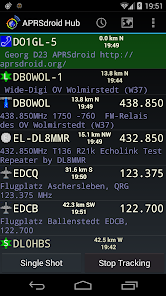
Screenshot 1
Screenshot 2
Screenshot 3
Screenshot 4
Screenshot 5
Screenshot 6
Screenshot 7
Screenshot 8
Advertisement

Features & Highlights

Customizable Alerts

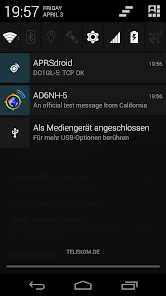
With APRSdroid, you can set personalized alerts for specific APRS messages or locations. This ensures you never miss important updates from your network, whether it's a friend's location or critical safety information, helping you stay informed and connected in various scenarios.

Offline Functionality

APRsDroid supports offline functionality, allowing you to access previously downloaded maps and data without an internet connection. This is particularly useful in remote areas where connectivity is limited, ensuring you can always stay engaged with your APRS network regardless of your location.

Real-Time Tracking

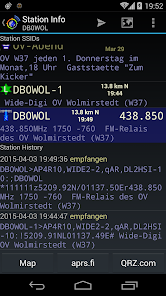
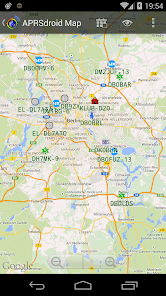
APRsDroid allows users to track real-time positions of fellow APRS users on a detailed map. This feature enhances situational awareness and helps in coordinating activities, especially during emergencies or events, making it an invaluable tool for ham radio operators and outdoor enthusiasts alike.

User-Friendly Interface

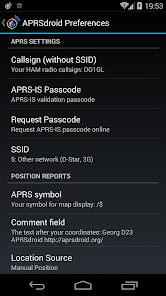
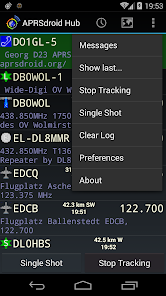
The app boasts an intuitive and user-friendly interface, making it easy for both beginners and experienced users to navigate. This means less time fumbling with settings and more time enjoying the benefits of APRS communications, enabling a smooth user experience.

Advertisement

Pros & Cons

Pros
  • User-friendly interface simplifies navigation for all skill levels.
  • Real-time tracking enhances situational awareness for users on the go.
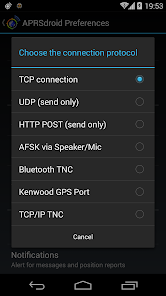
  • Supports multiple APRS protocols for versatile communication options.
  • Customizable alerts keep you informed about important events instantly.
  • Offline mode allows access to data without an internet connection.
Cons
  • Limited functionality compared to dedicated APRS hardware solutions
  • User interface may feel outdated and cluttered
  • Occasional connectivity issues can disrupt real-time tracking

Real Experience Using APRSdroid - APRS Client

Real Experience Application Scenarios

APRSdroid is designed primarily for amateur radio operators who utilize the Automatic Packet Reporting System (APRS) for real-time communication and location tracking. The app shines in a variety of scenarios, such as during outdoor activities like hiking, biking, or sailing, where users need to share their location with friends or family for safety. Additionally, it proves invaluable during emergency situations, allowing operators to relay critical information and coordinate rescue efforts. The app is also popular at public events, where it helps organizers monitor participants' movements and ensure safety. Whether you’re an experienced ham or a newcomer to APRS, APRSdroid provides versatile functionalities that cater to a wide range of use cases.

User Experience

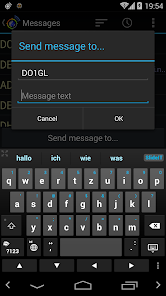
The user experience of APRSdroid is generally positive, with a user-friendly interface that caters to both novices and seasoned users. The app’s layout is intuitive, making it easy to navigate through various options, from sending messages to viewing maps. The integration of GPS functionality allows users to enable location sharing seamlessly, ensuring their friends can track their whereabouts without hassle. Many users appreciate the ability to customize settings according to their specific needs, including adjusting the reporting intervals and selecting preferred map types. However, some users have reported occasional connectivity issues, particularly in areas with poor signal reception, which can hinder real-time updates. Overall, APRSdroid delivers a solid user experience, enhanced by its ease of use and robust features.

Pricing

APRSdroid is available for free, which is a significant advantage for amateur radio enthusiasts looking to explore APRS without a financial commitment. However, the app does offer an optional Pro version that unlocks additional features, such as advanced mapping options and custom message formats. The Pro version is available for a reasonable one-time purchase, making it an attractive option for users who require more functionality. This pricing structure allows users to test the app’s capabilities before committing to a paid upgrade, ensuring that they only invest in features they find beneficial.

Updates & Support

The developers of APRSdroid are committed to providing regular updates that enhance functionality and address user feedback. Users can expect periodic updates that introduce new features, improve performance, and fix bugs. The support provided by the development team is commendable; they actively engage with users through forums and social media, addressing issues and providing assistance when needed. Additionally, the app includes comprehensive documentation and FAQs, making it easier for users to troubleshoot common problems. Overall, the commitment to updates and user support further solidifies APRSdroid’s reputation as a reliable tool for amateur radio operators.

verified Security & Privacy Review

Security & Privacy Review APRSdroid takes user security and privacy seriously, implementing several measures to protect personal data. The app requires minimal permissions, primarily accessing location services to provide accurate real-time positioning for APRS communications. Users are encouraged to review and customize these settings according to their privacy preferences. Data transmission is conducted over radio frequency and Internet connections, which can expose user information if not properly secured. However, APRSdroid does not store user data on centralized servers, reducing the risk of large-scale data breaches. Instead, it operates on a peer-to-peer basis, ensuring that user information remains within the APRS network where it is shared voluntarily. While APRSdroid does not share user data with third parties, it's essential for users to remain vigilant about the information they choose to transmit. Overall, APRSdroid offers a robust privacy framework, but users should always be mindful of their data sharing practices in any APRS environment.
Advertisement

User Reviews

  • Mat Sherwood
    2024/08/14

    I use this app with my android phone (Galaxy s22+) or a cheap android tablet running android 14. I have had great luck with it! Works very well with various radios using my digirig lite. Very pleased with the app. My only request would be to have the imperial system supported for the units. For my USA self it's a bit of a bummer to see distances in KM. Not the end of the world though. Just requires some math if I want to have a better idea of the distance to a specific station from my location.

  • Eric Wickersham
    2023/12/01

    I hadn't used this in a while, the last use was with the free version. That version stopped sending and receiving packets over TCP, despite all correct settings. So I uninstalled the free version, and paid for this new release. Same problems, no position reporting whatsoever. Nothing shown on the map. Nothing in the log. All required settings are correct. Bummer, it used to be great.

  • Eric Davis
    2023/02/26

    Been perfect until latest version where Location Access no longer has option to "allow all the time" so when using the service APRSdroid doesn't have GPS access unless the app is loaded. Would like to see an update. Thanks!!!! Still have the same problem where you can't select allow all the time for position, which renders the app useless while driving unless you have it open on your device. Otherwise great app!

  • Jerry
    2025/03/02

    Purchased this app for use on two phones and both have the same problem. App stops sending randomly. Will work for a day or two then stop until you open the app up. It shows that it is running in the background and I have it allowed for background usage and unrestricted battery. I have tried smart beaconing and periodic position with same results. Another annoyance is every time you make a change or start/stop you have to allow notifications. Who wants notifications every time it sends a track.

  • Scott Yarbrough
    2021/10/12

    Updated phone to a Note20Ultra 5G... it only shows the choice of 'location when app running' and not 'location all the time'. It is not allowing it to run the tracking mode. It DOES work on my iON and my tablet both... How can I get the phone into 'all the time' if the app isnt triggering that? Was 5 star before, will go back to 5 star when I can get the background tracking up and running again

Review Source: Google Play store public user reviews.

FAQ

1

Can I submit suggestions or feedback to APRSdroid - APRS Client?

Yes, users can submit suggestions or feedback through the app's support section or directly via the developer's contact information provided in the app.

2

Does APRSdroid - APRS Client collect my personal data?

APRSdroid - APRS Client is designed to prioritize user privacy and does not collect personal data without consent. However, users should review the privacy policy for detailed information.

3

Does APRSdroid - APRS Client support offline use?

APRSdroid - APRS Client requires an internet connection for most features, but some functionalities may be available in offline mode, such as viewing previously downloaded map data.

4

How do I cancel my APRSdroid - APRS Client subscription?

To cancel your APRSdroid - APRS Client subscription, go to your Google Play account settings, find the subscription section, and follow the prompts to cancel.

5

How much does a subscription to APRSdroid - APRS Client cost?

The subscription cost for APRSdroid - APRS Client may vary depending on the chosen plan, typically offering monthly and yearly options for users.

How to use APRSdroid - APRS Client

1

Can I change my customer number?

Unfortunately, customer numbers cannot be changed. If you need assistance, please reach out to customer service for alternatives.

2

How can I activate my APRSdroid account?

To activate your account, follow the link sent to your email after registration. If you have issues, contact customer service.

3

How can I contact customer service for issues with APRSdroid?

You can reach customer service through the app's support section or via our website's contact form. We’re here to help!

4

How do I log in to my APRSdroid account?

To log in, open the app, enter your username and password, then tap the login button.

5

How do I update my customer information?

You can update your customer information by logging into your account and navigating to the settings section. For help, contact customer service.

What's New

Updates for Android 14 and 15.

Editor's Choice