This site uses cookies to enhance your user experience. By clicking any link on this site you are giving your consent to our cookie policy. Read more
Reject
Accept All

Advertiser and Editorial Disclosures

Alphabet Game

Alphabet Game

verified

develUp Games

4.5
Rating
5,000,000+ Downloads
2.12.3 Version
Advertisement
  • category

    Category: Trivia

  • price

    Price: free

  • age rating

    Age Rating: Everyone

  • rating

    Rating: 4.5

  • available on

    Available on: Android, Windows

  • updated on

    Updated on: Jul 14, 2025

Screenshot 1
Screenshot 2
Screenshot 3
Screenshot 4
Screenshot 5
Screenshot 6
Advertisement

Features & Highlights

Customizable Play Settings

Parents and educators can tailor the game to fit individual learning needs. By adjusting difficulty levels, players can progress at their own pace, ensuring that every child feels challenged yet supported. This flexibility makes it suitable for various age groups and learning styles.

Engaging Visuals and Sounds

The game boasts vibrant graphics and delightful sound effects that create an immersive environment for learning. Each letter comes alive with animations that capture children's imagination, making the experience not only educational but also visually entertaining. It’s a feast for the senses that keeps kids coming back for more.

Interactive Learning Experience

Alphabet Game transforms learning into a fun and engaging adventure. With interactive puzzles and challenges, children can explore letters and sounds in a way that captivates their attention and enhances retention. It’s a playful approach that makes education feel like playtime.

Progress Tracking Features

Alphabet Game includes built-in progress tracking, allowing parents to monitor their child's learning journey. With insightful reports on performance and achievements, caregivers can easily identify areas for improvement and celebrate milestones, fostering a sense of accomplishment and motivation in young learners.

Advertisement

Pros & Cons

Pros
  • Enhances vocabulary through engaging and interactive gameplay.
  • Promotes critical thinking and problem-solving skills effectively.
  • Encourages teamwork and collaboration among players.
  • Suitable for all ages, making it a family-friendly option.
  • Fosters a love for learning in a fun environment.
Cons
  • Limited vocabulary expansion for advanced learners
  • Can become repetitive and less engaging over time
  • May not effectively address diverse learning styles

Real Experience Using Alphabet Game

Application Scenarios

The Alphabet Game is designed for a variety of scenarios, making it a versatile addition to any educational toolkit. Parents can use it to engage their children in learning the alphabet in a fun and interactive way, turning a potentially tedious task into an enjoyable experience. Teachers can incorporate the app into their classroom activities, encouraging students to participate in group games that reinforce their alphabet knowledge. Additionally, the app is suitable for language learners of all ages, providing a platform to familiarize themselves with the English alphabet through playful exercises. Whether at home, in a classroom, or on the go, the Alphabet Game adapts to different environments, making learning accessible and enjoyable for everyone.

User Experience

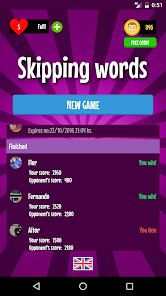
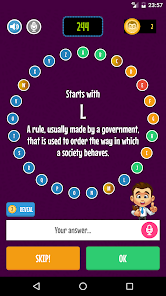
The user experience of the Alphabet Game is intuitive and engaging. The app features bright, colorful graphics that capture the attention of young learners while providing clear, easy-to-follow instructions. Users can navigate through various levels of difficulty, ensuring that both beginners and advanced learners find the content appropriate for their skill level. The interactive elements, such as touch-responsive activities and rewarding sound effects, enhance the learning process by keeping users motivated and focused. Feedback mechanisms, including progress tracking and achievement badges, encourage continued engagement and improvement. Overall, the user experience is designed to be seamless, ensuring that players can focus on learning without unnecessary distractions.

Pricing

The Alphabet Game operates on a freemium model, allowing users to download and access a limited version of the app for free. This initial offering provides enough content for users to assess its value and effectiveness before committing to a purchase. For those seeking a more comprehensive experience, the premium version unlocks additional features, levels, and personalized learning options. The pricing is competitive, reflecting the app’s educational value while remaining affordable for families and educators alike. Regular promotions and discounts may also be available, making it accessible to a broader audience.

Updates & Support

The developers of the Alphabet Game are committed to providing ongoing updates to enhance functionality and introduce new content. Users can expect regular updates that address any bugs, improve performance, and add fresh learning materials to keep the content engaging. Support options are readily available, including a comprehensive FAQ section and direct customer service contact for more complex issues. The community of users can also share feedback, which the developers actively consider for future enhancements. This commitment to support and improvement ensures that the Alphabet Game remains a relevant and effective educational tool for years to come.

verified Security & Privacy Review

Security & Privacy Review The Alphabet Game prioritizes user security and privacy, implementing robust encryption methods to safeguard personal data. The app collects minimal user information necessary for functionality, ensuring that sensitive data is not stored or transmitted unnecessarily. Upon installation, the app requests permissions to access certain features, such as storage and internet connectivity. Users are informed about these permissions, and the app does not access contacts or location data, minimizing potential privacy risks. The Alphabet Game adheres to industry standards for data protection, regularly updating its security protocols to guard against vulnerabilities. The privacy policy is transparent, detailing how user data is collected, used, and shared, with a clear option for users to opt-out of data collection where applicable. Overall, the app demonstrates a commitment to maintaining user privacy and security, making it a trustworthy choice for parents and children alike.
Advertisement

User Reviews

  • A Google user
    2018/10/29

    If you do not have Facebook, there really is no point in playing this game...Your progress relies on it as does competing with others.

  • K.L Lynch (MsMozzy)
    2021/05/29

    Pretty good app but you can't get much further if you're not able to understand Spanish?

  • A Google user
    2018/09/29

    There are several correct words you could answer with, but they are only looking for a specific one. Eg: " H a building that a family live in" "House, Home, Hotel..." The only correct answer was "House"

  • A Google user
    2018/09/25

    Should have a pause when skipping the words.

  • A Google user
    2019/01/18

    it's good to improve my vocabulary

Review Source: Google Play store public user reviews.

FAQ

1

Can I submit suggestions or feedback to Alphabet Game?

Yes, users are encouraged to submit suggestions or feedback directly through the app or via the official website to help improve the user experience.

2

Does Alphabet Game collect my personal data?

Alphabet Game is committed to user privacy and does not collect personal data unless explicitly provided by the user for account creation or feedback purposes.

3

Does Alphabet Game support offline use?

Yes, Alphabet Game allows users to access certain features offline, making it convenient for learning on the go.

4

How do I cancel my Alphabet Game subscription?

You can cancel your Alphabet Game subscription through your account settings in the app or by managing your subscriptions through the app store where you purchased it.

5

How much does a subscription to Alphabet Game cost?

A subscription to Alphabet Game typically costs $4.99 per month or $29.99 for an annual plan, though prices may vary based on promotions or location.

How to use Alphabet Game

1

Can I activate my account without a customer number?

No, you need your customer number to activate your account. If you can't find it, please contact customer service for help.

2

Can I have multiple accounts with the same customer number?

No, each customer number is unique to one account. If you need additional accounts, please contact customer service for guidance.

3

How can I update my customer number?

To update your customer number, please reach out to customer service, and they will guide you through the process.

4

How do I contact customer service for help with my account?

You can reach customer service via the support page on our website or by calling the provided phone number.

5

How do I log in to my Alphabet Game account?

To log in, visit the website and enter your email and password in the designated fields. If you encounter issues, please contact customer service.

What's New

Stability improvements

Editor's Choice